EasyManua.ls Logo

Weider 8225 - Page 18

Weider 8225
25 pages
Print Icon
To Next Page IconTo Next Page
To Previous Page IconTo Previous Page
Loading...
TROUBLE-SHOOTING
AND
MAINTENANCE
Inspect
and
tighten
all
parts
each
time
you
use
the
hard
drive
system.
Replace
any
worn
parts
immediately.
The
hard
drive
system
can
be
cleaned
using
a
damp
cloth
and
mild
non-abrasive
detergent.
Do
not
use
solvents.
TIGHTENING
THE
CABLES
Woven
cable,
the
type
of
cable
used
on
the
hard
drive
system,
can
stretch
slightly
when
it
is
first
used.
If
there
is
.
any
slack
in
the
cables
before
resistance
is
felt,
the
cables
should
be
tightened
as
described
below.
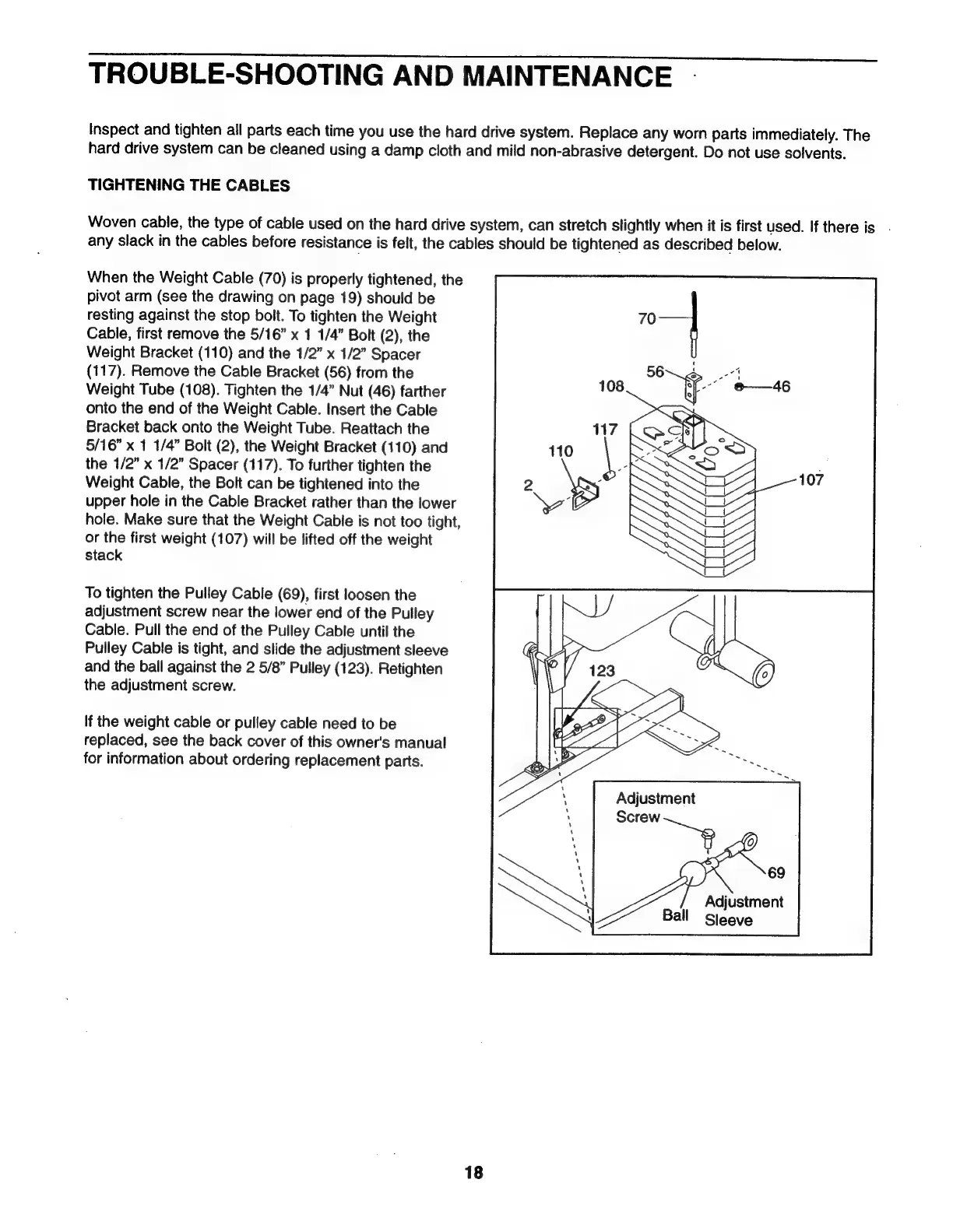
When
the
Weight
Cable
(70)
is
properly
tightened,
the
pivot
arm
(see
the
drawing
on
page
19)
should
be
resting
against
the
stop
bolt.
To
tighten
the
Weight
Cable,
first
remove
the
5/16”
x
1
1/4”
Bolt
(2),
the
Weight
Bracket
(110)
and
the
1/2”
x
1/2”
Spacer
(117).
Remove
the
Cable
Bracket
(56)
from
the
Weight
Tube
(108).
Tighten
the
1/4”
Nut
(46)
farther
onto
the
end
of
the
Weight
Cable.
Insert
the
Cable
Bracket
back
onto
the
Weight
Tube.
Reattach
the
5/16”
x
1
1/4”
Bolt
(2),
the
Weight
Bracket
(110)
and
the
1/2”
x
1/2”
Spacer
(117).
To
further
tighten
the
Weight
Cable,
the
Bolt
can
be
tightened
into
the
upper
hole
in
the
Cable
Bracket
rather
than
the
lower
hole.
Make
sure
that
the
Weight
Cable
is
not
too
tight,
or
the
first
weight
(107)
will
be
lifted
off
the
weight
stack
To
tighten
the
Pulley
Cable
(69),
first
loosen
the
adjustment
screw
near
the
lower
end
of
the
Pulley
Cable.
Pull
the
end
of
the
Pulley
Cable
until
the
Pulley
Cable
is
tight,
and
slide
the
adjustment
sleeve
and
the
ball
against
the
2
5/8”
Pulley
(123).
Retighten
the
adjustment
screw.
If
the
weight
cable
or
pulley
cable
need
to
be
replaced,
see
the
back
cover
of
this
owner's
manual
for
information
about
ordering
replacement
parts.
Adjustment
Ва!
Sleeve
18

Related product manuals