9
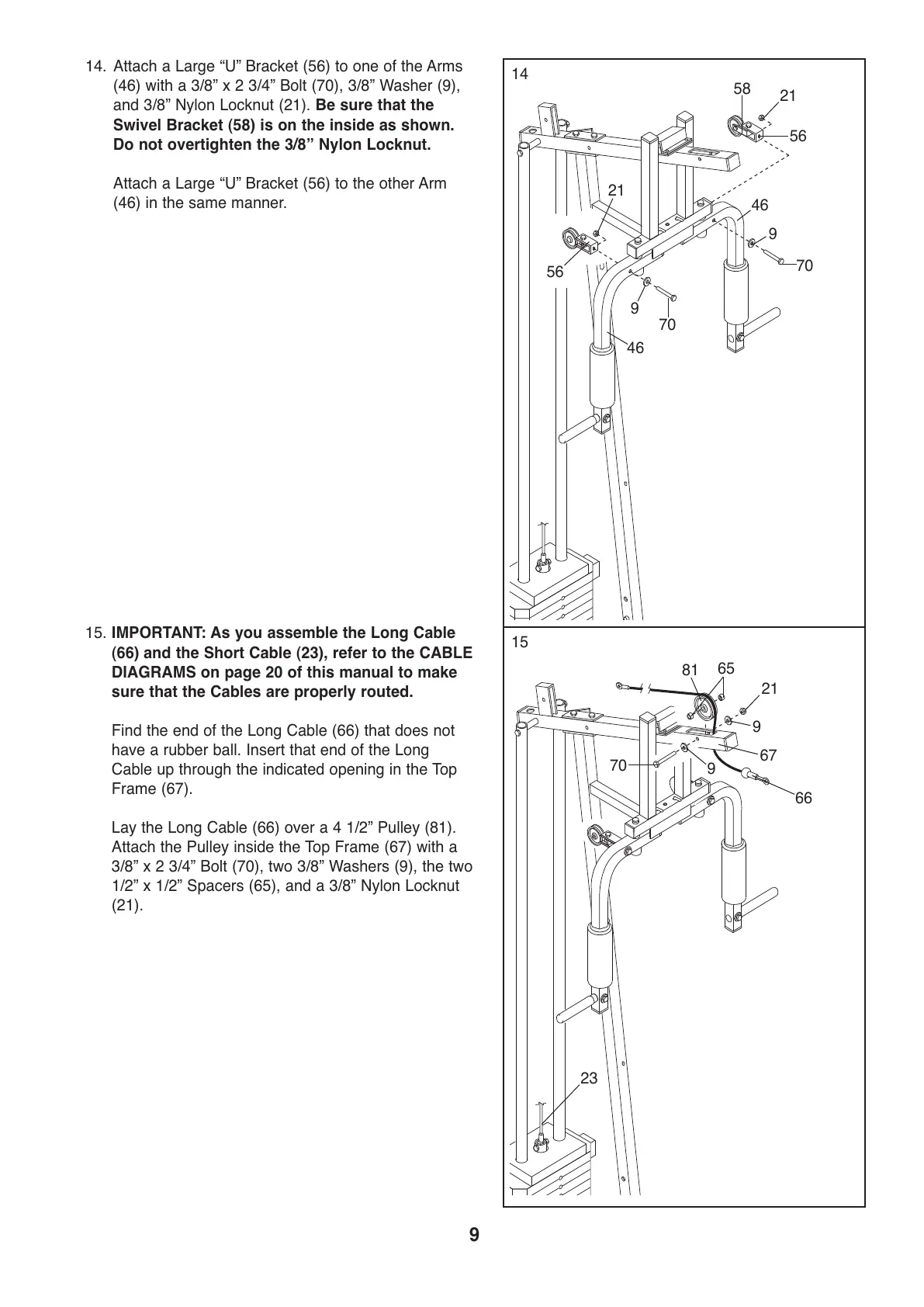
14. Attach a Large “U” Bracket (56) to one of the Arms
(46) with a 3/8” x 2 3/4” Bolt (70), 3/8” Washer (9),
and 3/8” Nylon Locknut (21). Be sure that the
S
wivel Bracket (58) is on the inside as shown.
Do not overtighten the 3/8” Nylon Locknut.
Attach a Large “U” Bracket (56) to the other Arm
(46) in the same manner.
15. IMPORTANT: As you assemble the Long Cable
(66) and the Short Cable (23), refer to the CABLE
DIAGRAMS on page 20 of this manual to make
sure that the Cables are properly routed.
Find the end of the Long Cable (66) that does not
have a rubber ball. Insert that end of the Long
Cable up through the indicated opening in the Top
Frame (67).
Lay the Long Cable (66) over a 4 1/2” Pulley (81).
Attach the Pulley inside the Top Frame (67) with a
3/8” x 2 3/4” Bolt (70), two 3/8” Washers (9), the two
1/2” x 1/2” Spacers (65), and a 3/8” Nylon Locknut
(21).
14
15
67
66
70
23
21
9
9
65
81
9
70
4
6
21
5
6
56
58
46
9
70
2
1


 To Next Page