14
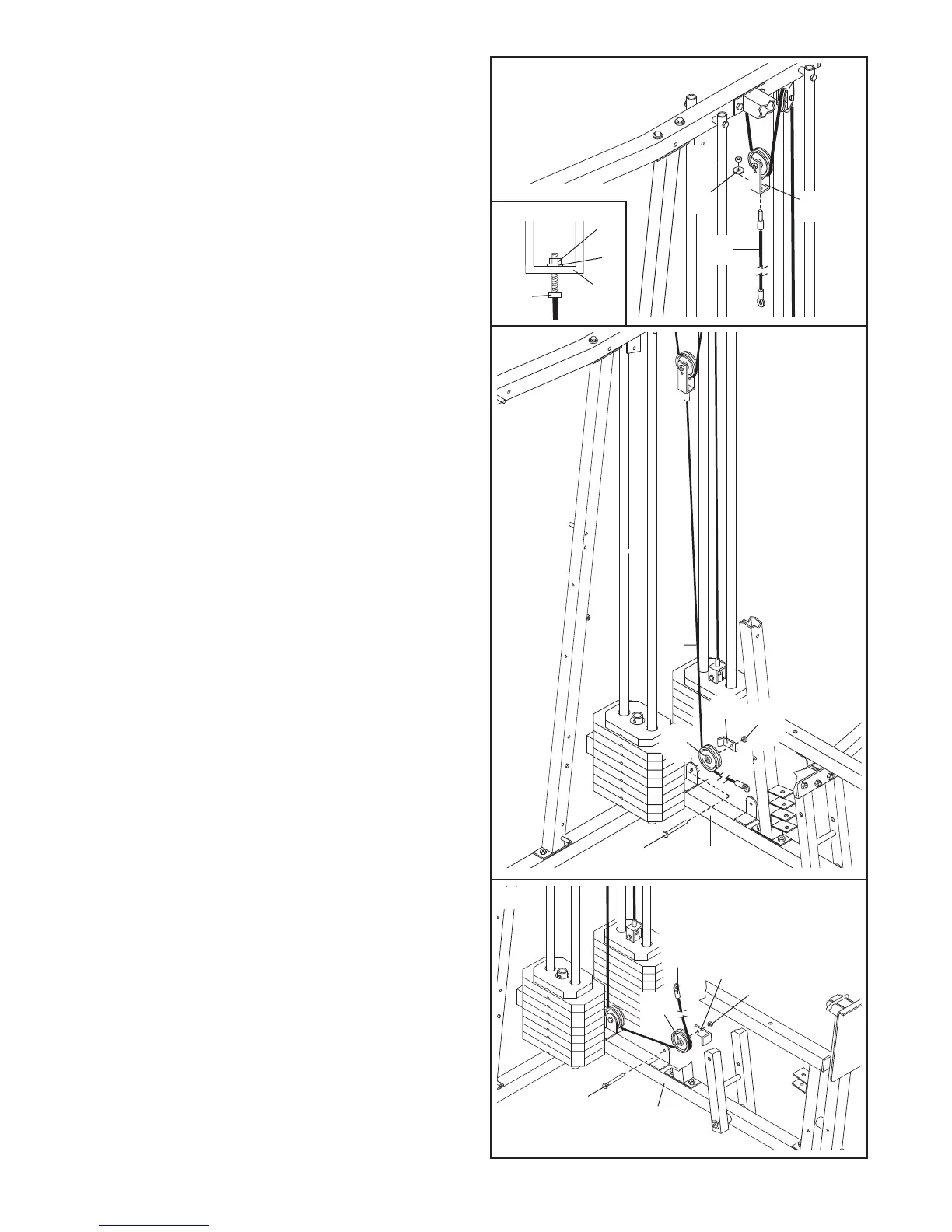
28. Identify the Press Cable (88)—this is the
longest Cable. Attach the end of the Press Cable
t
o the Large “U”-bracket (84) with an M8 Nylon
Locknut (40) and an M8 Washer (20).
Do not
c
ompletely tighten the Locknut. It should be
threaded onto the end of the Cable so that
two threads are showing above the Locknut,
as shown in the inset drawing.
29. Wrap the Press Cable (88) under a 90mm Pulley
(82). Attach the Pulley and a Cable Trap (80) to
the indicated bracket on the Press Base (13) with
an M10 x 48mm Bolt (50) and an M10 Nylon
Locknut (42).
Make sure that the Cable Trap is
turned to hold the Cable in place.
30. Wrap the Press Cable (88) under a 90mm Pulley
(82). Attach the Pulley and a Cable Trap (80) to
the other bracket on the Press Base (13) with an
M10 x 48mm Bolt (50) and an M10 Nylon Locknut
(42).
Make sure that the Cable T
rap is turned
to hold the Cable in place.
28
29
30
88
20
8
4
40
88
50
13
82
80
42
50
88
82
80
42
13
40
20
84
88


 To Next Page