13
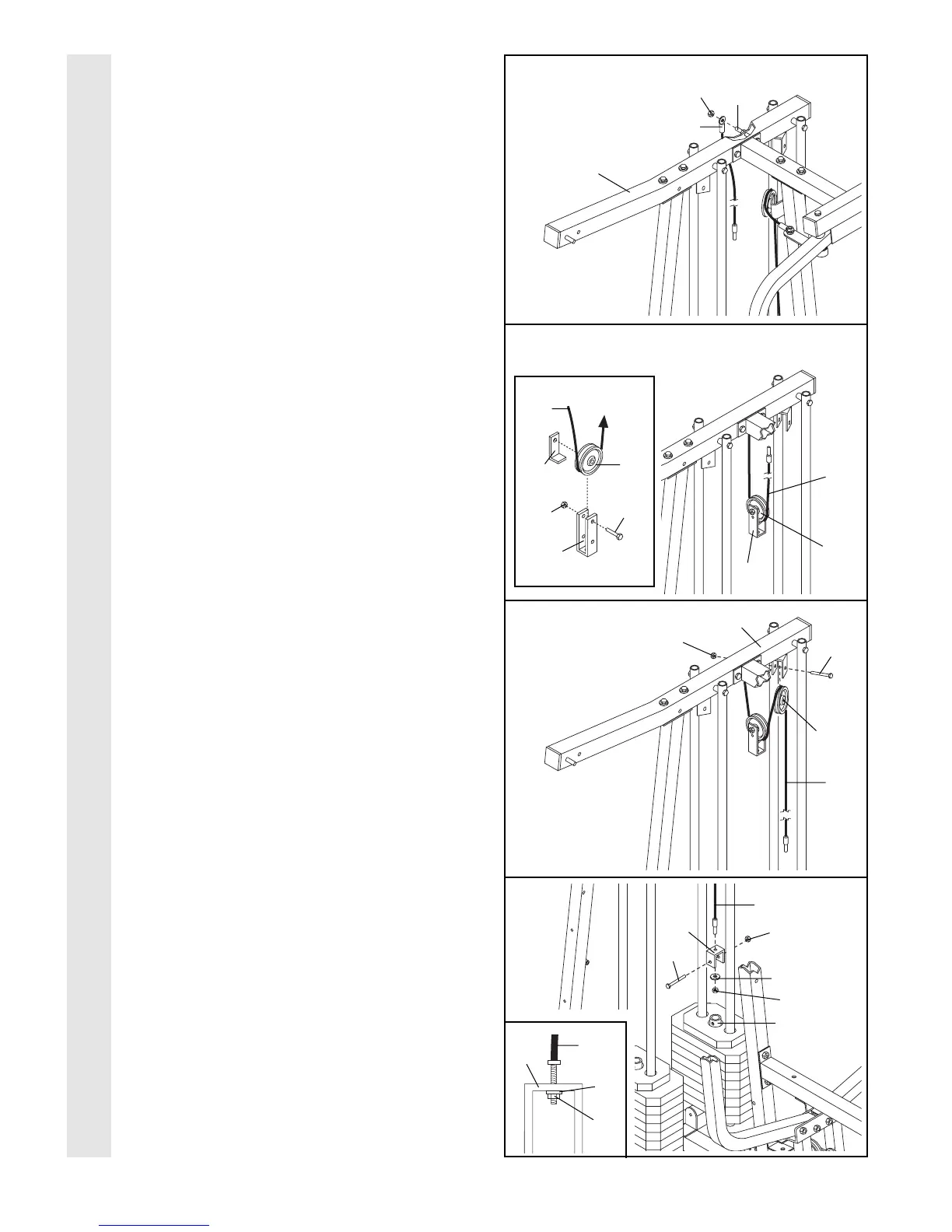
24. Identify the Rear Cable (86)Ñthis is the
shortest Cable. Slide one end of the Rear
Cable onto the 5/16Ó x 3Ó Bolt (91) on the Top
Frame (2). Thread a 5/16Ó Nylon Jam Nut (90)
onto the Bolt. Do not fully tighten the Jam
Nut; leave enough room between the two
Jam Nuts for the Cable to pivot.
25. See the inset drawing. Attach a 3 1/2Ó Pulley
(82) and a Cable Trap (80) to the upper hole
in the Large ÒUÓ Bracket (83) with a 3/8Ó x 2Ó
Bolt (50) and a 3/8Ó Nylon Locknut (42). Be
sure that the Cable Trap is inside the
Large ÒUÓ Bracket. Note: This may come
pre-assembled.
Route the Rear Cable (86) through the Large
ÒUÓ Bracket (83) and the 3 1/2Ó Pulley (82).
Be sure that the Cable is in the groove of
the Pulley and that the Cable and Pulley
move smoothly.
26. Wrap the Rear Cable (86) around a 3 1/2Ó
Pulley (82). Attach the Pulley to the Top
Frame (2) with a 3/8Ó x 2Ó Bolt (50) and a 3/8Ó
Nylon Locknut (42). The Cable must be
routed in the direction shown.
27. Attach the Rear Cable (86) to a Small ÒUÓ
Bracket (32) with a 1/4Ó Washer (37) and a
1/4Ó Nylon Locknut (44). Do not completely
tighten the Nylon Locknut. It should be
threaded onto the end of the Cable only a
couple of turns, as shown in the inset
drawing.
Attach the Small ÒUÓ Bracket (32) to the indi-
cated Weight Tube (25) with a 5/16Ó x 1 3/4Ó
Bolt (68) and a 5/16Ó Nylon Locknut (40).
27
24
25
26
CABLE ASSEMBLY
91
90
86
2
86
80
42
83
50
82
82
82
50
42
37
44
25
32
68
2
86
83
86
86
40
86
44
32
37



 To Next Page