14
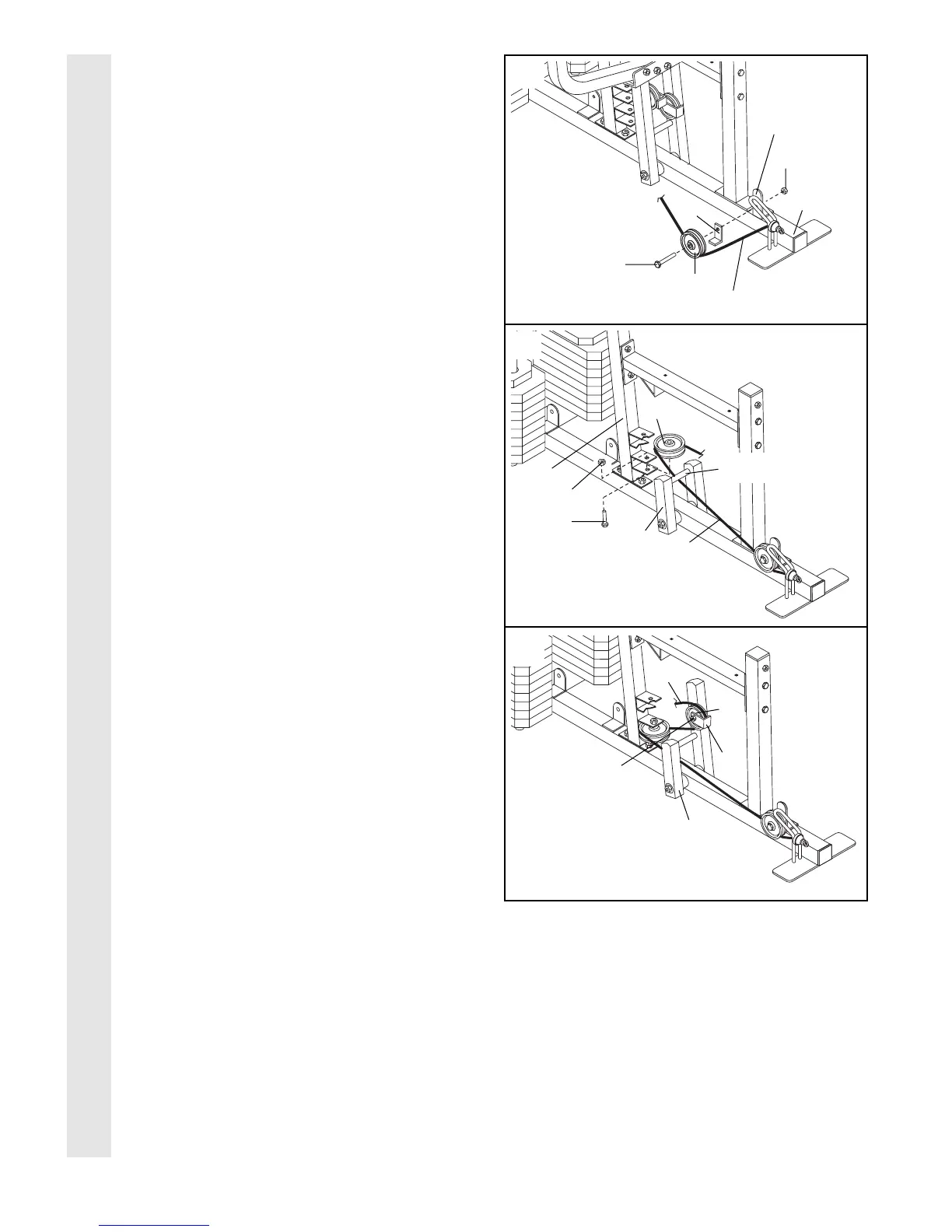
28. Identify the Press Cable (87)Ñthis is the
longest Cable. Wrap the Press Cable around
a 3 1/2Ó Pulley (82). Attach the Pulley and a
Cable Trap (80) to the indicated bracket on
the Press Base (13) with a 3/8Ó x 2Ó Bolt (50)
and a 3/8Ó Nylon Locknut (42). Be sure that
the Cable Trap is turned to hold the Cable
in place.
29. Route the Press Cable (87) under the cross-
bar on the Press Frame (12). Wrap the Press
Cable around a ÒVÓ Pulley (81). Attach the ÒVÓ
Pulley to the lower bracket on the Press
Upright (4) with a 3/8Ó x 2 1/4Ó Bolt (71) and a
3/8Ó Nylon Jam Nut (43).
30. Route the Press Cable (87) around the indi-
cated 3 1/2Ó Pulley (82) attached to the Press
Frame (12). Be sure that the Cable Trap
(80) is turned to hold the Cable in place.
Tighten the 3/8Ó Nylon Locknut (42) and the
3/8Ó x 3 1/2Ó Bolt (not shown).
28
29
30
CABLE ASSEMBLY
87
82
50
80
13
42
Bracket
87
Crossbar
71
12
81
4
43
87
82
80
42
12


 To Next Page