15
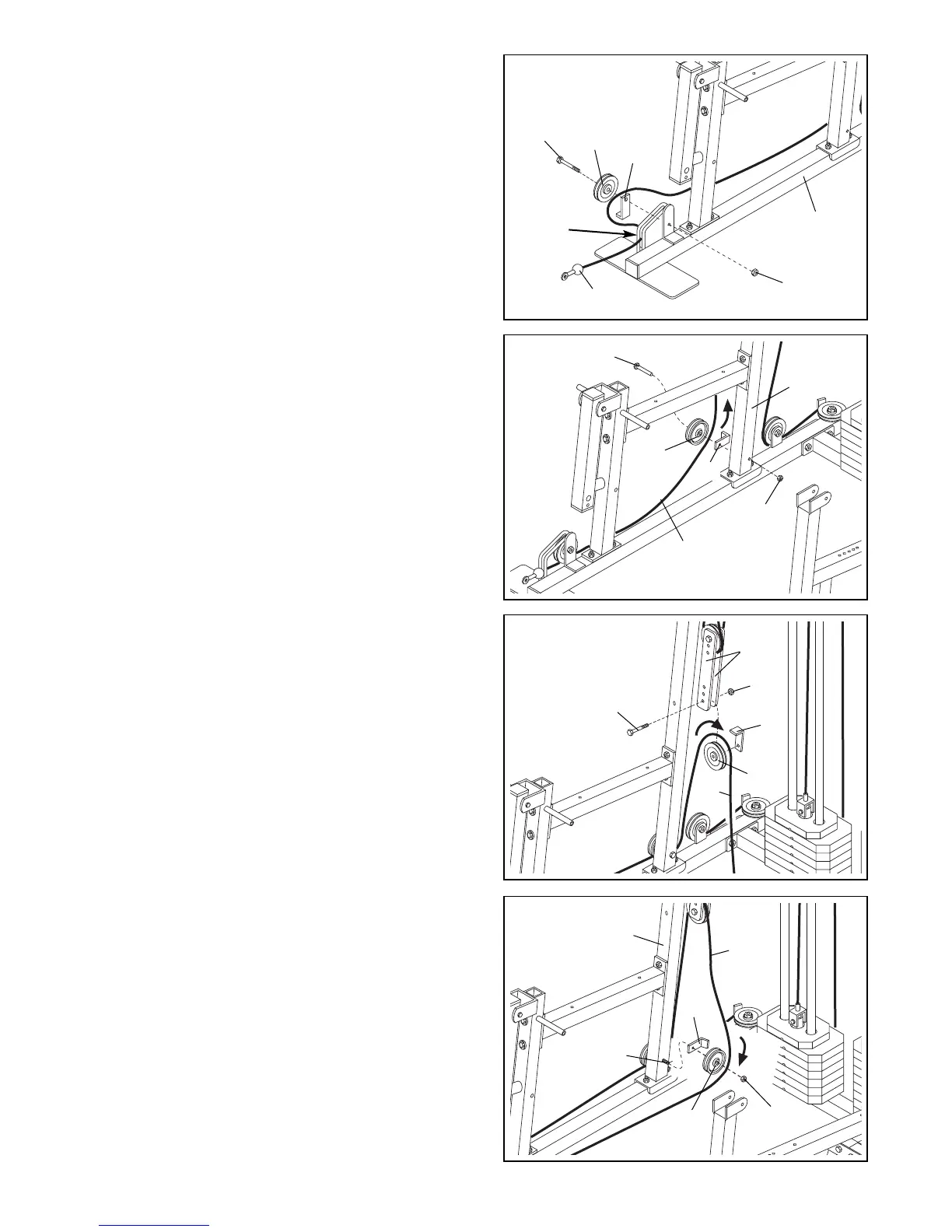
31. Remove a Pro Pulley (26) from the bag labeled
“PULLEY BAG 2.
Identify the Low Pulley Cable (75). It is approximately
143 1/2” long and it has a ball on one end and a loop
on the other. Route the end with the loop through the
slot in the cable guide on the Butterfly Base (4).
Route the Low Pulley Cable (75) under a Pro Pulley
(26) as shown. Attach the Pro Pulley and a Cable
Trap (25) to the bracket on the Butterfly Base (4) with
a 3/8” x 2” Bolt (54) and a 3/8” Nylon Locknut (50).
Make sure the Cable Trap is oriented as shown.
31
4
50
75
25
54
26
Cable
Guide
32. Wrap the Low Pulley Cable (75) around a 3 1/2”
Pulley (24) in the direction shown. Attach the Pulley
and a Cable Trap (25) to the indicated hole in the
Butterfly Upright (1) with a 3/8” x 4 3/4” Bolt (60) and
a 3/8” Nylon Jamnut (63). Note: Thread the Jamnut
only two turns onto the Bolt, since you will later
attach another Pulley to the Bolt. Make sure the
Cable Trap is oriented as shown.
32
24
1
75
63
25
60
33. Wrap the Low Pulley Cable (75) over a 3 1/2” Pulley
(24) in the direction shown. Attach the Pulley and a
Cable Trap (25) to the lower hole in the Adjustable
Pulley Plates (23) with a 3/8” x 2” Bolt (54) and a 3/8”
Nylon Locknut (50). Make sure the Cable Trap is
oriented as shown.
33
50
25
24
75
23
54
34. Remove the 3/8” Nylon Jamnut (63) from the
3/8” x 4 3/4” Bolt (60) inserted into the Butterfly
Upright (1) in step 32.
Wrap the Low Pulley Cable (75) around a 3 1/2”
Pulley (24) in the direction shown. Attach the Pulley
and a Cable Trap (25) to the 3/8” x 4 3/4” Bolt (60)
with the 3/8” Nylon Jamnut (63). Make sure the
Cable Trap is oriented as shown.
34
1
63
60
24
75
25



 To Next Page