EasyManua.ls Logo

Weider FLEX HTS E220 - Page 14

Weider FLEX HTS E220
20 pages
Print Icon
To Next Page IconTo Next Page
To Previous Page IconTo Previous Page
Loading...
РАСЕ
13
WEIDER
SPORTING
GOODS
STEP
7
STEPPER
HANDLE
ASSEMBLY
[PART
NAME
|
136
5/16"
Х
3/4"
HEX
HEADBOLT
|
2
|
4.1
141
2
1/2"
SQUARE
PLASTIC
INSERT
САР
47
114"ROUNDPLASTICINSERTCAP
|
2
50
18"X1/27ROUNDHEADSCREW
|
+
55
14"NYLONLOCKNUT
|
2
61
SHe"NYLONLOCKNUT
|
2
`
CE
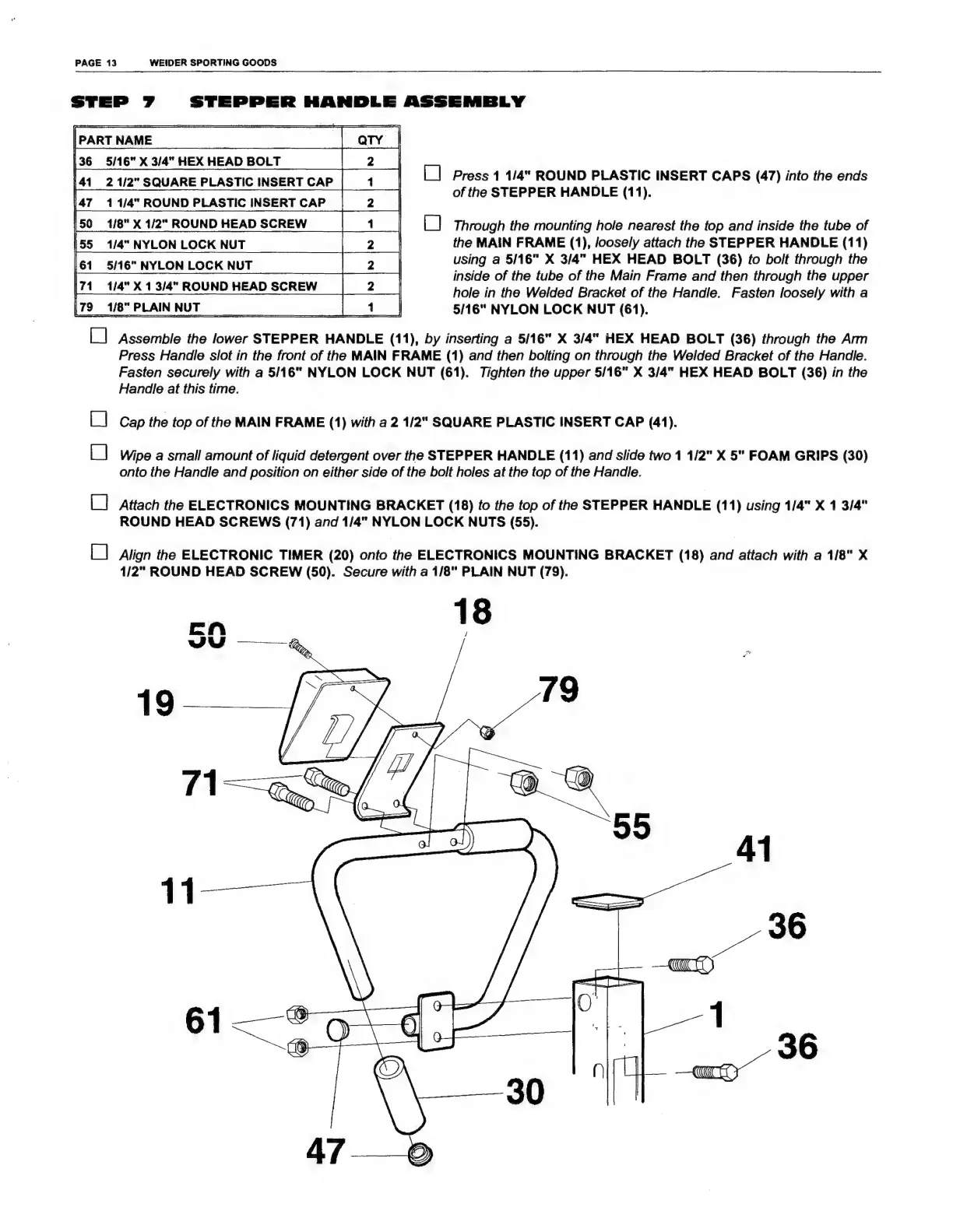
Press
1
1/4"
ROUND
PLASTIC
INSERT
CAPS
(47)
into
the
ends
of
the
STEPPER
HANDLE
(11).
E.
Di
Through
the
mounting
hole
nearest
the
top
and
inside
the
tube
of
the
MAIN
FRAME
(1),
loosely
attach
the
STEPPER
HANDLE
(11)
using
а
5/16"
X
3/4"
HEX
HEAD
BOLT
(36)
іо
bolt
through
the
inside
of
the
tube
of
the
Main
Frame
and
then
through
the
upper
hole
in
the
Welded
Bracket
of
the
Handle.
Fasten
loosely
with
a
5/16"
NYLON
LOCK
NUT
(61).
|71
1/4"
X
1
3/4"
ROUND
HEAD
SCREW
Ц
=
79
1⁄8"
PLAIN
NUT
[|
|
Assemble
the
lower
STEPPER
HANDLE
(11),
by
inserting
a
5/16"
X
3/4"
HEX
HEAD
BOLT
(36)
through
the
Arm
Press
Handle
slot
in
the
front
of
the
MAIN
FRAME
(1)
and
then
bolting
on
through
the
Welded
Bracket
of
the
Handle.
Fasten
securely
with
a
5116"
NYLON
LOCK
NUT
(61).
Tighten
the
upper
5/16"
X
3/4"
HEX
HEAD
BOLT
(36)
in
the
Handle
at
this
time.
Cap
the
top
of
the
MAIN
FRAME
(1)
with
a
2
1/2"
SQUARE
PLASTIC
INSERT
CAP
(41).
Wipe
a
small
amount
of
liquid
detergent
over
the
STEPPER
HANDLE
(11)
and
slide
two
1
1/2"
X
5"
FOAM
GRIPS
(30)
onto
the
Handle
and
position
on
either
side
of
the
bolt
holes
at
the
top
of
the
Handle.
[|
[|
[
|
Attach
the
ELECTRONICS
MOUNTING
BRACKET
(18)
fo
the
top
of
the
STEPPER
HANDLE
(11)
using
1/4"
X
1
3/4"
ROUND
HEAD
SCREWS
(71)
and
1/4"
NYLON
LOCK
NUTS
(55).
[
|
Align
the
ELECTRONIC
TIMER
(20)
onto
the
ELECTRONICS
MOUNTING
BRACKET
(18)
and
attach
with
a
1/8"
X
1/2"
ROUND
HEAD
SCREW
(50).
Secure
with
a
1/8"
PLAIN
NUT
(79).
/
0
18
E
w
HS
(i.
(7
Ф)
19
|
7

Related product manuals