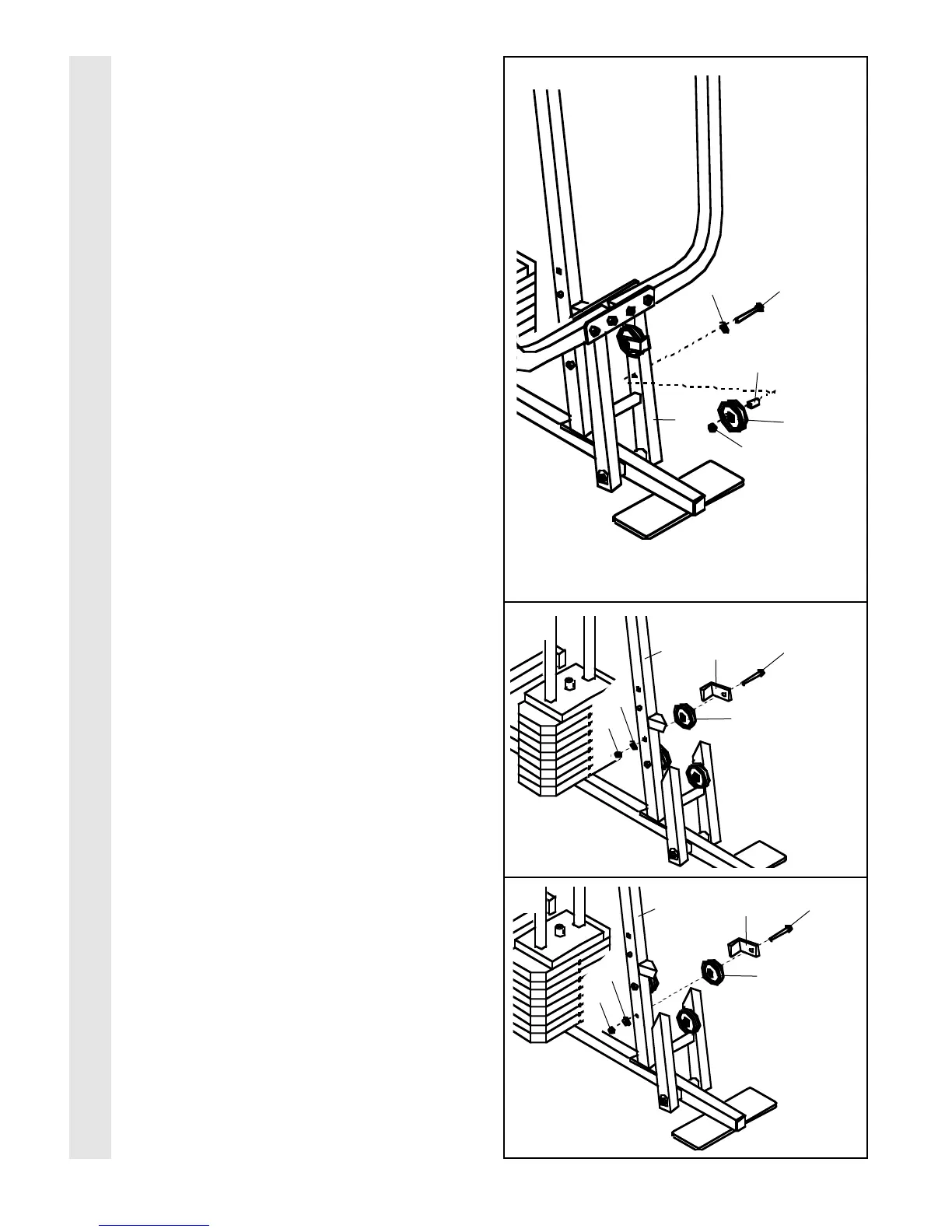
19. Assembly steps 19 through 21 show how
to complete the assembly of several pre-
attached parts.
The 5/8” x 9/16” Spacer (73) has been pre-
attached on the wrong side of the 3 1/2”
Pulley (15) for shipping purposes. Remove
the 3/8” Nylon Locknut (21), the Spacer, and
the Pulley from the 3/8” x 3 3/4” Bolt (71). Do
not remove the Bolt. The Bolt has been
shown removed for part identification.
Reattach the 3 1/2” Pulley (15), with the 5/8”
x 9/16” Spacer (73) between the Pulley and
the Press Frame (17). Do not tighten the
3/8” Nylon Locknut (21) yet. Be sure that
the 3/8” x 3 3/4” Bolt (71), the 3/8” Flat
Washer (9), the 5/8” x 9/16” Spacer (73),
the 3 1/2” Pulley, and the 3/8” Nylon
Locknut (21) are oriented as shown.
20. The indicated 3/8” x 3 3/4” Bolt (71) has been
inserted from the wrong side for shipping pur-
poses. Remove the Bolt and the 3/8” Nylon
Locknut (21).
Slide the Cable Trap (66) and the 3 1/2”
Pulley (15) onto the 3/8” x 3 3/4” Bolt (71).
Re-insert the Bolt into the Front Upright (42)
from the direction shown. Hand tighten the
3/8” Nylon Locknut (21) with the 3/8” Flat
Washer (9) onto the Bolt. Be sure that all
parts are oriented as shown. Do not tight-
en the Nylon Locknut yet.
21. The indicated 3/8” x 3 3/4” Bolt (71) has also
been inserted from the wrong side for ship-
ping purposes. Remove the Bolt and the 3/8”
Nylon Locknut (21).
Slide the Cable Trap (66) and the 3 1/2”
Pulley (15) onto the 3/8” x 3 3/4” Bolt (71).
Re-insert the Bolt into the Front Upright (42)
from the direction shown. Hand tighten the
3/8” Nylon Locknut (21) with the 3/8” Flat
Washer (9) onto the Bolt. Be sure that all
parts are oriented as shown. Do not tight-
en the Nylon Locknut yet.
21
19
15
71
73
21
17
66
42
20
11
71
15
9
9
21
66
42
71
15
9
21
CABLE ASSEMBLY








 To Next Page