22
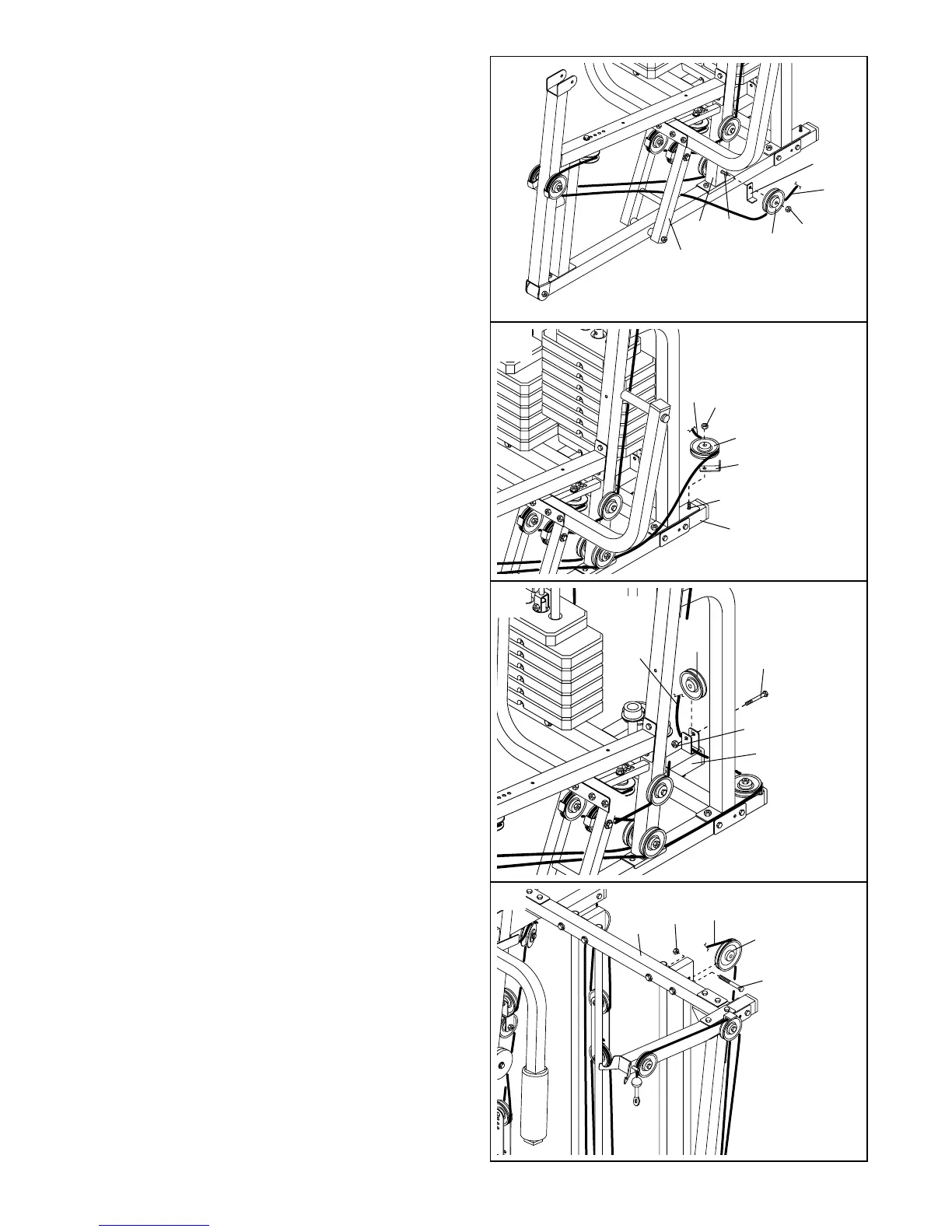
57. Remove the 3/8” Nylon Jamnut (92) used in step
53. Route the Press Cable (72) through the Press
Frame (17).
Wrap the Press Cable (72) around a 3 1/2” Pulley
(35) in the direction shown. Slide a Cable Trap
(38) and the Pulley onto the 3/8” x 4 3/4” Bolt
(102) in the bottom of the Press Upright (5).
Properly tighten the 3/8” Nylon Jamnut (92) onto
the Bolt. Make sure the Cable Trap is posi-
tioned to hold the Cable in the groove of the
Pulley.
60. Wrap the Press Cable (72) around a 4 1/2” Pulley
(36) in the direction shown. Attach the Pulley
inside the indicated bracket on the Center Top
Frame (8) with a 3/8” x 1 3/4” Bolt (94) and a 3/8”
Nylon Locknut (90).
57
92102
38
35
17
5
72
60
94
8
90
72
36
58. Wrap the Press Cable (72) around a 3 1/2” Pulley
(35) in the direction shown. Slide a Cable Trap
(38) and the Pulley onto the 3/8” x 4” Carriage
Bolt (112) in the Press Base (3). Secure the Pulley
with a 3/8” Nylon Jamnut (92). Make sure the
Cable Trap is positioned to hold the Cable in
the groove of the Pulley.
58
3
112
35
38
72
92
59. Lay the Press Cable (72) in the bracket on the
Center Base (2). Attach a 3 1/2” Pulley (35) inside
the bracket with a 3/8” x 1 3/4” Bolt (94) and a
3/8” Nylon Jamnut (92).
59
94
92
2
72
35




 To Next Page