7
3
4
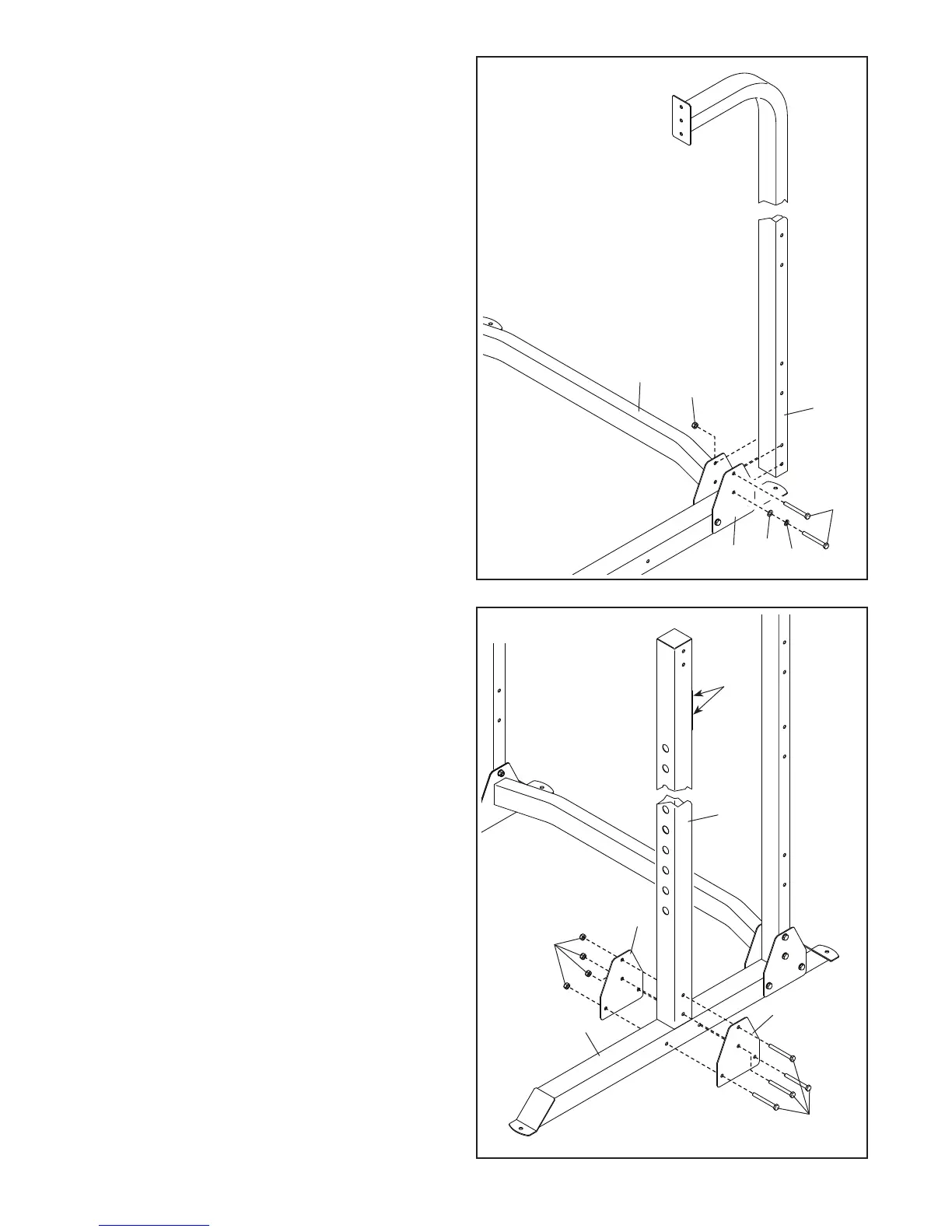
3. Identify the Right Rear Upright (5) and orient it
as shown.
Attach the Right Rear Upright (5) to the
Crossbar (7) and the Support Plate (13) with two
M10 x 95mm Bolts (19), an M10 Split Washer
(23), an M10 Washer (20), and an M10 Locknut
(21); do not fully tighten the Bolts yet.
Attach the Left Rear Upright (not shown) to
the other side of the weight rack in the same
way.
4. Identify the Right Front Upright (3) and orient it
so that the indicated holes (A) are in the position
shown.
Attach the Right Front Upright (3) to the Right
Base (1) with four M10 x 95mm Bolts (19), two
Support Plates (13), and four M10 Locknuts (21);
do not fully tighten the Locknuts yet.
Attach the Left Front Upright (not shown) to
the other side of the weight rack in the same
way.
5
19
3
A
1
13
13
19
21
23
20
13
21
7


 To Next Page