41
July, 2016
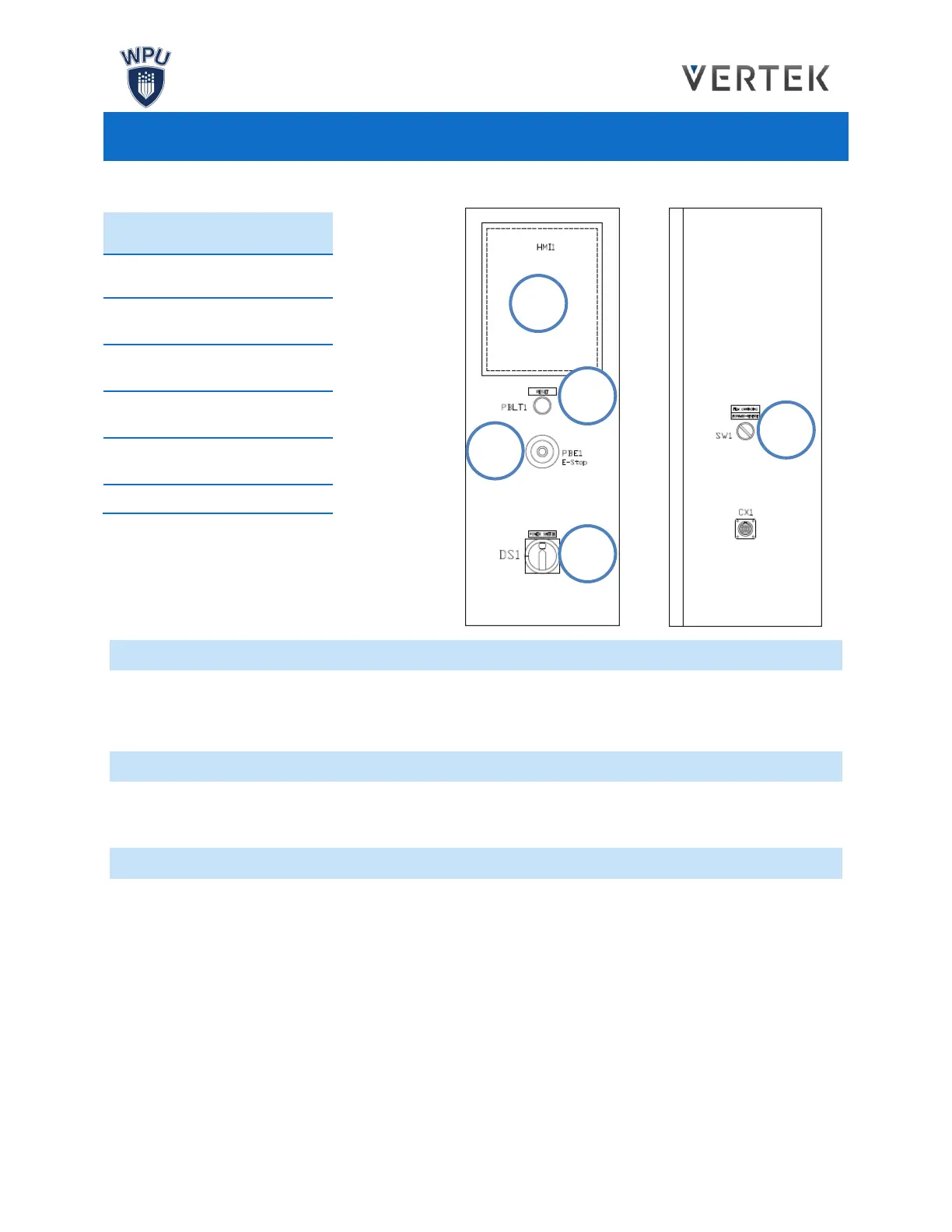
For details concerning the H.M.I. Software and Machine Operation, please see their respective sections.
ALARMS
In the event of a machine malfunction, such as a jam, an alarm warning will display on the H.M.I. Touch
Screen. After an alarm has been triggered, the machine should be inspected and the alarm must be
cleared. Alarms may be cleared on the H.M.I. Touch Screen or by pressing the green Reset Button.
DOORS
The machine will halt all functions when the safety doors open. The doors must be closed and the green
reset button must be pressed before the machine may resume normal operation.
EMERGENCY STOP
For emergency machine shut off, use the Emergency Stop button. Pressing the E-stop will cut power to
the machine. Air will be cut off from pneumatics and servos will immediately stop.
In the event that the Emergency Stop button is pressed, it must be reset again before the machine can be
operated. Retract the Emergency Stop button until it returns to its original position. The green Reset
Button must be pressed before the machine may resume normal operation.
The operator may also need to halt the functions of any interfacing machinery feeding the bagger in the
event of an emergency.
RESET BUTTON
(RESETS ALARMS)
FILM UNWIND
DIRECTION CONTROL


 To Next Page