73
July, 2016
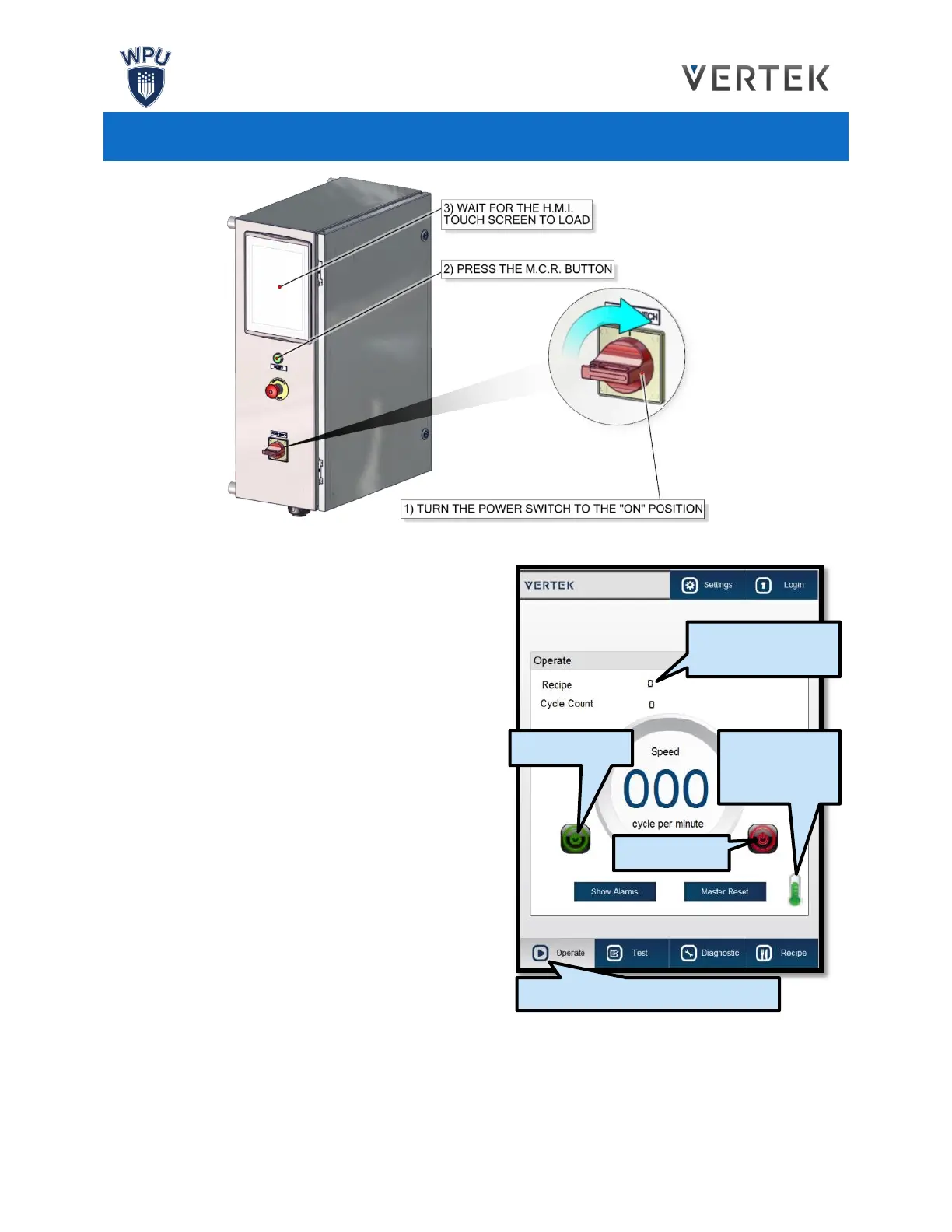
0. Ensure all covers are closed and the
Emergency Stop button is not engaged.
1. Locate the Power Switch on the Control Box.
Turn the Power Switch to the “ON” position. It
will take a few seconds for the H.M.I. Touch
Screen to power up.
2. Press the M.C.R. Enabled button.and wait for
the H.M.I. screen to load.
3. Navigate to the H.M.I.’s Operate Screen. Setup
the bagger’s settings, ensuring that the
machine is loaded with the correct Recipe.
4. Allow time for the Heating Elements to reach
their set points. Check the Temperature by
pressing the thermometer shown on the
Operate Screen.
5. Press the green “Start” button to on the
Operator Screen to begin the bagging process.
The bagging process will repeat until the
operator presses the red “Stop” button.
6. For emergency machine shut off, use the Emergency Stop button. Pressing the E-stop will cut
power to the machine. Air will be cut off from pneumatics and servos will immediately stop.
7. To resume using the machine: resolve any issues with the machine, close all covers, pull out the
Emergency Stop Button and press the M.C.R. Enabled button.
CHECK THE RECIPE
SELECTION
NAVIGATE TO THE OPERATE SCREEN
PRESS ICON
TO CHECK THE
TEMPERATURE



 To Next Page