6
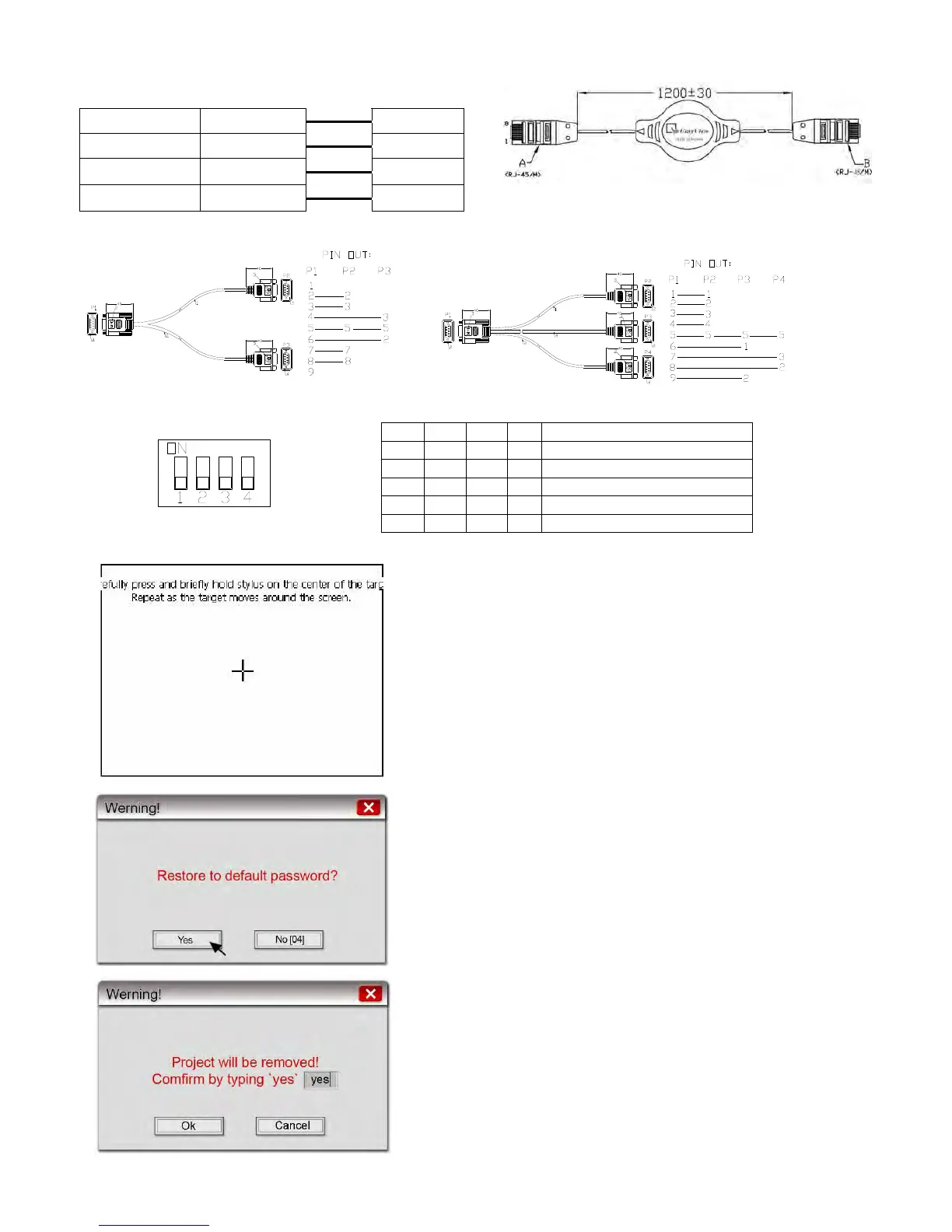
MT8-Ethernet/RZC045120: Direct connect (Ethernet crossover cable)
MT-600/8000
Ethernet RJ45
Wire color
PC or Note
Book RJ45
1 TX+ White/Orange 3 RX+
2 TX- Orange 6 RX-
3 RX+ White/Green 1 TX+
6 RX- Green 2 TX-
MT8-COM1/RZC002320
1
5
6
9
5
9
1
6
6
9
1
5
MT8-COM3/RZC004850
5
9
1
6
1
5
6
9
1
5
6
9
5
9
1
6
2.3.5 Dip Switch
z Touch Screen Calibrate and Reset Password mode: In
this mode when you power on the MT8000 series, the
screen will display a “+” sign at the center of the screen.
Use a stylus or finger to push the center of the “+” until
it moves. The “+” moves to upper-left, upper-right,
lower -left, lower-right and center. When all five “+” are
done the “+” will disappear. The Touch Screen
parameter will store at Flash Rom.
z If losing or forgetting system passwords, users can set
Dip Switch 1 to “ON” position, the rest of Dips remain
on “OFF” position and then reboot MT8000 series.
Under this situation, MT8000 series will jump to Touch
Adjust (Touch screen calibration) mode. After
calibration, the pop-up window appears as the
illustration below. Users will be inquired if restoring the
system password to the default value.
z When “YES” is chosen, another pop-up dialog appears
as below. Users will be confirmed again if restoring the
system password to the default value and will be asked
to input “YES”. Then click OK. (The default password
is 111111. However, other passwords, including
SW1 SW2 SW3 SW4 Mode
ON OFF OFF OFF Touch Screen Calibrate mode
OFF ON OFF OFF
EB8000 System Tool Bar
OFF OFF ON OFF Boot Loader mode
OFF OFF OFF ON Reserve
OFF OFF OFF OFF Normal


 To Next Page