Manual R06-2016 89 / 172
ROTARY INDEXING TABLE CONTROLLER
EF2...B
OPERATION / DESCRIPTION OF WEISS SOFTWARE | 8.3 Machine configuration
8.3.5 I/O configuration
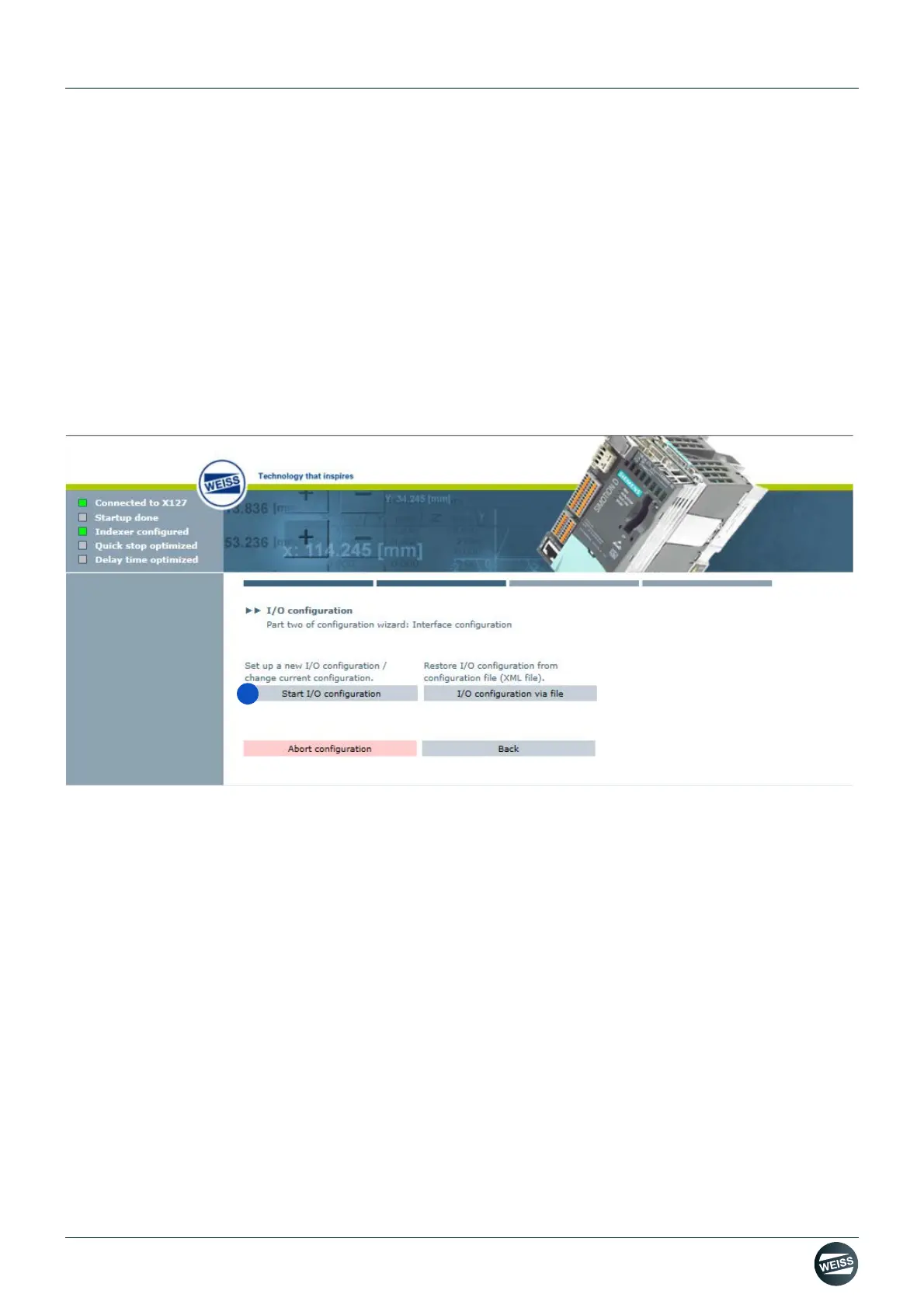
2nd section of the machine configuration: Interface configuration.
There are two different ways to configure the interfaces:
[A] Start I/O configuration
Go to chapter 8.3.5.1 „Start I/O configuration“ on page 89
[B] I/O configuration via file
The I/O configuration via file is carried out in the same manner as the Indexer configuration via file.
8.3.5.1 Start I/O configuration
1. Start I/O configuration.
Configure the inputs and outputs with regard to the interface used.
I/O configuration PROFIBUS if you are using a PROFIBUS interface
Go to chapter „I/O configuration PROFIBUS“ on page 90
I/O configuration PROFINET if you are using a PROFINET interface
Go to chapter „I/O configuration PROFINET“ on page 95
I/O configuration terminal module if you are using a Terminal Module (TM15) for the in-/outputs
Go to chapter „I/O configuration terminal module“ on page 97



 To Next Page