SOFTWARE INSTALL
This Quick start guide is intended for use with CardioPerfect
Workstation version 1.6.6 or higher. Before you start, install the
CardioPerfect Workstation software and ABPM 7100 driver. See
the Welch Allyn CardioPerfect Workstation Installation Guide for
installation instructions.
PROGRAM YOUR DEVICE
CONNECT DEVICE TO A COMPUTER
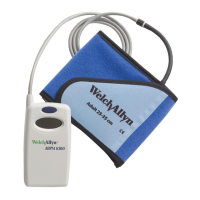
1. Install two fresh AA batteries into the ABPM 7100 device.
2. Connect the PC interface cable to the USB port on the computer.
Note To avoid repeating the device configuration steps, use the same
USB port (Com port) when connecting the device to the PC.
3. Connect the other end to the ABPM 7100 device.
4. Press and hold the On/Off button for two seconds to turn on the
device. “CO” appears on the device screen indicating the device
is connected.
COMMUNICATE WITH THE DEVICE
1. On the PC, right-click on (My) Computer.
2. Select Properties.
3. Click on Device Manager. (For Windows XP, Device Manager is
located on the Hardware tab.)
4. Double click Ports (Com & LPT) and note the Prolific USB-to-
Serial Com port number. You will need this number in the next
steps.
5. Open the CardioPerfect Workstation Software and log in.
6. Navigate to the Advanced tab by selecting File > Settings... >
Ambulatory blood pressure > Advanced. Choose the correct
Com port number in the ABPM 7100 drop down menu.
7. Click OK to accept the change.
SETUP NEW PATIENT
1. Click Patient, to enter a new patient.
2. Fill in the Patient card and click OK.
Note To select a patient from the database: In the Patients tab, enter
the patient name or number into the search box and then select Go.
Select the patient for whom you want to record the test.
PROGRAM YOUR DEVICE
1. Click on ABP .
2. If prompted, select ABPM 7100 and click OK.
3. Select Protocol, Referring Physician, etc. and click OK. The device
is now programmed with the patient information.
4. Disconnect the PC interface cable from the device.
DEVICE SAFETY
For complete directions for use, warnings and cautions,
please consult your user manual located on the software CD.
The cuffs and the tube are made from electrically nonconductive
material and protect the device from the effects of a defibrillator
discharge.
CAUTION Ensure the tube cannot be kinked or compressed
when patient is resting or sleeping.
CAUTION During a defibrillator discharge the device must not
be allowed to touch the patient. The device can be damaged from the
discharge and give inaccurate measurements.
CAUTION The device fulfills the requirements of EMC
standards. However, it should not be exposed to strong
electromagnetic fields.
CAUTION The device should not be used at the same time as
high-frequency surgical equipment.
CAUTION If liquids enter the device, remove the device from
use until it has been properly dried, inspected, and tested by qualified
service personnel.
DEVICE BUTTONS
Note To stop a measurement, press any button.
Start button
• Starts the automatic
protocol
• Triggers a measurement
in addition to the
automatic protocol
Event button
Records an event and
triggers an additional
measurement.
Day/Night button
Patient presses immediately
before going to sleep and
upon waking.
On/Off button
Turns on or off device, press
for two seconds.
SIZING CHART
Note Correct cuff fit is extremely important for accurate measurement.
CUFF SIZE ARM CIRCUMFERENCE
REUSABLE SLEEVE CUFFS
Child Cuff 14-20 cm
Small Adult Cuff 20- 24 cm
Adult Cuff 24- 32 cm
Adult Plus Cuff 32- 38 cm
Large Adult Cuff 38- 55 cm



 To Next Page
 Loading...