EasyManua.ls Logo

Welch Allyn ABPM 7100 - User Manual

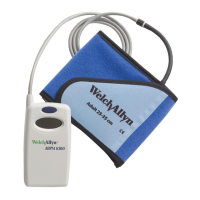
Welch Allyn ABPM 7100
484 pages
Print Icon
To Next Page IconTo Next Page
Loading...
ABPM 7100
Ambulatory Blood
Pressure Monitor
ABPM 7100ABPM 7100
EN
CS
DA
EL
NL
HR
FI
HU
FR
KK
DE
LV
IT
PL
NO
RU
PTESSVTR
Instructions for Use /
Návod k použití
Brugsvejledningen /
Οδηγίες χρήσης
Gebruikshandleiding /
Upute za upotrebu
Käyttöohjeet /
Használati utasítás
Mode d‘emploi /
Пайдалану нұсқаулығы
Gebrauchsanweisung /
Lietošanas norādījumi
Istruzioni per l‘uso /
Instrukcja użytkowania
Bruksanvisning /
Руководство по эксплуатации
Instruções de Utilização
Instrucciones de uso
Bruksanvisning
Kullanım Talimatları

Table of Contents

Other manuals for Welch Allyn ABPM 7100

Questions and Answers

  • A
    Alisha JohnsonSep 23, 2025
    How to fix time and date not updating on Welch Allyn ABPM 7100 Blood Pressure Monitor?
    • A
      Amanda BatesSep 23, 2025
      If the time and date on your Welch Allyn device are not updated after a long period without power, the internal buffer battery is depleted. Date and time can be reset after every power pack or battery replacement.
  • J
    Jesus MorseAug 23, 2025
    Why my Welch Allyn Blood Pressure Monitor cannot be switched on?
    • B
      Brian JeffersonAug 25, 2025
      If your Welch Allyn Blood Pressure Monitor will not switch on, possible causes include incorrectly inserted batteries (reinsert them with correct polarity) or low battery voltage (replace the batteries).
  • J
    Jacob WeberAug 25, 2025
    What does Err 6 mean on Welch Allyn ABPM 7100 Blood Pressure Monitor?
    • B
      Brian ChandlerAug 26, 2025
      If your Welch Allyn Blood Pressure Monitor displays 'Err 6' and a continuous alarm sounds, check the cuff for air build-up or kinks in the tubing, and straighten the tubing if needed. Ensure the cuff is correctly connected to the device. If there are leaks in the cuff or tubing, replace the cuff.
  • J
    Janet MartinAug 27, 2025
    How to fix faulty connection between Welch Allyn ABPM 7100 and PC?
    • G
      glopezAug 27, 2025
      A faulty connection between your Welch Allyn ABPM 7100 and the PC can be due to several reasons. First, the incorrect COM interface might be set – ensure you set the correct interface in the service programs. Second, the cable plug or socket could be defective, so inspect the plug and socket on the ABPM 7100, making sure the pins are straight. Finally, the ABPM 7100 may not be in transmitting mode; switch it off and then on again without removing the connecting cable.
  • E
    erinallenAug 27, 2025
    What does Err 1 mean on Welch Allyn Blood Pressure Monitor?
    • A
      April MeyersAug 27, 2025
      The 'Err 1' message on your Welch Allyn Blood Pressure Monitor can occur if the patient displays severe arrhythmia, if the arm was moved during measurement, or if there was insufficient valid pulse rate detected. Keep the arm still during measurement. Place the cuff on your arm again.
  • K
    kennethwhiteSep 16, 2025
    What to do if Welch Allyn ABPM 7100 display doesn't show 'co' or 'bt'?
    • Z
      zmillsSep 16, 2025
      If your Welch Allyn ABPM 7100 display doesn't show 'co' or 'bt', you are not in transmitting mode. For cable communication, switch the ABPM 7100 off and then on again without pulling the plug. For BT communication, press and hold the START button and then press the DAY/NIGHT button. Select “bt” using the START button.
  • R
    Ronald BarnettSep 13, 2025
    Why Welch Allyn ABPM 7100 didn't conduct measurements during night?
    • A
      Alyssa RamirezSep 13, 2025
      If no measurements were conducted during the nocturnal phase with your Welch Allyn ABPM 7100, the battery packs or batteries may have been prematurely depleted, or the patient may have switched off the ABPM 7100. Draw the patient’s attention to the urgency of a complete 24-hour measurement.
  • D
    David FlynnSep 14, 2025
    Why an error occurs during first measurement on Welch Allyn ABPM 7100 Blood Pressure Monitor?
    • J
      Jennifer GarciaSep 14, 2025
      If an error occurs during the first measurement with your Welch Allyn Blood Pressure Monitor, the cuff size may not be suitable for the patient’s arm circumference. Measure the patient’s arm circumference and compare this with the imprint on the cuff. You may require a different cuff size.
  • D
    David ChangSep 5, 2025
    What does Code 2 mean on Welch Allyn ABPM 7100?
    • J
      Jessica GuzmanSep 5, 2025
      Try again. If the error persists, send the device to your Welch Allyn specialist for inspection.
  • M
    Mark LewisSep 3, 2025
    What does Code 4 mean on Welch Allyn ABPM 7100?
    • L
      Laura CampbellSep 3, 2025
      If your Welch Allyn ABPM 7100 displays 'Code 4', the Bluetooth® interface of the ABPM 7100 has not yet been paired with the analysis software. Reconnect the device via Bluetooth®.

Summary

Symbols

Documentation Symbols

Explains symbols used in the manual for warnings and information.

Power, Shipping, and Miscellaneous Symbols

Covers symbols related to power supply, shipping, storage, and general device use.

Introduction

Preliminary Note

Initial statement regarding the ABPM 7100 system's capabilities.

About These Instructions

Guidance on how to use the instruction manual effectively.

Clinical Data

Information on clinical standards and device testing.

CE Mark and Compliance

Details on product certifications and regulatory directives.

Core Instructions for Use

Intended Use and Indications

Specifies the device's purpose and approved clinical applications.

Contraindications and Essential Performance

Lists conditions for non-use and critical performance features.

Side Effects of Monitoring

Describes potential adverse effects of the monitoring procedure.

Device Setup and Preparation

Product Description and Components

Overview of the ABPM 7100 system and its constituent parts.

Device Controls, Display, and Connections

Details on buttons, LCD display, and interface ports.

Technical Data and Accessories

Specifications and available accessories for the device.

Safety Instructions and Battery Insertion

Critical safety warnings and battery installation procedures.

Activating and Configuring the Device

Steps for powering on and initial device setup.

Setting Time, Logs, and Patient Data

Procedures for configuring measurement logs and patient information.

Cuff Selection and Application

Guidance on choosing and correctly applying the blood pressure cuff.

Finalizing Measurement Setup

Connecting tubing and patient positioning for accurate measurement.

Measurement Process

Measurement Safety and Precautions

Safety guidelines and precautions during the measurement process.

Performing Measurements

Step-by-step guide for initiating and conducting measurements.

Handling Measurement Errors

Procedures for dealing with measurement failures and errors.

Acoustic Signals and Cancellation

Explains device sounds and how to cancel active measurements.

Care, Maintenance, and Troubleshooting

Cleaning and Disinfection

Procedures for cleaning and disinfecting the device and accessories.

Maintenance Plan

Schedule for regular device checks, updates, and upkeep.

Troubleshooting and Error Codes

Identifying and resolving common device issues and error codes.

Warranty, Service, and Compliance

Limited Warranty

Details on product warranty coverage, terms, and limitations.

Service Policy

Guidelines for obtaining service, repairs, and spare parts.

EMC Guidelines and Declarations

Information on electromagnetic compatibility and environmental guidelines.

Welch Allyn ABPM 7100 Specifications

General IconGeneral
Device TypeAmbulatory Blood Pressure Monitor
Measurement MethodOscillometric
Cuff Pressure Range0-300 mmHg
MemoryUp to 300 readings
Data TransferUSB
Systolic Range60-270 mmHg
Mean Arterial Pressure Range40-200 mmHg
Pulse Rate Range40-200 bpm
Power Source2 AA batteries
Operating Conditions10 to 40 °C, 15 to 90% RH
Storage Conditions10 to 95% RH
Diastolic Range30 to 200 mmHg

Related product manuals