Getting Started
Charging Spot
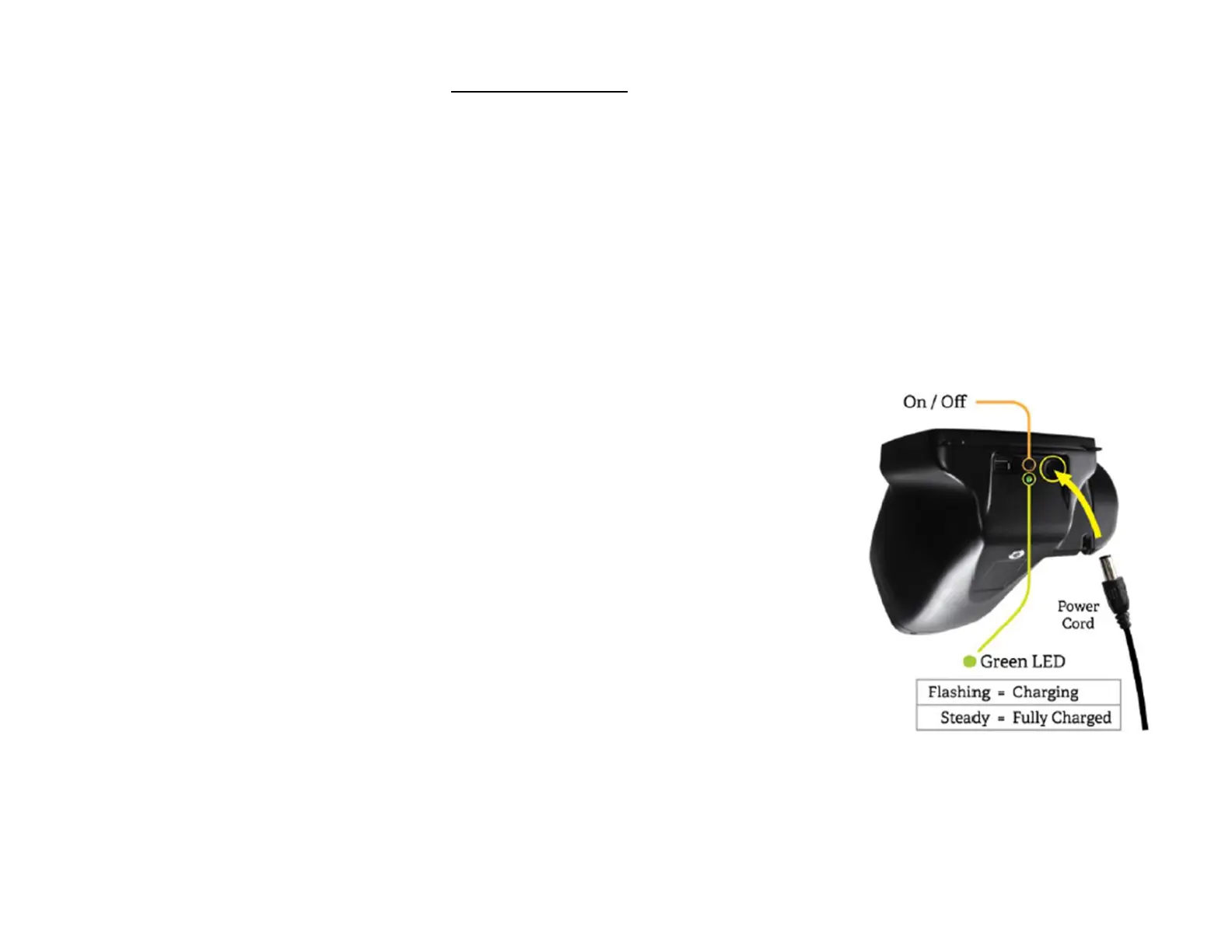
Spot contains a rechargeable battery for mobile use. To charge the battery, tilt Spot forward and find the
power connector port , then gently insert the power connector from the AC adapter, as seen below. DO NOT
force the power connector into the power port on Spot. It should easily insert. Forceful insertion can cause
damage to Spot and potentially void the limited warranty. Finally, plug the AC adapter into an available AC
outlet. When the battery charge indicator (green LED) is steady, no further charging is required (Figure 1).
Spot will also run directly off the AC power source.
Wrist Strap
ALWAYS use the included wrist strap as extra precaution to help prevent
damage to Spot if it slips from your hands. Attach the wrist strap to the pin
located under the handle. DO NOT carry Spot by the wrist strap. The wrist
Strap is an extra precaution but does not guarantee damage will be
prevented if dropped.
Tripod mount
The vision screener can be mounted to a standard photographic tripod. A
¼-20 threaded mount located on the bottom of the device is available for
attaching a tripod.
Powering Spot On and Off
To power on Spot, press and release the power button. The system will
take approximately 30 seconds to complete its start-up process.
When complete you will be at the Main Menu or Home Screen.
To power off Spot, hold the power button for about 2 seconds. A
confirmation screen will appear to confirm shutdown of the device.
Figure 1



 To Next Page
 Loading...












