17
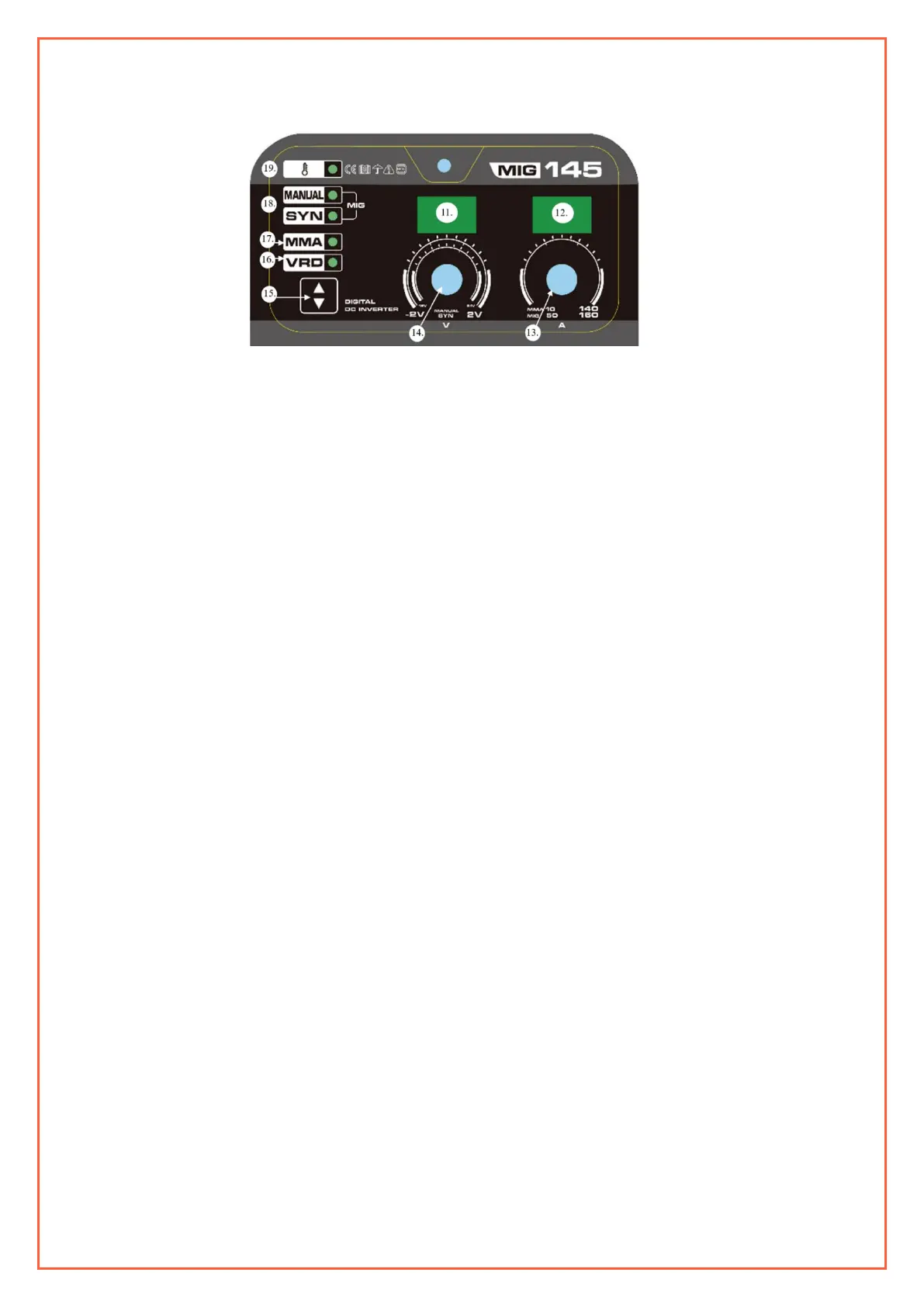
• Once the machine has powered up press the welding process selector (11) to select MMA.
• Your Weldco Inverter welder is fitted with a “Voltage Reduction Device” (VRD) (16)
The VRD reduces the open circuit voltage to safer levels. The VRD default is OFF. To activate the VRD press the welding
process selector (15) to select VRD.
• Adjust the welding current to the relevant level for the welding electrode type and size, as per the electrode
manufacturer by adjusting the amperage adjustment dial (13).
• Insert the electrode into the electrode holder. Once the electrode contacts the work piece (also any metal connected to
the work piece) the electrode will strike an arc, for this reason do not rest the fitted electrode on the work area.
• With your PPE on, strike the work piece with the electrode (like striking a match) hold the electrode slightly off the
work piece to maintain a constant arc.
• To stop the weld, quickly lift the electrode from the work piece (stopping the electrical circuit).
• It is important to chip away the “SLAG” before continuing to weld and for weld inspection, Allowing the weld to cool
slightly will make “SLAG” removal easier. It is important to wear eye protection whilst removing the “SLAG”.


 To Next Page