17
17
2 Operation interface specification
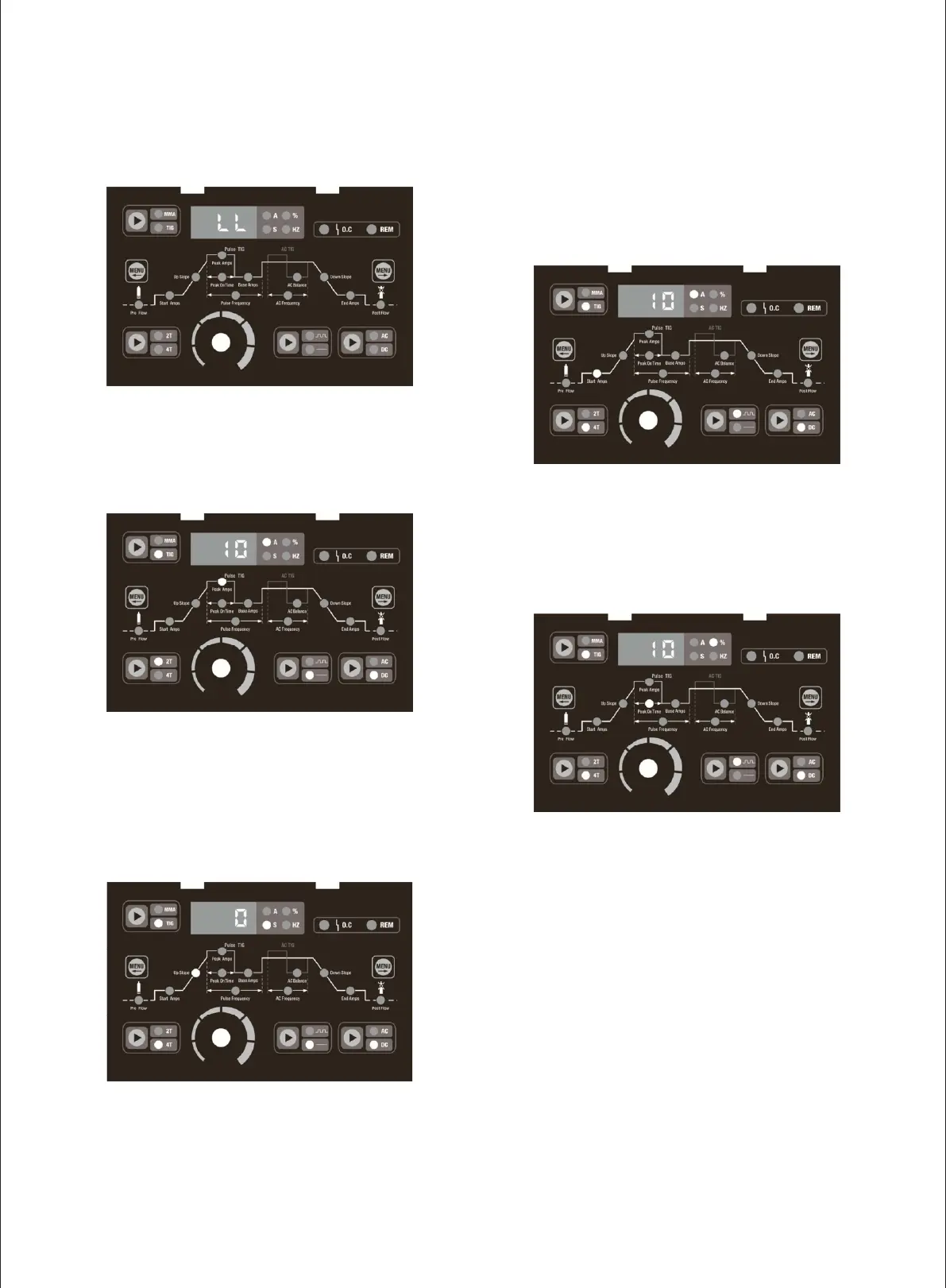
The picture 2 shows the digital display meter reads
“LL”when the machine starts working.
Picture 3
The picture 3 shows when under TIG mode, the Peak Amps
indicator light on, adjust the parameter knob, meter reads
5-200A adjustable, press the Move Left/Right Selector
Menu Button to choose other parameter settings.
Picture 2
Picture 4
The picture 4 shows when under 4T mode, press the Move
Left Selector Menu Button to Up Slope indicator light on,
adjust the parameter knob, the meter reads 0-10s
adjustable.
Picture 5
The picture 5 shows press the Move Left Selector Menu
Button to Start Amps indicator light on, adjust the
parameter knob, the meter reads 5-200A adjustable.
Picture 6
The picture 6 shows when under pulse mode, press the
Move Right Selector Menu Button to Peak On Time
indicator light on, adjust the parameter knob, the meter
reads 10-90% adjustable.


 To Next Page