18
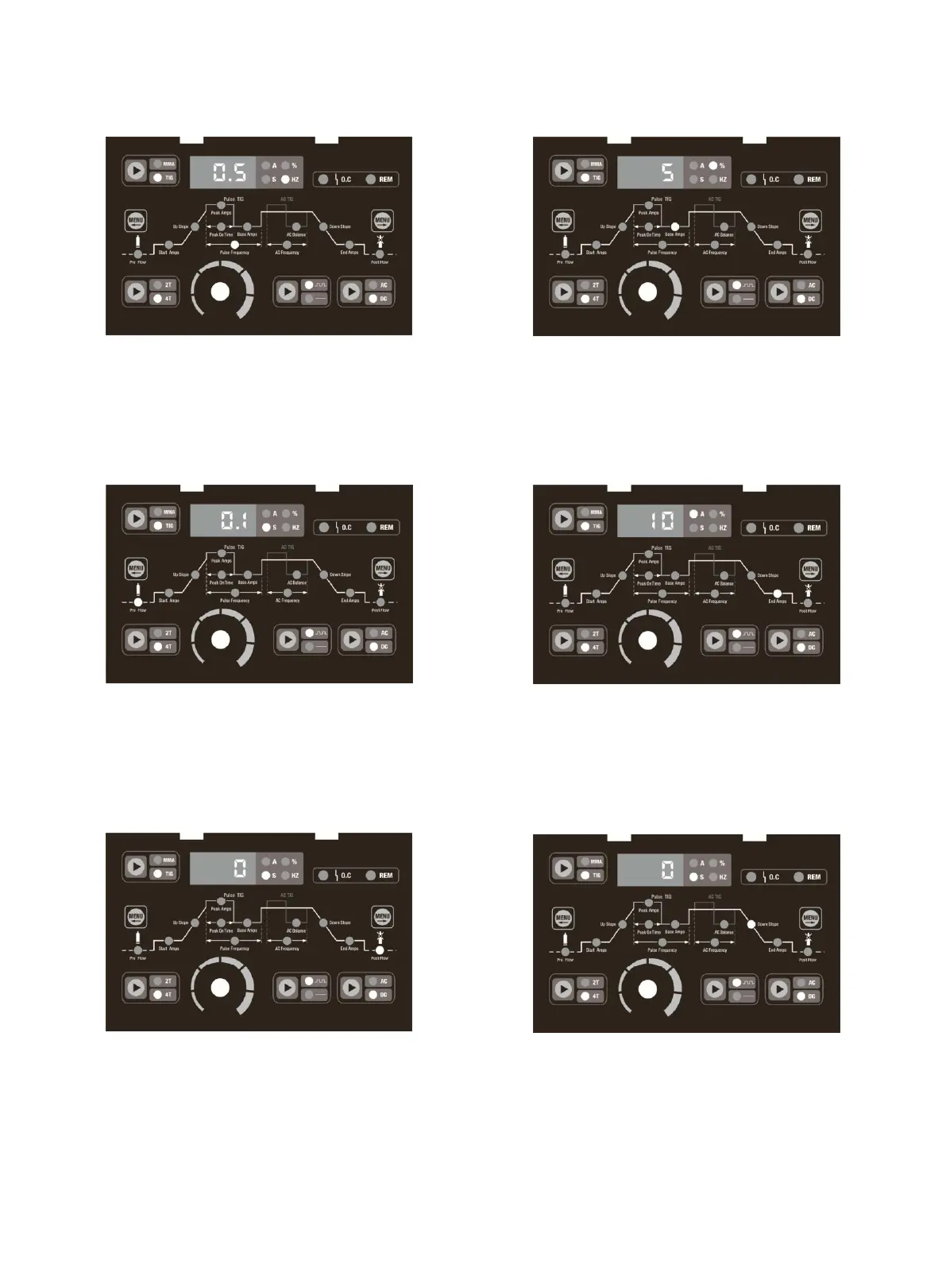
Picture 7
The picture 7 shows press the Move Right Selector Menu
Button to Pulse Frequency indicator light on, adjust the
parameter knob, the meter reads 0.5-200 HZ adjustable.
Picture 8
The picture 8 shows press the Move Left Selector Menu
Button to Pre flow indicator light on, adjust the parameter
knob, the meter reads 0.1-1S adjustable.
Picture 9
The picture 9 shows press the Move Right Selector Menu
Button to Post flow indicator light on, adjust the parameter
knob, the meter reads 0-15S adjustable.
Picture 10
The picture 10 shows press the Move Right Selector Menu
Button to Base Amps indicator light on, adjust the
parameter knob, the meter reads 5-95% adjustable.
Picture 11
The picture 11 shows press the Move Right Selector Menu
Button to End Amps indicator light on, adjust the parameter
knob, the meter reads 5-200A adjustable.
Picture 12
The picture 12 shows press the Move Right Selector Menu
Button to Down Slope indicator light on, adjust the
parameter knob, the meter reads 0-25S adjustable.


 To Next Page