19
Picture 13
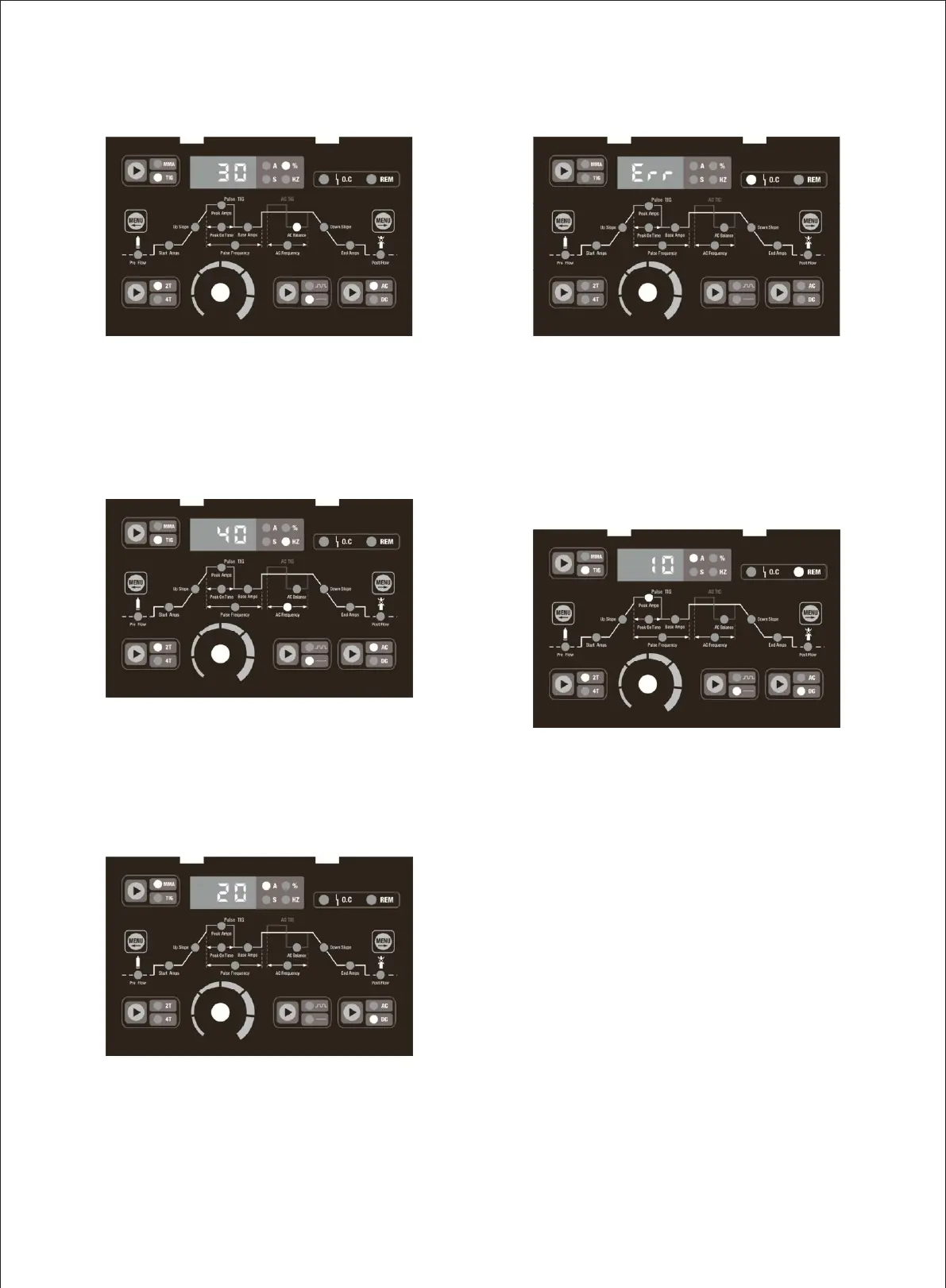
The picture 13 shows when choose under AC mode, press
the Move Right Selector Menu Button to AC balance
indicator light on, adjust the parameter knob, the meter
reads 30-70% adjustable.
Picture 15
The picture 15 shows when choose under MMA mode,
adjust the parameter knob, the meter reads 20-180A
adjustable, only AC/DC mode can be selected, other buttons
can’t be used.
Picture 14
The picture 14 shows when choose under AC mode, press
the Move Right Selector Menu Button to AC Frequency
indicator light on, adjust the parameter knob, the meter
reads 40-200HZ adjustable.
Picture 16
The picture 16 shows when the temperature is too high or
abnormal the digital display show"Err", abnormal light O.C
lights up, this time no output, will have to wait until the
temperature reducing or restart the machine to return to
normal.
Picture 17
The picture 17 shows In TIG mode, when connecting the
foot pedal to the machine, the REM indicator is on, the
machine is converted to REM mode automatically. At this
time: Start Amps, Peak Amps, End Amps these three
current parameters are controlled by the foot pedal, other
parameters are controlled by the knob on the front panel.


 To Next Page