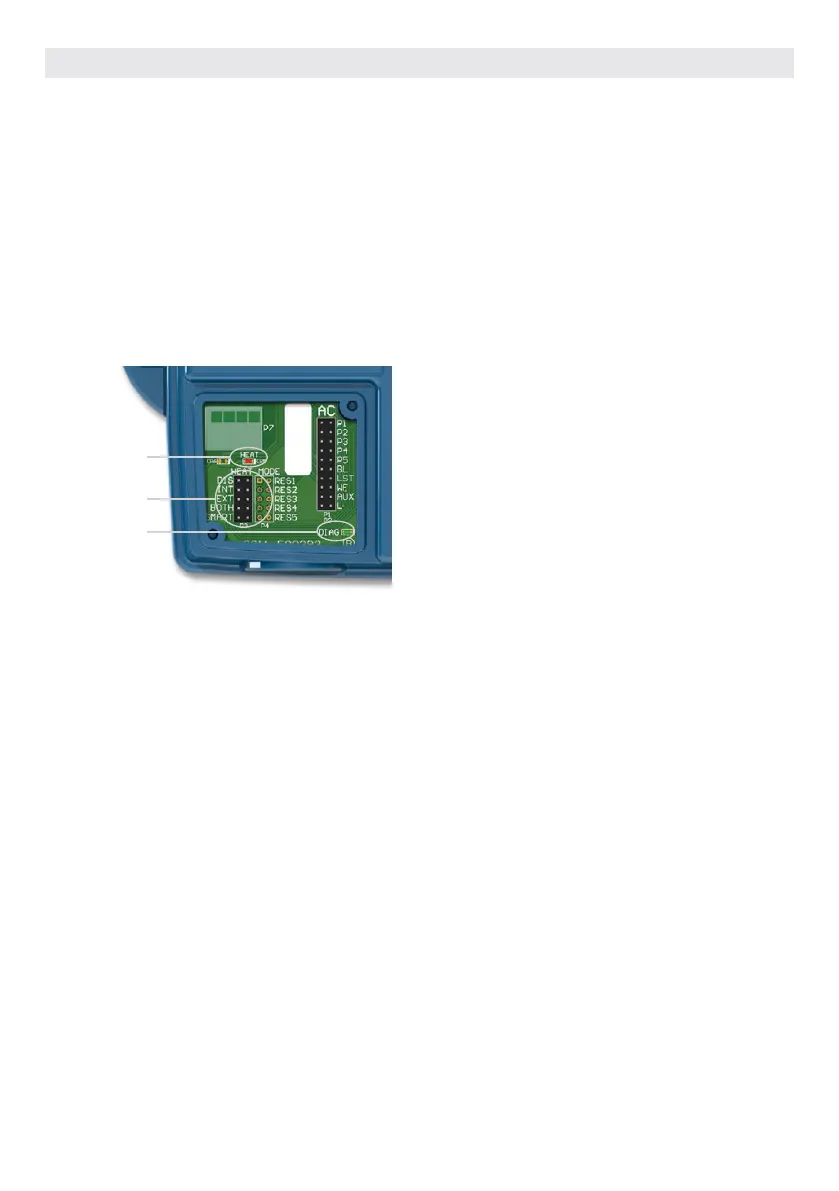
You can choose between four different water regulation
modes available. Your in.grid is automatically detected by the
hot tub control system at power up. It will be ready to use with
your preferred heat mode one minute following power up.
The relay contacts of the in.grid will be closed if the external
heating system is activated. Otherwise, the relay contacts
are open.
Your desired heat mode must be set by adding a jumper on
one of the five (5) different positions.
*Note: Your heat mode selection can be changed with the
in.touch 2 app on your mobile device. On your app, any new
selection will override the jumper setting of the in .grid. The
in.touch 2 app will automatically detect the in.grid presence and
will adapt its menu configuration as required.
Heat mode
selection
Diagnostic
LED
Heat
LED
Five available heat modes are offered with in.grid:
1- DIS (DISABLED)
Use this mode if the hot tub configuration does not have any
external heating system and only the single switch function-
alities are used. This will avoid in.touch 2 application on a
mobile device to display the Heat Mode Selection menu*. The
hot tub controller will regulate the water temperature using
the standard resistive heater. The single button switches will
control the different hot tub accessories according to the AC
jumper selections.
IMPORTANT: This mode can only be set with the heat mode
jumpers.
2- INT (INTERNAL)
This mode provides an easy way to revert back to standard
water regulation using the internal heater in case of problem
with the external heating system.
* This mode can be set with your in.touch 2 app on a mobile
device without the need to open the hot tub skirt to change the
jumper setting on the in.grid. Thanks to your in.touch 2, it will be
easier to set your preferred heating mode back once the external
heating system is available.
3-EXT (EXTERNAL)
Use this mode for a maximum energy saving purpose. The
hot tub control system will only use your external heating
system to regulate the water temperature. In normal opera-
tion, the internal heater will never be activated.
* This mode can be set with your in.touch 2 app on a mobile
device without the need to open the hot tub skirt to change the
jumper setting on the in.grid.
Freeze Protection
Freeze protection has been added because EXT (EXTERNAL)
mode does not allow the activation of the internal heater.
In cold weather, if it becomes impossible to keep the water
over freezing point, the help of the internal heater will then
be needed. This is the only time the freeze protection will
come in.
At any time, if the water temperature drops to 40°F (4.5°C),
the resistive heater will give a boost to avoid freezing. The
freeze protection will stay active until water temperature
reaches the minimum allowed set point (usually 59°F / 15°C).
Normal EXT mode will resume functioning thereafter.
4- BOTH (BOTH SYSTEMS ALL AT ONCE)
Use this mode for swim hot tubs or large hot tubs, which have
bigger needs of energy to keep the water temperature at the
desired set point.
The hot tub control system will always use the external
heating system AND the internal heater simultaneously to
regulate the water temperature; they are both activated or
deactivated at the same time.
* This mode can be set with your in.touch 2 app on a mobile
device without the need to open the hot tub skirt to change the
jumper setting on the in.grid.
5- SMART (ENERGY SAVINGS)
Use this mode for a better energy saving purpose, combined
with a maximum water temperature regulation efficiency.
The hot tub control system will always use the external
heating system to regulate the water temperature. If the tem-
perature falls too far below your set point (-2.5°F), the internal
heater will be activated to help your external heating system
reach the set point.
Once the temperature is within 1.5°F from set point, the in-
ternal heater is deactivated and the external heating system
takes all control of the water regulation again.
* This mode can be set with your in.touch 2 app on a mobile
device without the need to open the hot tub skirt to change the
jumper setting on the in.grid.
Troubleshooting
DIAGNOSTIC LED
The diagnostic LED will help you with the status of the con-
nection between the hot tub control system and the in.grid.
Blinking light: Hot tub control system not detected, not
compatible or in Disable mode if one of your
single switches doesn’t operate properly.
Solid light: Hot tub control system detected
No light: Power Off
HEAT LED
Solid light: Relay contacts close and external heating
system on.
No light: Relay contacts open and external heating system
off.
OPTIONAL ACCESSORIES IN.GRID
Heat Mode Operations
100



 To Next Page