USER INTERFACE EASY 7
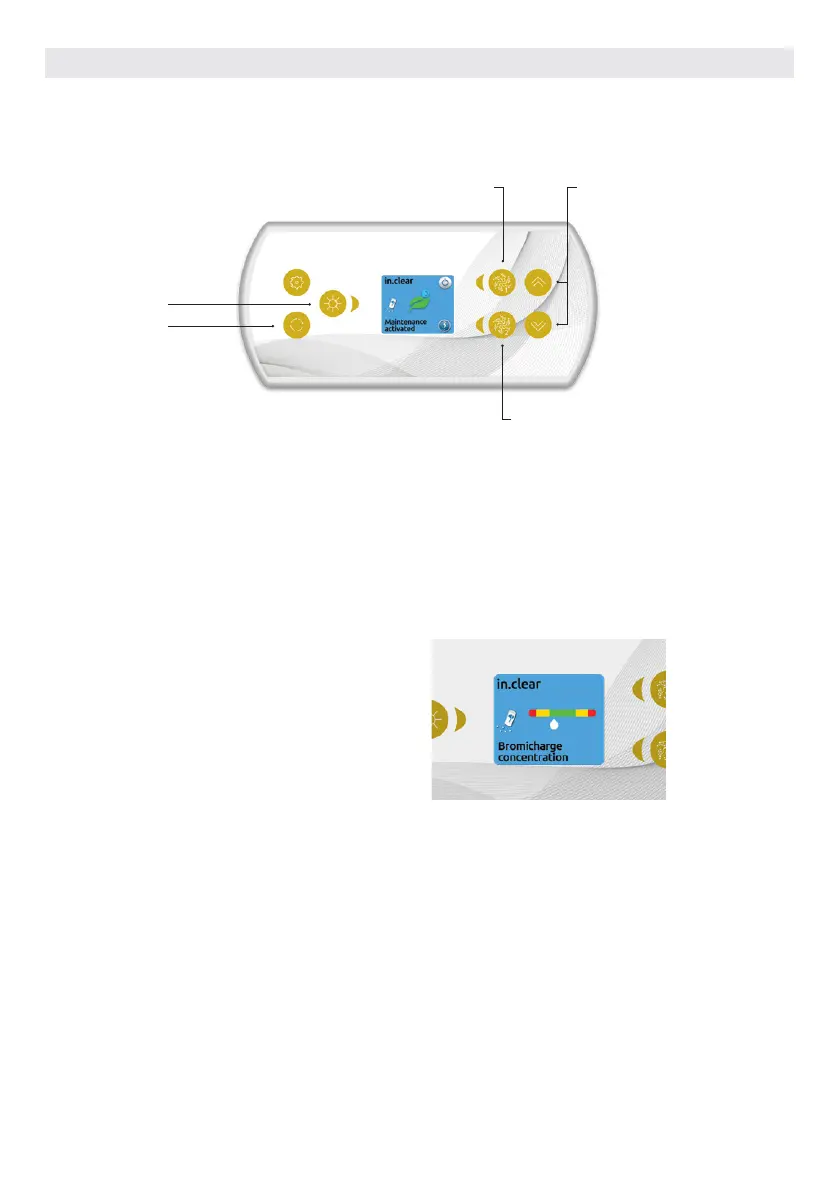
Power Boost adjustment
Boost activation/deactivation
Mode
Diagnostic
IN.CLEAR FUNCTIONS
This menu is only available if an in.clear linked is detected.
Press on the Mode key to access your in.clear module.
This menu allows you to activate or deactivate your in.clear,
to start or stop a Boost, and to enter diagnostic mode.
Turning the in.clear on/off
Press the power key to turn the in.clear on or off.
Control the Boost level
Press on the Boost activation/deactivation key to start a
Boost, and again to cancel.
To adjust the Boost level use the arrow keys.*
A message indicating that Boost mode is active is displayed
at the bottom of the main screen for the duration of the
Boost.
* See the in.clear user manual for more details about Boost levels.
Diagnostic Mode
Press on the Diagnostic key to start a BromiCharge con-
centration level test. To exit diagnostic mode press on the
Diagnostic key again. The system will automatically exit after
15 minutes.
In diagnostic mode, the BromiCharge gauge indicates the ap-
proximate level of BromiCharge in the hot tub water. Do not
add BromiCharge if the indicator is in the green zone.
When BromiCharge is added the indicator will move slowly
to the right. When water is added to the hot tub the indicator
will move to the left. To obtain a good level of BromiCharge,
start the pumps and add the specified amount of BromiCh-
arge** and allow 5 minutes for the indicator to adjust before
adding more.
For optimal performance, aim for the middle of the green
zone.
** For more information on adjusting your BromiCharge level
see the in.clear user manual.
50



 To Next Page