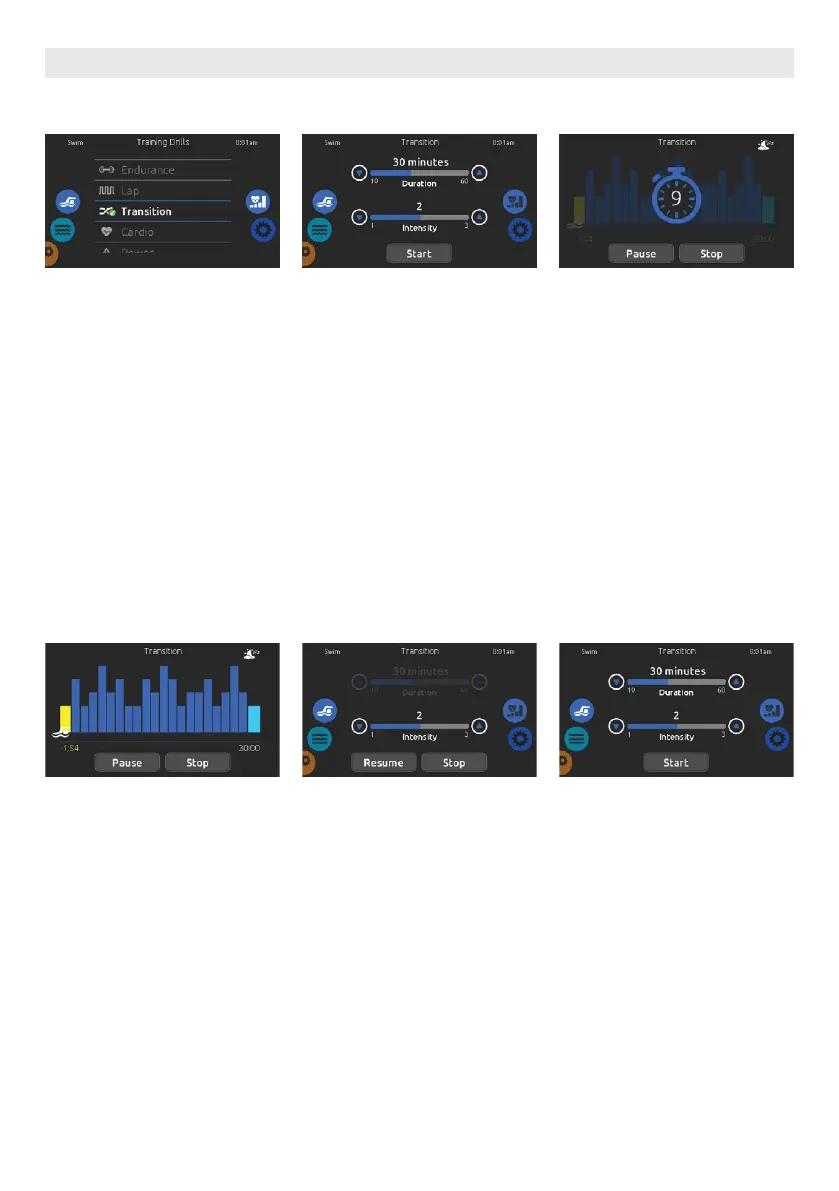
You can adjust the duration and inten-
sity of your Transition training drill by
touching the up and down arrows.
Touch Start when ready.
To select a training drill, touch the
training drill icon on the top of the right
wheel icon.
If you choose Transition, this training
drill will perform a series of equal steps
at random intensities.
The preparation countdown is dis-
played, allowing you to get in position
before your swimming session starts.
Your in.mix controlled lights will blink
during the countdown (requires an
installed in.mix).
The keypad can be put in sleep mode
by touching the sleep icon located
at the top right of the screen. It will
prevent interruptions of your swim
session from water splashing on the
keypad display.
You can touch Pause or Stop whenever
you need.
During the workout session, you can
follow your progression with the swim-
mer icon moving toward right over the
training duration bar.
Your in.mix controlled lights will
change colors before each interval to
inform you of the change of intensity
(requires an installed in.mix).
You can touch Pause or Stop whenever
you need.
Touch Pause to suspend your swim
session. You will be able to change
the intensity level of your drill or go
in other menus to start the music, for
example.
Touch Resume when ready to swim
again. The workout session will resume
but the preparation countdown stop-
watch won’t reappear.
If you touch Stop to interrupt your swim
session, you will be able to change the
duration and/or the intensity of your
session, select another training drill or
modify any other parameters.
Touch Start to start your workout from
the beginning. The preparation count-
down will start.
USER INTERFACE SMART TOUCH
TRAINING DRILLS TRANSITION
58



 To Next Page