USER INTERFACE SMART TOUCH
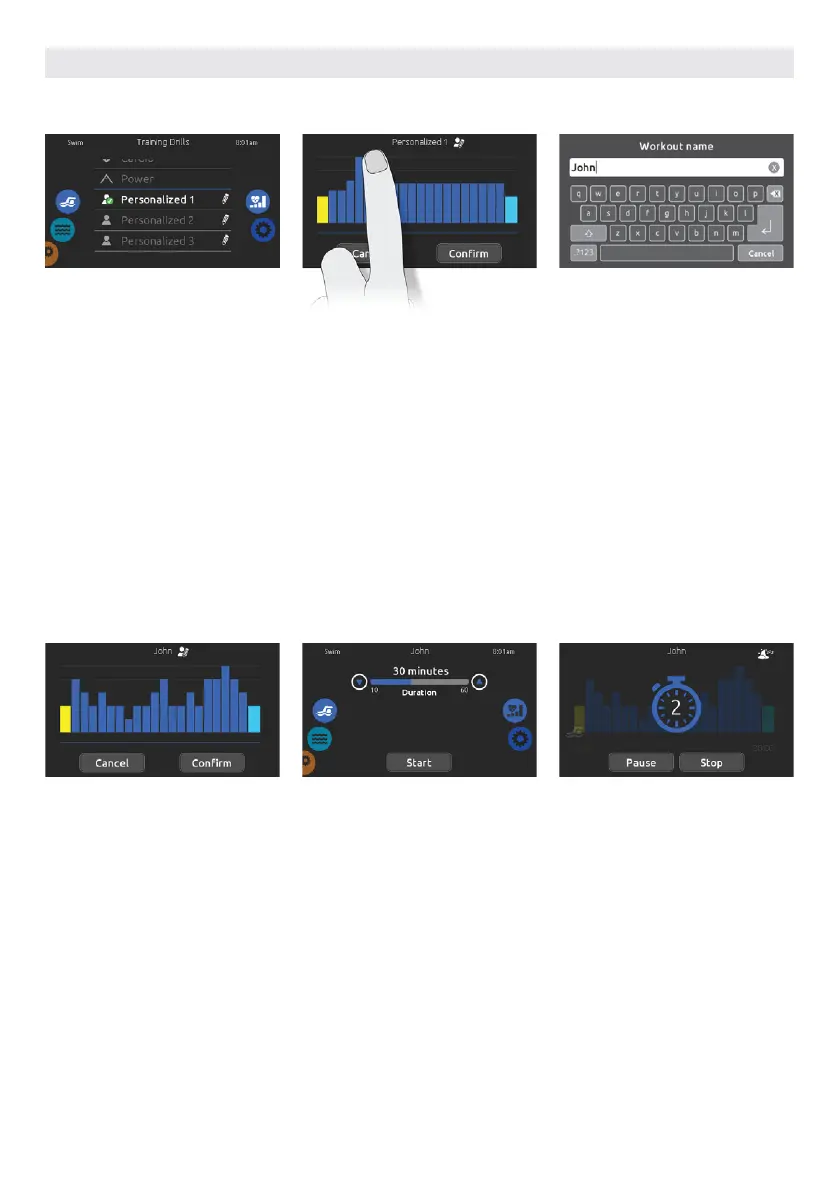
Three personalized training drills are
available and can be edited to create
custom workouts.
Touch the pencil icon at the right end of
the desired personalized drill to open
the training drill edit window.
Type your workout name. Once done,
touch the return key to get back to the
training drill screen.
This page allows you to adjust the dura-
tion of your personalized training drill
by touching the up and down arrows.
Touch Start when ready.
Touch Confirm to save your personal-
ized workout. If you cancel, the modifi-
cations will not be saved.
The preparation countdown is dis-
played, allowing you to get in position
before your swimming session starts.
Your in.mix controlled lights will blink
during the countdown (requires an
installed in.mix).
The keypad can be put in sleep mode
by touching the sleep icon located
at the top right of the screen. It will
prevent interruptions of your swim
session from water splashing on the
keypad display.
You can touch Pause or Stop whenever
you need.
TRAINING DRILLS PERSONALIZED
Draw with your finger the desired
workout pattern on the screen.
Name your personalized training by
touching the pencil icon located at the
right of the workout name.
61



 To Next Page