87
BOOST KEY
The first press of the Boost key
turns the in.clear ON and puts
the in.clear into maintenance
mode. ON appears on the
keypad display.
Press the Boost key once while
in maintenance mode to start
a boost, or to adjust boost
settings.*
The Bromine Generation
Indicator (LED), located above
the Boost key, lights up when
the cell is producing bromine
and is off when no bromine is
being produced.
Press and hold the Boost key for
2 seconds to turn the in.clear
off. OFF will appear on the
keypad display. Do not turn the
in.clear off unless required for
maintenance, or if advised by a
technician or a Gecko represen-
tative. Turning the in.clear off
will cancel the boost.
Note: With the standalone
version the Bromine
Generation indicator will blink
if the in.clear system cannot
generate bromine due to low or
no water flow.
* In older versions, pressing the
Boost key during a boost cycle
will cancel the remainder of
that boost cycle and return the
in.clear system to maintenance
mode.
PROGRAM KEY
Press and hold
the Program key for
2 seconds to change the
maintenance mode level.
Once in maintenance mode
adjustment, press the Program
key again to view the suggest-
ed minimum filtration time
* (stand alone version only).
Press the Program key once
more for Diagnostic mode.
* Not displayed in older
versions.
+/- KEYS
Use the Up and Down keys
to adjust the maintenance
and boost levels while in the
appropriate mode.
DIAGNOSTIC MODE
Diagnostic mode can be used
to periodically adjust the
sodium bromide level or to
check sodium bromide keypad
warnings and errors.
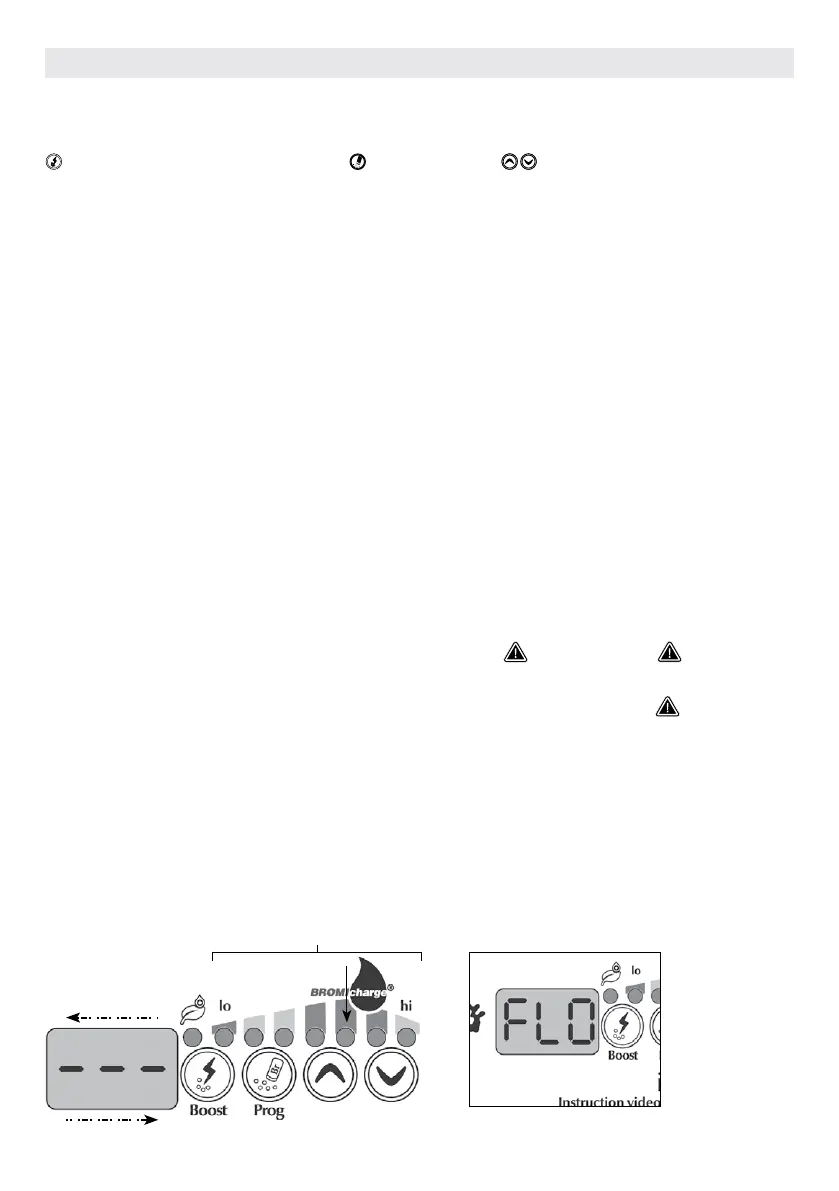
The BromiCharge Gauge will
indicate the level of sodium
bromide in the hot tub water.
As you add sodium bromide to
the hot tub an animation will
indicate rising levels*. If the
levels go down (when adding
fresh water, for example)
the animation will indicate
diminishing levels.
Press the Prog key to exit
diagnostic mode or the system
will automatically exit after 15
minutes.
*In older versions a number
will be displayed instead of an
animation to indicate the level.
The target number is 12.
Water must be
circulating through the
in.clear cell in order for
the diagnostic mode
to work. If no water
is circulating through
the in.clear unit, a FLO
message will appear
on the keypad display.
Make sure the pump
is circulating water
through the in.clear.
BromiCharge gauge
BROMICHARGE GAUGE (LEDS)
In diagnostic mode, the BromiCharge gauge (LEDs) indicates the approx-
imate sodium bromide level of your hot tub water. Do not add sodium
bromide if the indicator is in the green zone.
When adding sodium bromide, the gauge indicator will gradually shift to
the right. When adding clean water to the hot tub the indicator will shift to
the left. In order to achieve the proper level, start pumps and add 227g (.5
lb) at a time and always allow
5 minutes for the gauge to react before adding more sodium bromide.
The green zone in the center area of the gauge should be targeted for
optimal performance.
increase
decrease
KEYPAD FUNCTIONS
Be aware that the gauge
will move according to
sodium bromide level.
Make sure your water
temperature is at least
32° C (90° F).
OPTIONAL ACCESSORIES IN.CLEAR



 To Next Page