TROUBLESHOOTING
LOW OR NO BROMINE READING
Make sure the maintenance level is properly set according
to the procedure described in the section Set Maintenance
Level. Make sure there is no error or warning message on
the display, the cell is activated and that water is circulating
properly through the cell.
Make sure water chemistry is balanced. Refer to the section
Adjust Water Chemistry in the Hot tub for more details.
Test your hot tub water for phosphate to make sure there
is no contamination. Phosphates should never exceed 100
PPB. Phosphates can be introduced to your hot tub water by
household cleaners, soaps and lotions.
Change your filter or clean it with a filter cleaner and rinse
thouroughly with cold water.
Make sure the in.clear cell is not damaged and that no calci-
um or lime deposits appear on the cell plates. Clean your cell
regularly (at least once a year).
LONG RECOVERY TIME AFTER USAGE
Activate Boost Mode at the appropriate level every time you
use your hot tub. Refer to the section Determine the Boost
Level.
Heavy bather loads will require longer boost periods. If
bromine level is below 3 PPM following a boost period, re-ac-
tivate Boost Mode to bring the bromine bank within 3-5 PPM.
The bromine bank should always be regenerated following
a boost period. If a high boost level does not regenerate the
bromine bank properly, increase the daily filtration time.
If bromine production is still inadequate after following all
of the instructions above, biofilm deposits could be causing
the lack of bromine generation. Flushing products such
as Sea Klear Hot tub System Flush, Swirl Away or National
Chemistry Hot tub Purge have shown to be effective for
biofilm removal.
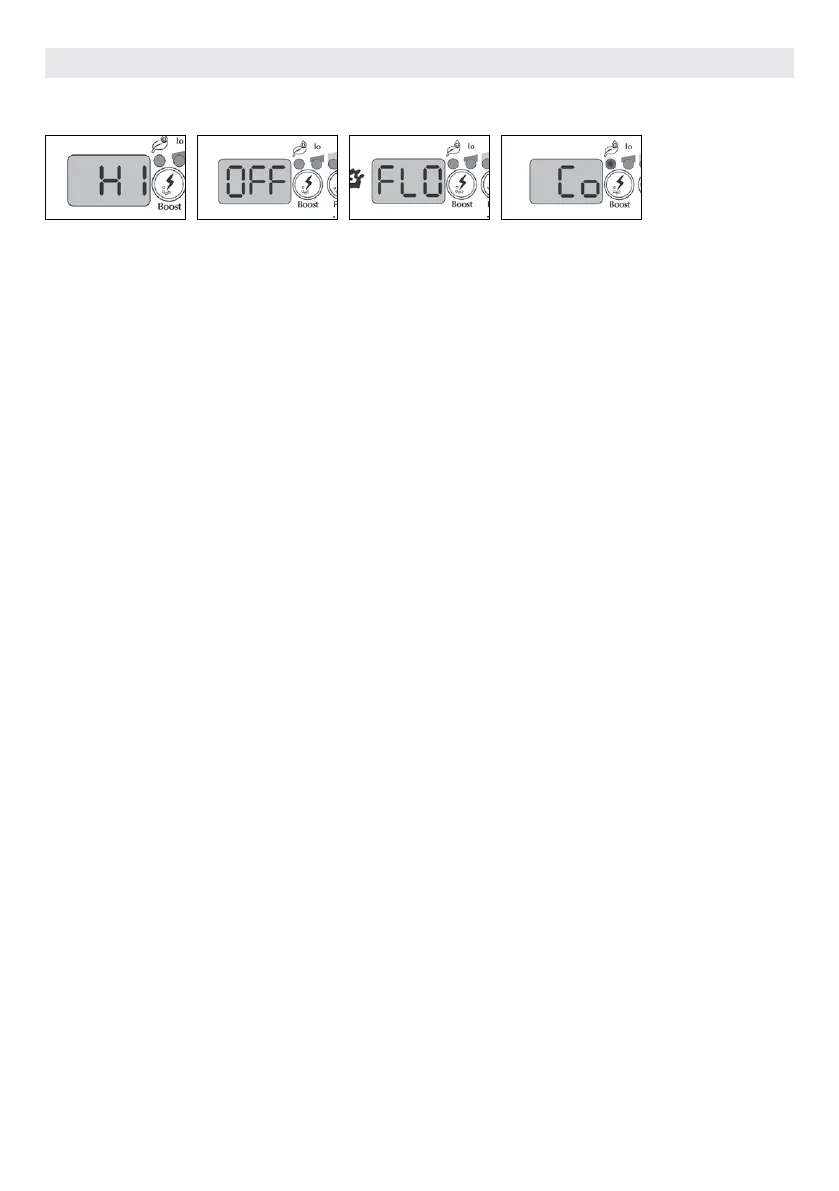
FLO ERROR (OUT
OF DIAGNOSTIC
MODE)
With the linked version the
FLO error appears when the
in.clear's pressostat is open for
longer than 3 minutes and the
pump associated with it was
activated by the hot tub pack.
Verify that the in.clear unit
was installed on the right
pump (must be installed on the
circulation pump if present).
Check that the in.clear is
installed on the pressure side
of the pump and that water is
flowing through the in.clear
unit.
COMMUNICATION
ERROR
The Co error indicates that a
linked version of the in.clear is
being used, but a pack cannot
be detected. Ensure that you
are using a compatible pack
with appropriate software,
and that all connections are
secure. If this does not clear the
message, contact your dealer
for help.
HIGH SODIUM BRO-
MIDE WARNING
High Sodium Bromide Warning
(Hi) occurs when too much
sodium bromide is present in
the water or there is a high TDS
level (water hardness, alkalini-
ty, organic compounds, etc).
To clear a High Sodium Bromide
Warning, readjust the sodium
bromide content of your water
in diagnostic mode, into the
green zone by draining some
water from your hot tub and
adding fresh water.
IN.CLEAR IS
TURNED OFF
The OFF message indicates that
the in.clear is turned off.
Press the Boost key to reacti-
vate the in.clear.
OPTIONAL ACCESSORIES IN.CLEAR
90



 To Next Page