OPTIONAL ACCESSORIES IN.TOUCH 2
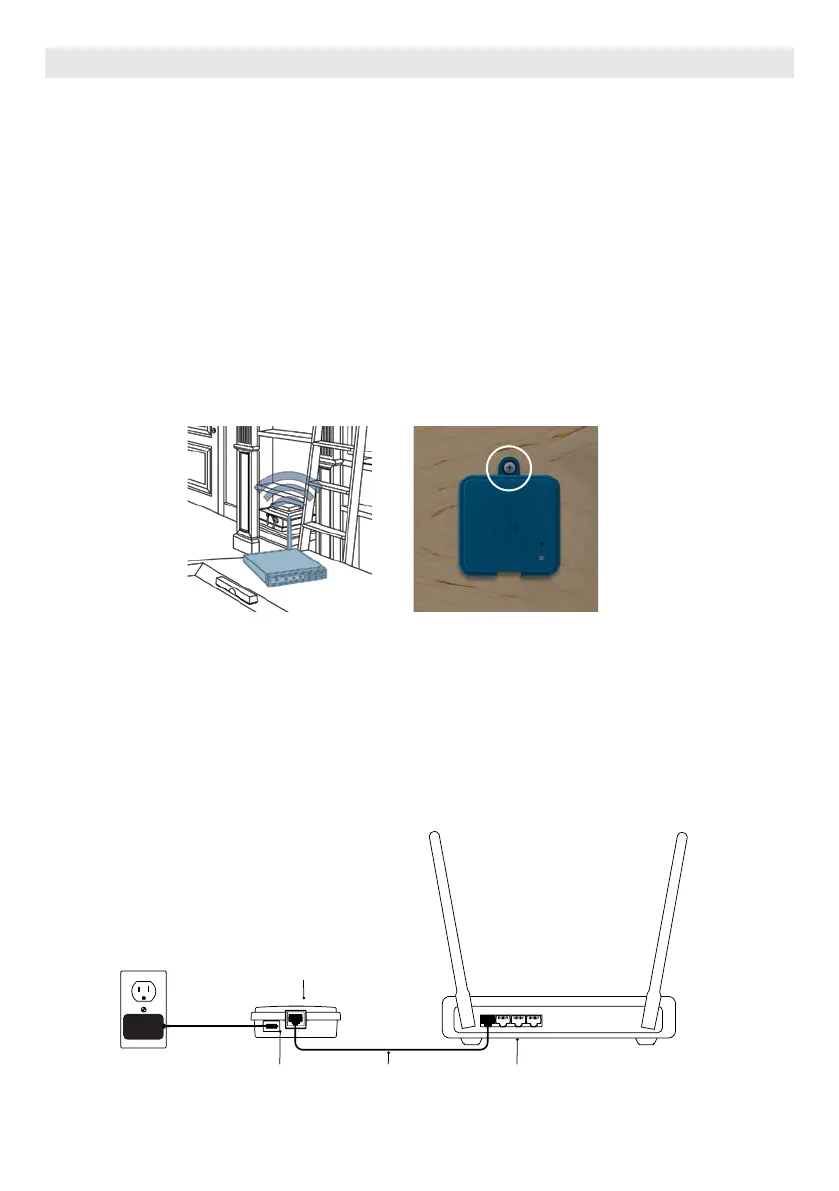
The Home Transmitter unit must be installed inside the
house near the router as it needs to be connected to
it. The Home Transmitter is provided with an Ethernet
cable and a power supply. If required, a longer cable of
good quality can be used by the installer (longer cable
not provided) to install the Home Transmitter closer to
the hot tub within the home.
The only requirement for installation location is that
household .current be available to power the Home
Transmitter using the provided wall transformer.
The Home Transmitter can be fixed in the house to opti-
mize the signal strength. We recommend that you install
the unit with a #8 pan head screw.
Here are some suggestions for a successful installation:
• If possible, install device on the first floor of your
house.
• If installing in a basement, place at highest level pos-
sible and closest to a window.
• Try to install as far as possible from materials that
may interfer with signal (ie. metal structures, thick
cement walls).
• Install as far as possible from router as the signal
emitted by the antenna may interfere with RF signal.
HOME TRANSMITTER EN MODULE INSTALLATION
Simply connect Ethernet cable into the RJ45 port of the
Home Transmitter and in one of the available LAN ports
on the router.
Finally, to power up the Home Transmitter, connect
the provided transformer to a 120V (North American
model) or 220V (European model) household supply and
connect the USB cable between the transformer and the
Home Transmitter.
Micro usb power
RJ45 Ethernet
connection
Ethernet cable LAN port, router
CONNECTION OF THE HOME TRANSMITTER EN MODULE
101



 To Next Page