SMART TOUCH
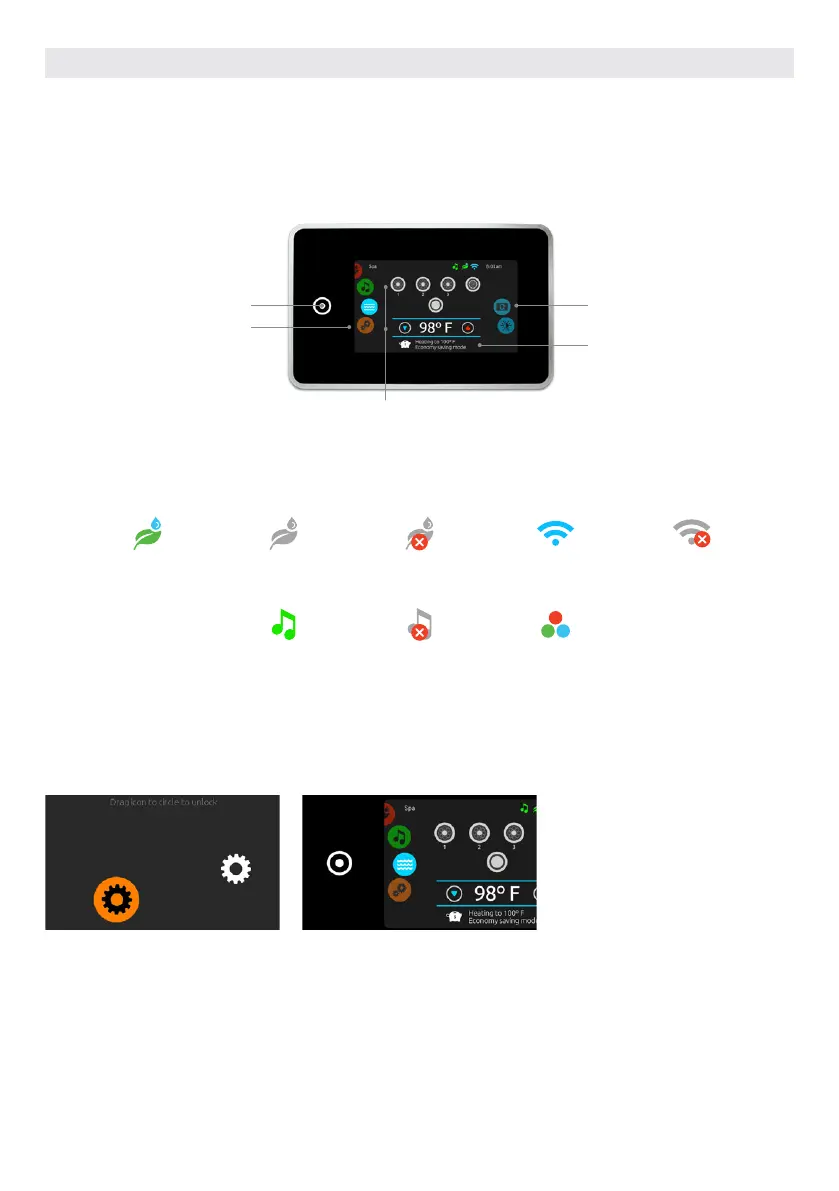
TOUCH SCREEN KEYPAD
No buttons, keys and overlays! Mode and function selection wheels, all-on or all-off one touch activation key of last used settings,
interactive display icons and on-screen messages are all elements of the Smart Touch user interface designed to let hot tub users
interact intuitively with their hot tub and its value-added accessories.
NOTIFICATION ICONS
Notification icons at the top right-hand side of the screen show the status of connected value-added accessories.
in.clear
system is on
in.clear
system is idle
in.clear
system is off
system is
connected to wifi
system is
not connected to wifi
Aquasoul Pro audio
system is on
Aquasoul Pro audio
system is on
in.mix
is installed
HOT TUBS FUNCTIONS
Quick and easy step-by-step instructions to control the main functions and to configure the system settings of your hot tub
from its Smart Touch main hot tub keypad.
ALL-ON, ALL-OFF TARGET KEY
Smart Touch features an all-on or all-off
one touch activation key of last used
settings that, when pressed, stops or
starts all working components and
accessories at once.
From the home page you can access
the following modes:
• sanitization (with in.clear connected)
• audio (with Aquasoul Pro connected)
• color (with in.mix installed)
• spa
• settings
To select a mode, slide the left wheel
up or down until the desired icon menu
is highlighted in the middle.
TURN KEYPAD ON
3 minutes after the last pump is turned
off, the screen will shut off if there is no
touch activity.
Touch the screen to turn on the keypad.
Then follow the instructions on the
screen to access the main screen.
USER INTERFACE SMART TOUCH
All-on or all-off key
(one touch activation
of last used setting
Direct to function selection
wheel (settings and addi-
tional options)
On-screen system
message and
reminder
Mode selection
wheel (settings
and accessories)
Interactive display icons
(main hot tub functions)
53



 To Next Page