USER INTERFACE EASY 7
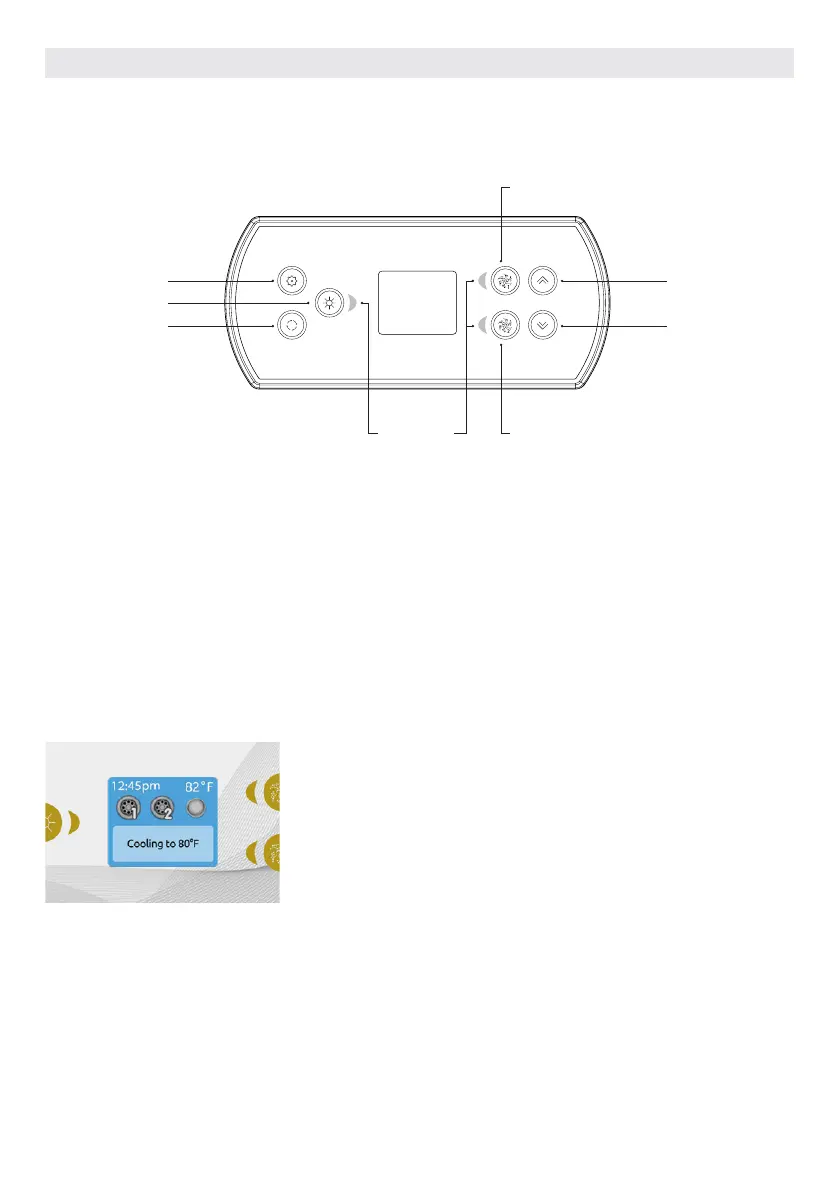
Settings Settings
Key 1
Key 2
Selection
lights
Light Key
Mode Mode
EASY 7 KEYPAD LAYOUT
SETTINGS KEY
One press gives you access to a menu to
manage the settings of your hot tub. Refer
to the settings section for details about
the settings menu.
MODE KEY
Successive presses on the Mode key will give access to control different optional
accessories of your hot tub such as Audio and others. Note that if an accessory is not
present in your hot tub configuration, its menu will not appear. Refer to the following
section to get details about the possible accessories and their detailed functionalities.
The screen will revert back to the hot tub mode if no key is pressed for 60 seconds.
If you don't have any accessories on your hot tub, the Mode key can be used to directly
change your display orientation.
POWER
Press any button to turn the keypad on.
After 30 minutes without activity it will
shut off.
MAIN SCREEN
The main screen gives you access to your
accessories and water temperature. At
the bottom of the screen you will see any
error or maintenance messages that are
present..
*Functions for keys 1 and 2 will depend on your system's low level configuration.
40



 To Next Page