MODIFYING SCHEDULES
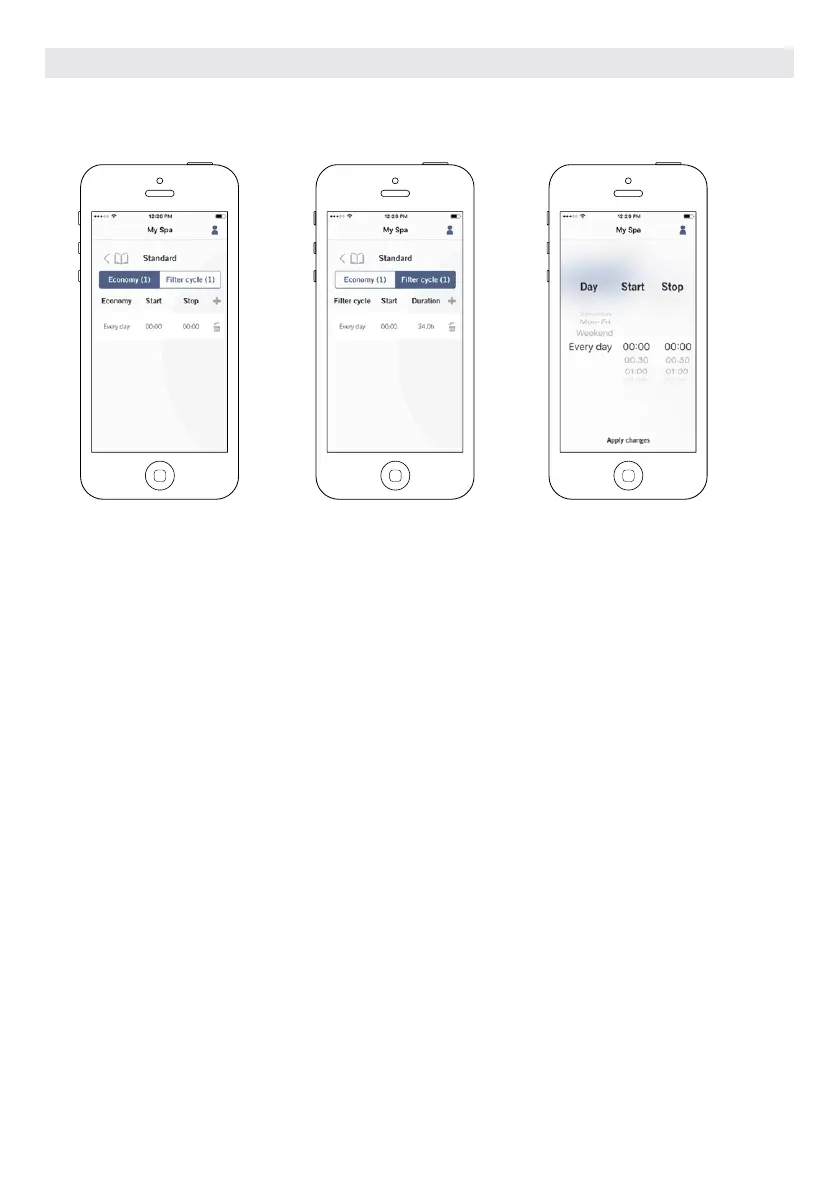
In this menu it is possible to add, remove or edit schedules of economy or filtration.
To have access to this menu, simply touch the tabs:
Water Care menu - the little pen at the right of the wanted water care
Touch the Economy tab to modify the economy schedules and Filter cycle tab for the filtration schedules. You can add
economy or filtration schedules by touching the « + » symbol.
To delete a schedule, touch the garbage can icon at the right end of the desired line.
You can modify the programmed schedules by selecting one and adjusting the schedule.
You have several possibilities for the schedule (Mon-Fri, weekend, every day, or single days). The schedules will be
repeated weekly. The time and duration are set in 30 minute increments. Once you have set the schedule, use the
arrow at the top of the page to go back. Ensure that you have selected the desired Water Care mode in the main Water
Care menu.
When an economy schedule is active, the set point will be reduced by 20°F, which means that the heating system will
not be engaged unless the temperature falls to 20°F below the hot tub’s set temperature.
The filtration schedule is applied to the main filtration pump, most likely pump 1. If your hot tub uses a circulation
pump configured to run 24 hours, the screen will show purge schedules instead of filtration. The purges are pre-
programmed for a fixed number of minutes, therefore the duration will be set to N/A on the screen and only the start
time can be modified.
OPTIONAL ACCESSORIES IN.TOUCH 2
114



 To Next Page