EasyManua.ls Logo

Wen DF475X - User Manual

Wen DF475X
44 pages
Print Icon
To Next Page IconTo Next Page
Loading...
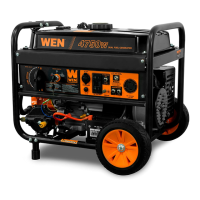
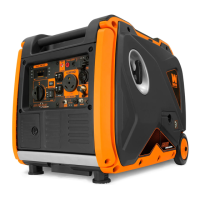
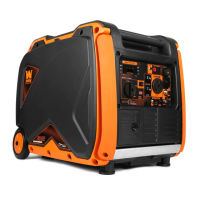
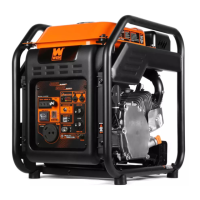
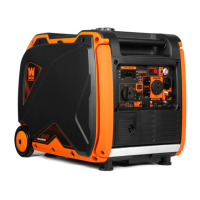
4750-WATT
DUAL FUEL GENERATOR
Instruction Manual
IMPORTANT: Your new tool has been engineered and manufactured to WEN’s highest standards for dependability,
ease of operation, and operator safety. When properly cared for, this product will supply you years of rugged,
trouble-free performance. Pay close attention to the rules for safe operation, warnings, and cautions. If you use
your tool properly and for its intended purpose, you will enjoy years of safe, reliable service.
NEED HELP? CONTACT US!
Have product questions? Need technical support? Please feel free to contact us:
TECHSUPPORT@WENPRODUCTS.COM1-800-232-1195 (M-F 8AM-5PM CST)
For replacement parts and the most up-to-date instruction manuals, visit WENPRODUCTS.COM
MODEL DF475X

Questions and Answers

  • T
    timothycookAug 14, 2025
    What to do if my Wen DF475X runs but has no electrical output?
    • S
      sharon18Aug 14, 2025
      If your Wen Portable Generator runs but there is no electrical output whatsoever, it might be due to a tripped circuit breaker. To resolve this, turn off and unplug all electrical devices, wait 5 minutes, and then press the circuit breaker to reset it. Check the total wattage of the devices and reduce the load if it exceeds the generator's capacity. Then, plug the loads back in one by one.
  • K
    Kevin GuzmanAug 21, 2025
    Why does my Wen DF475X run but not support all devices?
    • M
      Mrs. Heather HansenAug 21, 2025
      If your Wen Portable Generator runs but doesn't support all connected electrical devices, it might be overloaded. Turn off and unplug all electrical devices. Wait 5 minutes, then press the circuit breaker to reset it. Reduce the load as necessary, then plug the devices back in one by one. Also, a short circuit in one of the devices could be the cause, so try disconnecting any faulty or short-circuited electrical loads. Another possible cause is a dirty air filter. Clean or replace the air filter element.
  • B
    Breanna MillerAug 30, 2025
    What to do if my Wen DF475X Portable Generator has no GFCI outlet output?
    • D
      Daniel SnowAug 30, 2025
      If your Wen Portable Generator engine runs but there is no electrical output from the GFCI outlets, first press the RESET button on the GFCI outlet, as it may have been tested but not reset.
  • S
    Steve HortonNov 6, 2025
    How to troubleshoot a Wen DF475X that won't start?
    • P
      Patricia HamiltonNov 6, 2025
      If your Wen Portable Generator's engine won't start, ensure the engine switch is set to ON. Also, check that the fuel valve is turned to ON and that the oil level is sufficient—add or replace oil if needed. Make sure the generator has fuel; if the fuel is old or contaminated, drain and replace it with fresh fuel. Inspect the spark plug; clean or replace it if it's dirty or broken. If the carburetor is air locked, shut off the fuel valve, remove the bolt from the bottom of the carburetor, take off the carburetor bowl to allow it to reset, then replace the bowl and reinstall the bolt. If you are using propane, check that the propane tank is ON and that the regulator is not stuck. If the regulator is stuck, turn OFF propane tank. Disconnect hose from onboard regulator. Spray a small amount of...

Summary

Specifications

Introduction

Service Record

Log for maintenance and service history.

General Safety Rules

Work Area Safety

Safety rules for the operating environment.

Electrical Safety

Precautions for electrical hazards.

Personal Safety

Operator safety guidelines.

Power Tool Use and Care

Proper usage and maintenance advice.

Service

Information on professional servicing.

California Proposition 65 Warning

Health advisory for California residents.

Generator Safety Warnings

DANGER! CARBON MONOXIDE

Critical warning about CO poisoning risk.

WARNING! RISK OF EXPLOSION. HIGHLY FLAMMABLE

Hazard warning for flammable vapors.

OPERATING ENVIRONMENT

Safety considerations for the generator's location.

GENERATOR OPERATION

Safe operating procedures for the generator.

GENERATOR PREPARATION

Essential steps before starting the generator.

Know Your Generator

Tool Purpose

Understanding the generator's function and applications.

Control Panel

Detailed description of the generator's control panel.

Unpacking & Packing List

Unpacking

Instructions for safely removing the generator from packaging.

Packing List

List of all included accessories and parts.

Assembly & Adjustments

To Install the Feet

Steps to attach the generator's support feet.

To Install the Wheels

Instructions for mounting the generator wheels.

To Install the Handle

Guide for attaching the generator's handle.

Generator Preparation

Step 1 - Add;Check Oil

Procedure for checking and adding engine oil.

Engine Oil Recommendations

Guidance on selecting the correct engine oil.

Step 2 - Add;Check Fuel

Procedure for checking and adding fuel.

Fuel Option A: Gasoline

Specific instructions for using gasoline.

Fuel Option B: Liquid Petroleum Gas (LPG)

Specific instructions for using LPG.

Step 3 - Connect the Battery

Steps to connect the generator's battery.

Step 4 - Ground the Generator

Procedure for properly grounding the generator.

High Altitude Operation Above 2000 Feet

Considerations for operating at high altitudes.

Starting the Generator

Before Starting the Generator

Pre-start checks and safety reminders.

Starting the Generator

Step-by-step guide to starting the generator.

Using Your Generator

Calculating the Wattage of Your Device(s)

How to determine device power needs.

Connecting Electrical Devices

Procedure for connecting devices to the generator.

CO Sensor Information

Explanation of the carbon monoxide sensor system.

Changing Fuels

Instructions for switching between gasoline and LPG.

Shutting Off the Generator

Steps to safely turn off the generator.

Maintenance

Recommended Maintenance Schedule

Schedule for routine generator upkeep.

Cleaning the Generator

Procedures for cleaning the generator exterior.

Draining the Carburetor

Steps to drain the carburetor.

Checking;Adding Oil

Routine check and addition of engine oil.

Draining;Changing Oil

Procedure for draining and changing engine oil.

Air Filter Maintenance

How to inspect and clean the air filter.

Spark Arrestor Maintenance

Maintenance of the spark arrestor.

Spark Plug Maintenance

Inspection and replacement of the spark plug.

Battery Maintenance;Storage

Care and storage guidelines for the battery.

Draining the Fuel Tank

Procedure for draining the fuel tank.

Testing the GFCI Outlets

Monthly testing procedure for GFCI outlets.

Transportation & Storage

Transporting the Generator

Safety guidelines for moving the generator.

Storing the Generator

Procedures for storing the generator.

Product Disposal

Guidelines for responsible disposal.

Troubleshooting Guide

Wiring Diagram

Exploded View & Parts List

Generator

Visual breakdown and parts list for the generator.

Engine

Visual breakdown and parts list for the engine.

Warranty Statement

Wen DF475X Specifications

General IconGeneral
ModelDF475X
TypePortable Generator
Starting Watts4750 W
Rated Watts3800 W
Fuel TypeGasoline
Engine Type4-stroke OHV
Engine Displacement224 cc
Low Oil ShutdownYes
CARB/EPA CompliantYes
Max Power4750 W
Fuel Tank Capacity4 gallons
Run Time at 50% Load11 hours
AC Outlets2 x 120V 20A
DC Output12V/8.3A
Starting SystemRecoil

Related product manuals