6
Major weighing deviations (incorrect weighing results) may be experienced should electro-
magnetic fields (e.g. due to mobile phones or radio equipment), static electricity accumulations
or instable power supply occur. Change location or remove source of interference.
Place the balance on a firm, level surface;
Avoid extreme heat as well as temperature fluctuation caused by installing next to a radiator or in the
direct sunlight;
Protect the balance against direct draughts due to open windows and doors;
Avoid jarring during weighing;
Protect the balance against high humidity, vapors and dust;
Do not expose the device to extreme dampness for longer periods of time.
Non-permitted condensation (condensation of air humidity on the appliance) may occur if a cold
appliance is taken to a considerably warmer environment. In this case, acclimatize the disconnected
appliance for ca. 4 hours at room temperature.
Avoid static charge of goods to be weighed or weighing container.
4.2 Unpacking / Installation
Carefully remove the balance from the packaging, remove plastic cover and setup balance at the intended
workstation.
1. Take the balance and supplied accessories (a feeder, pan elements) out of the box.
2. Place the balance on a stable ground not affected by mechanical vibrations and airflows.
3. Level the balance with foot screws so that the air bubble in water-level is in the middle.
4. Plug the adapter to the power socket at the back of the balance.
5. Connect the power adapter to an AC220V ± 10% 50Hz ± 1Hz outlet.
Packing List
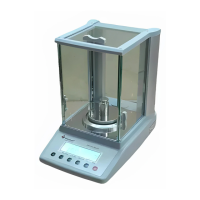
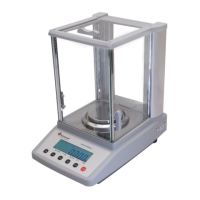
Balance with Wind Protection
Weighing pan set
Power Cord
Instruction Manual
Check List
Test Certificate
4.3 Mains connection
Before connecting the Power cord check if the printed voltage value is the same as the local supply voltage.
Only use the original supplied mains Powercord. Otherwise there is a risk that the Scale be impaired.
4.4 Connection of peripheral devices
The balance may send data to a computer or a printer through RS232C port.
When cooperating with the balance, a computer should be equipped with a program which enables
processing data from the balance.
Before connecting or disconnecting of additional devices (printer, PC) to the data interface, always
disconnect the balance from the power supply.
.


 To Next Page