1 Overview
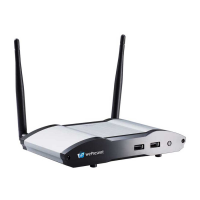
WiCS-2100 is an advanced wireless presentation system which optimizes the
collaborative experience with more intuitive solutions. Among its outstanding features,
the most distinguished ones are auto layout, enhanced cross-platform capability and
advanced OSD control.
WiCS-2100 Feature Highlights:
MirrorOp Sender for Windows and Mac
Win: Windows 7/8/10
Mac: macOS 10.9 and above
High-quality presentation (Word, Excel,
PowerPoint, PDF, Photo, Camera, Web Browser)
via Android and iOS devices.
MirrorOp Receiver
(the SidePad Function)
Control the projecting PC or Mac via iOS or Android
devices
Broadcast slides to the audience (multiple login
devices) via WiFi and web browser.
Audience can save the projecting slides for
taking notes.
Access to WebSlides can be secured with a
password.
Automatic arrangement of (up to 4) projected
device screens in the display layout.
AirPlay/
Google Cast Support
Device screens can be projected to the display
directly via AirPlay or Google Cast.
Project the screen to up to four display devices at
the same time.
Advanced On-Screen
Moderation/User List
in Thumbnail Preview
The moderator can control who is projecting.
The more visual on-screen user list shows
device screens of all (up to 32) login users in
thumbnail view.


 To Next Page