9
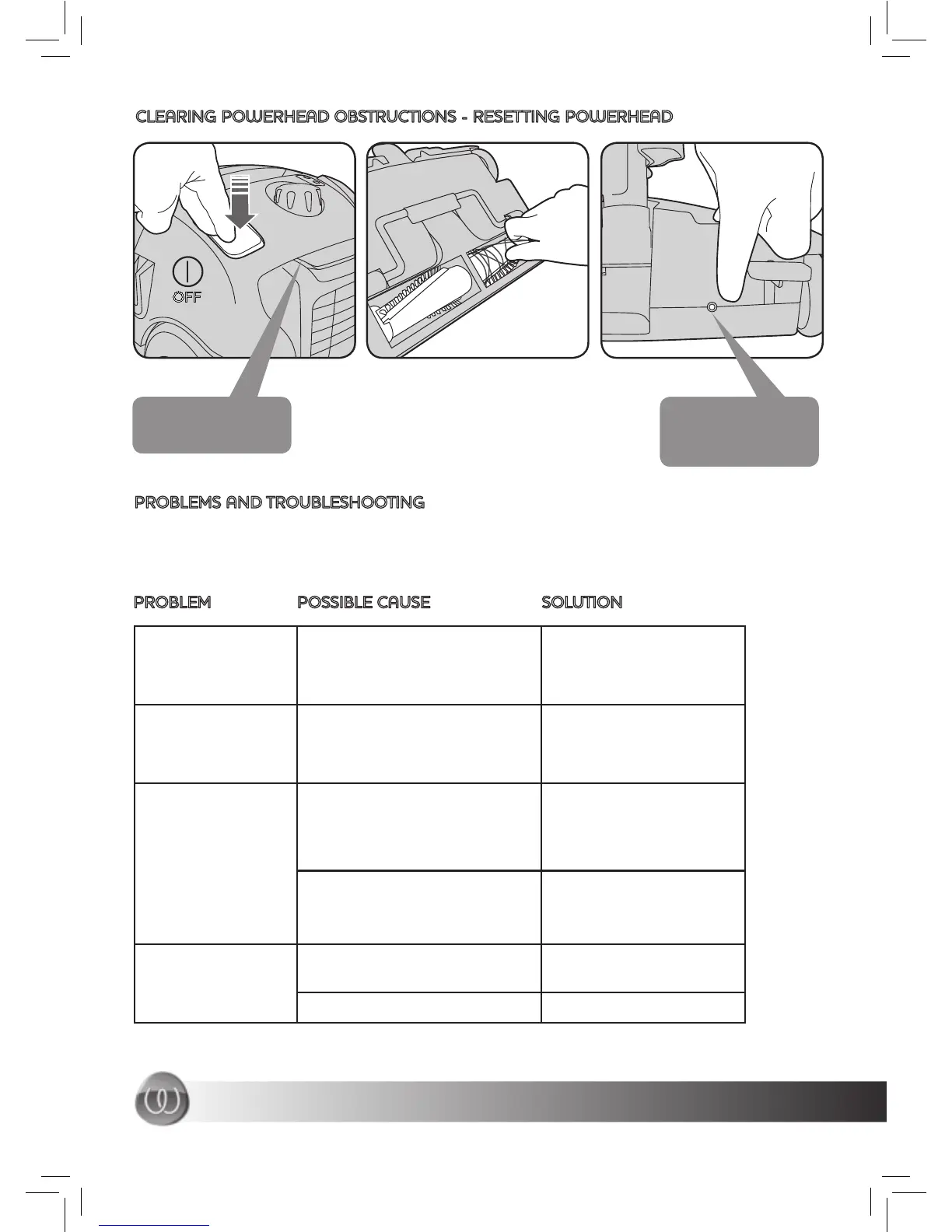
CLEARING POWERHEAD OBSTRUCTIONS - RESETTING POWERHEAD
OFF
Be sure to completely
remove all obstructions
before pressing the
reset button.
Make sure the machine
is also disconnected
from the power source.
PROBLEMS AND TROUBLESHOOTING
If a problem occurs it can usually be solved by referring to the checklist below. If your problem
can not be fi xed using these tips, please contact our customer support centre (1800 815 270)
who will be happy to help.
PROBLEM POSSIBLE CAUSE SOLUTION
Motor does not start
or stops
No power supply Check cord, plug
and socket. If still
inoperative contact
service agent
The dust bag is full, fi lters are
dirty, suction hose or wand
is blocked
Empty the dust bag,
Ensure that the switch
clean or replace fi lters,
remove objects from
hose and wand
on the handle and
powerhead is switched on
Reset button has tripped Make sure the roller is
clean and then press the
reset button (see above)
Roller not rotating
on powerhead
Powerhead is not switched on Check the powerhead
is switched on
The belt is broken Contact the service agent
No power supply to powerhead
not working
Powerhead
gradually decreases
Suction force



 To Next Page