18
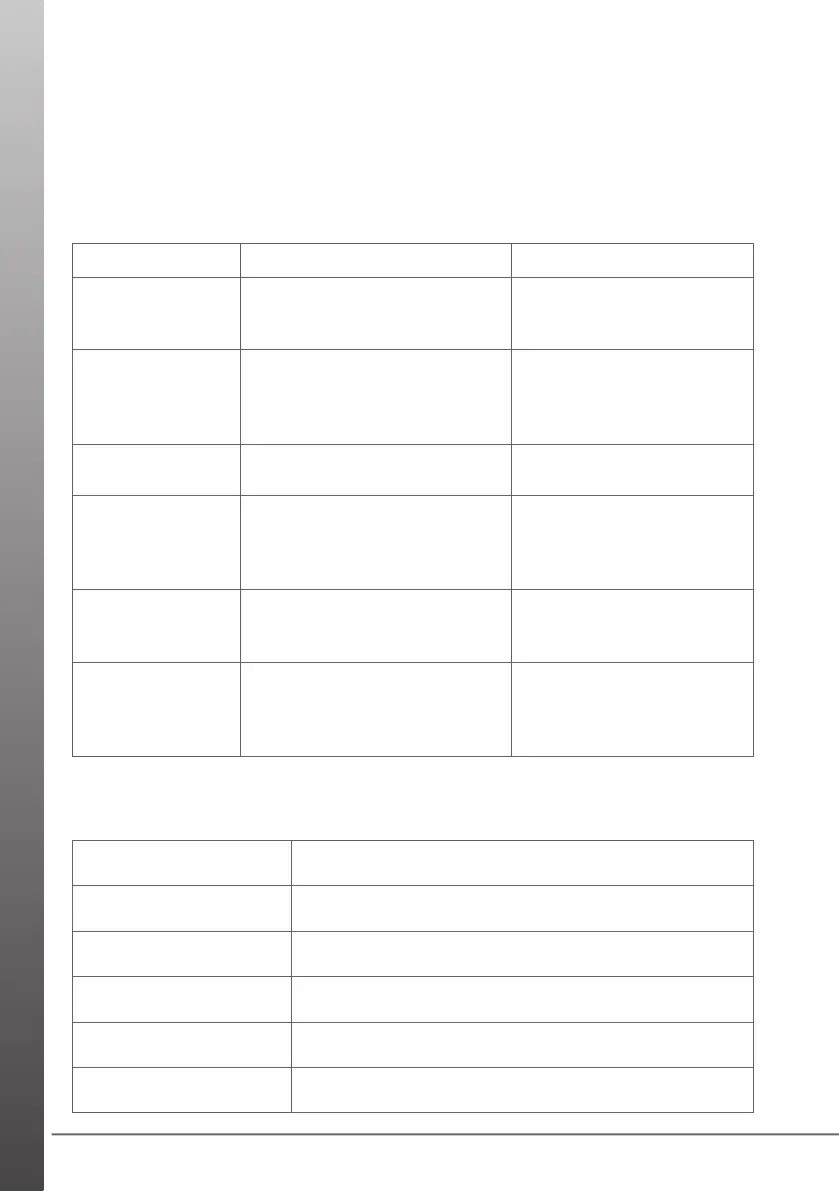
Problem Cause Solution
The robot cannot
start.
The indicator light illuminates
red. The battery requires
charging.
Place the robot onto the
charging base to
recharge.
The robot cannot
charge.
The indicator light illuminates
red while on the charging
base.
Ensure that the charging
contacts are aligned to
the charging contacts on
the charging base.
The robot is
stuck.
The indicator light illuminates
red and cannot move.
Relocate the robot.
Abnormal noise
during use.
Main brush, side brushes or
wheels may be tangled with
debris.
Turn off the robot and
clear the debris from the
main brush, side brushes
and wheels.
Cleaning ability
declines or dust
falls out.
The dust bin is full, the lters
are blocked or the main
brush is tangled with debris.
Empty the dust bin, clean
or replace the lters, and/
or clean the main brush.
Not connecting
to WiFi
Wrong Wi password Router
with 5GHz Wi
Conrm home WiFi
password during Add
Device. Select 2.4GHz
WiFi router.
TROUBLESHOOTING
Servicing should be performed by an authorised service agent or qualied
technician.
Contact Wertheim Customer Service for your nearest authorised service agent
on 1800 815 270 (AUS), 0800 282 288 (NZ).
SPARE PARTS
Part Part Number
Roller Brush 33788149
Side Brushes x 2 33788150
Filter Set 32201738
Charger Base 33201792
Charger Adaptor 33201793


 To Next Page