EasyManua.ls Logo

Westermo TR-36 - S2 DIP-Switch: Mode and Interface Selection

Default Icon
36 pages
Print Icon
To Next Page IconTo Next Page
To Previous Page IconTo Previous Page
Loading...
15
6614-2202
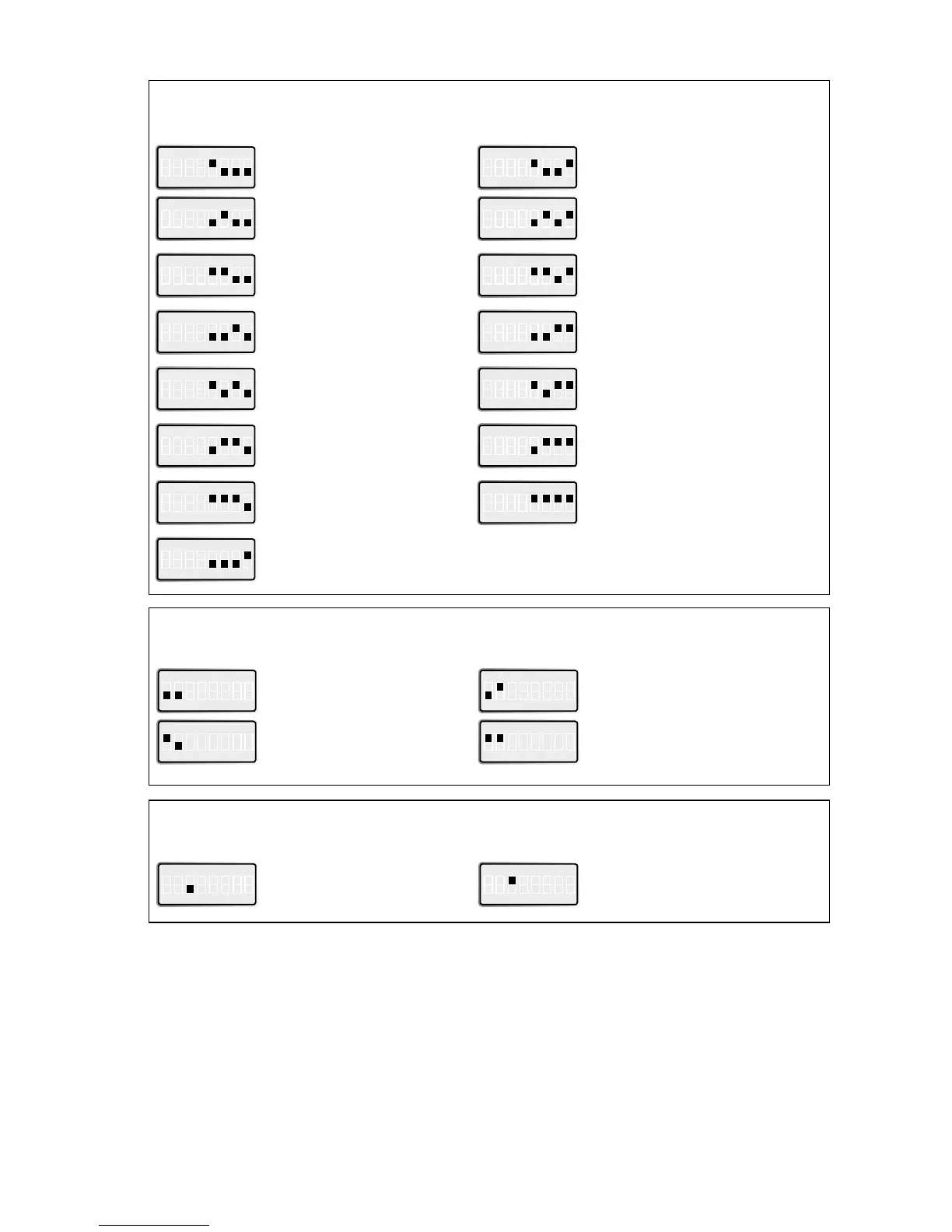
S2 DIP-switch 
Leased Line Mode selection
ON 
1 2 3 4 5 6 7 8
Leased line disable,
PSTN enable
ON 
1 2 3 4 5 6 7 8
Leased line answering
ON 
1 2 3 4 5 6 7 8
Leased line V.23 multidrop 
For V.23 Multidrop settings,
see selection below.
ON 
1 2 3 4 5 6 7 8
Leased line calling
S1 DIP-switch 
Selection of DTE format
ON 
1 2 3 4 5 6 7 8
7E 1S
ON 
1 2 3 4 5 6 7 8
ON 
1 2 3 4 5 6 7 8
7O 1S
ON 
1 2 3 4 5 6 7 8
ON 
1 2 3 4 5 6 7 8
8N 1S
ON 
1 2 3 4 5 6 7 8
ON 
1 2 3 4 5 6 7 8
8E 1S
ON 
1 2 3 4 5 6 7 8
ON 
1 2 3 4 5 6 7 8
8O 1S
ON 
1 2 3 4 5 6 7 8
ON 
1 2 3 4 5 6 7 8
Direct mode 8E1 or 8O1 
8O1 in command mode
ON 
1 2 3 4 5 6 7 8
ON 
1 2 3 4 5 6 7 8
Direct mode 7E1 or 7O1 
8N1 in command mode
ON 
1 2 3 4 5 6 7 8
ON 
1 2 3 4 5 6 7 8
7N 2S
S2 DIP-switch 
DTE interface Selection
ON 
1 2 3 4 5 6 7 8
RS-422/485 disable,
RS-232 enable
ON 
1 2 3 4 5 6 7 8
RS-422/485 enable,
RS-232 disable

Related product manuals