EasyManua.ls Logo

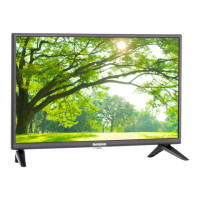
Westinghouse UW32S3PW - User Manual

Westinghouse UW32S3PW
72 pages
Print Icon
To Next Page IconTo Next Page
Loading...

Other manuals for Westinghouse UW32S3PW

Questions and Answers

  • G
    griffithdouglasAug 14, 2025
    Why does my Westinghouse LCD TV remote control not work?
    • C
      Chad ConnerAug 14, 2025
      Ensure you are pressing only one button at a time. Check that the batteries are properly inserted and replace them with new ones if they are drained.
  • W
    William WilliamsAug 17, 2025
    How to fix a Westinghouse LCD TV with no power?
    • M
      Mr. Thomas SimpsonAug 17, 2025
      First, ensure the power indicator is illuminated blue. Then, check that the power cord is securely connected to the AC-in jack and plugged into a working AC outlet. To verify the outlet is functional, try plugging in another electrical device.
  • A
    Alyssa ReyesAug 20, 2025
    What to do if there is no sound on my Westinghouse LCD TV?
    • C
      Christopher DavisAug 20, 2025
      First, verify the audio input cable is properly connected to the correct terminal and that the correct input mode is enabled. Check if the volume is muted by pressing the Vol+ key. You may also adjust the Bass, Treble, and Balance settings in the Audio menu. If using the TV speakers, ensure the TV Speakers option is set to On in the Audio menu. If you're using an external audio device, make sure the TV Speakers option is set to Off in the Audio menu.
  • J
    James BrewerAug 25, 2025
    What to do if there is no picture on my Westinghouse LCD TV?
    • C
      Catherine QuinnAug 25, 2025
      Make sure the video input cable is properly connected to the correct terminal, and that the correct input mode is enabled. For example, if a VGA cable is connected to display a computer screen, the VGA input mode must be enabled. Verify that the antenna is properly connected and that the preferred channel is enabled in the channel list. You can access this by pressing and selecting Channels/Channel List. Also, adjust the display settings.
  • J
    Jacob MayAug 27, 2025
    How to improve poor image quality on Westinghouse LCD TV?
    • S
      Summer GarciaAug 27, 2025
      Check your antenna connection, and if necessary, rotate the antenna and wait up to ten seconds for a signal. Reduce signal splitters and excessively long cables. Replace poor antenna cables and/or connectors to improve signal quality. Press to adjust the Aspect ratio. Adjust the Noise Reduction setting in Picture menu. If you are in HDMI mode, ensure the external device is compatible with the LED TV.
  • J
    Jeremiah ThompsonAug 30, 2025
    Why are the colors wrong on my Westinghouse LCD TV?
    • C
      Christina RodriguezAug 30, 2025
      If any colors (red, green or blue) are missing, check the video cable to ensure it is securely connected. Loose or broken pins in the cable connector could cause an improper connection. Adjust the Hue, Saturation, and Color Temperature settings in the Picture menu. You can also connect the TV to another computer to check if the problem is with the computer screen.
  • D
    Debbie ShawSep 3, 2025
    Why does my Westinghouse LCD TV power suddenly turn off?
    • G
      Glenn RichardsonSep 3, 2025
      Make sure the sleep timer is turned off.
  • K
    Kelly MedinaSep 6, 2025
    What to do if Westinghouse LCD TV shows no picture with VGA cable?
    • S
      smithwesleySep 6, 2025
      Make sure the VGA cable is properly connected to the LED TV’s VGA port. Decrease the video resolution setting on the computer and try again. Adjust the display settings.
  • J
    Jonathan ShieldsSep 9, 2025
    How do I fix a cut off picture on my Westinghouse LCD TV?
    • D
      Darin BrooksSep 9, 2025
      Press to adjust the Aspect ratio.

Summary

Important Information

Warnings and Safety Precautions

Crucial warnings to reduce risk of fire or electric shock, including handling and environmental advice.

General Safety Precautions

Comprehensive safety instructions for operating, cleaning, and maintaining the LED TV.

Antenna Installation Safety

Lightning and Power Line Safety

Safety measures during lightning storms and warnings about proximity to overhead power lines.

Terminals and Connections

Input;Output Ports

Identification and function of all input and output terminals on the TV.

Remote Control Guide

Remote Control Buttons

Explanation of the function for each button on the remote control.

Antenna and External Connections

Antenna Connection Types

Guides for connecting outdoor antennas and cable TV (CTV/DTV) to the unit.

External Device Connections

Instructions for connecting various external audio-video devices to the TV.

Power Connection and Initial Setup

Connecting AC Power

Procedure for connecting the TV to a power outlet using the AC adapter.

Initial Setup Wizard

Guide to the initial setup process, including language, time zone, and connection options.

Source Connection Setup

Steps for setting up antenna, cable/satellite box, or other input sources during initial setup.

Basic Operations

Setup Menus: Picture Settings

Menu Navigation and Operation

How to navigate and operate the TV's setup menu screens.

Setup Menus: Audio Settings

Setup Menus: System Settings

Parental Control Settings

Setting up parental controls, changing passwords, and blocking programs by rating.

Wall Mount Option

Troubleshooting Guide

Power and Remote Issues

Solutions for common problems related to power and remote control functionality.

Picture and Sound Issues

Troubleshooting steps for picture cut-off, poor image quality, or no sound.

Persistent Problems and Support

Guidance on contacting support if problems persist after troubleshooting.

Specifications

Westinghouse UW32S3PW Specifications

General IconGeneral
Screen Size32 inches
Display TypeLED
Resolution1366 x 768
HDMI Ports3
USB Ports1
Refresh Rate60 Hz
Smart TVNo
Aspect Ratio16:9
Built-in TunerYes

Related product manuals