8
QUICKSTART
QUICK START GUIDE
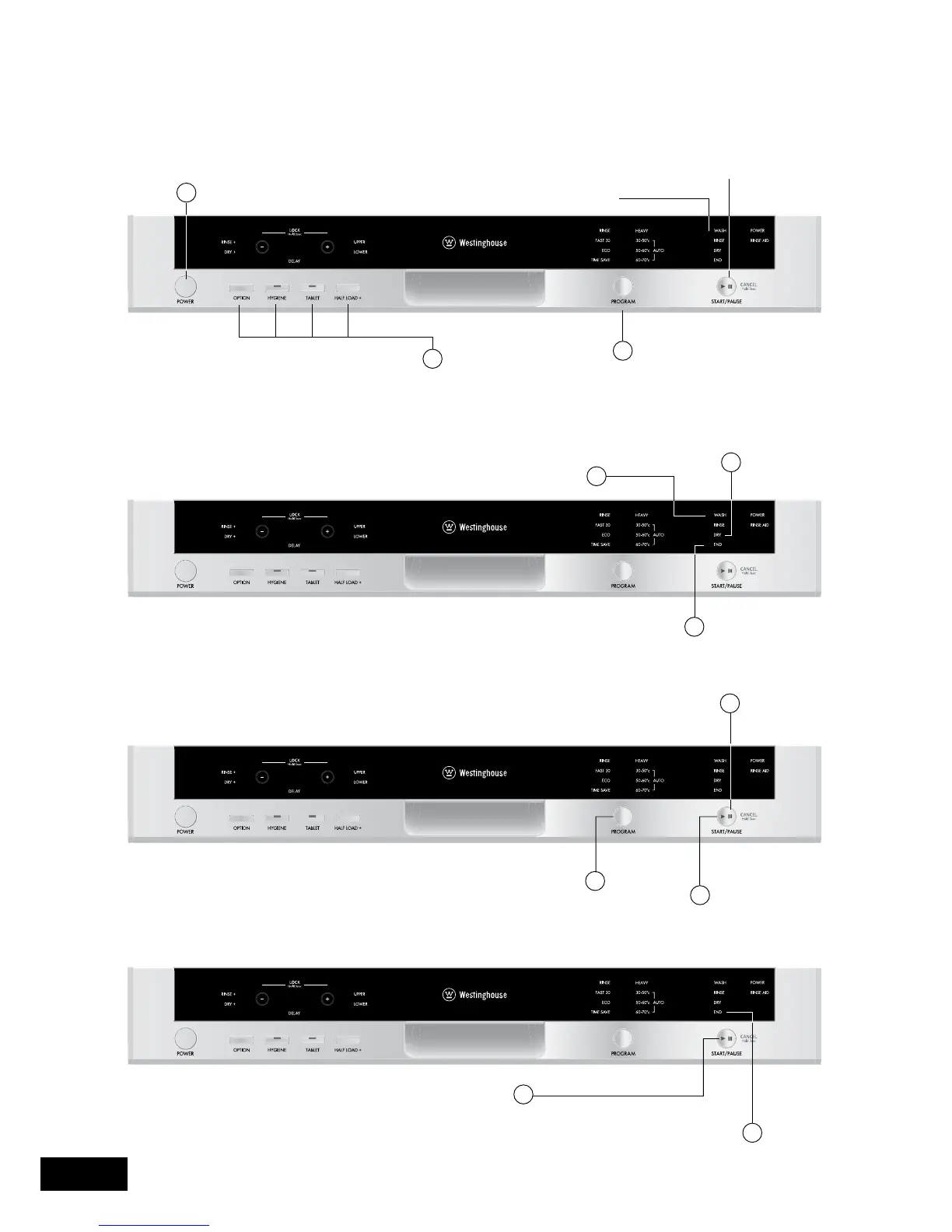
Switching on the machine
Progress indicator
Changing a program
Cancelling a program
You can follow the program flow using the progress
indicator lights located on the control panel.
If you would like to change programs while a washing
program is on.
If you want to cancel current program for any reason.
2
Press the POWER button
Select the program via the
PROGRAM button
Once the POWER button is pressed,
the START/PAUSE symbol illuminates
Additonal functions
3
1
The START/PAUSE button light
turns off once the program starts
and the WASH light is on
1
3
During the washing cycle
the WASH light is on
Once the program is completed the END light comes on
Do not open the dishwasher until this light comes on
2
Once completed the
DRY light will illuminate
and the machine will run
silently whilst drying
1
2
3
Press the PAUSE/START button
After the dishwasher stops, select the desired
program on the PROGRAM button
Press the PAUSE/START button
to commence new program
1
2
Hold the PAUSE/START button for 3 seconds
The END light starts flashing and water inside the machine
will drain for 30 seconds.
The program is cancelled when the END light stops flashing



 To Next Page