13
Key function instruction
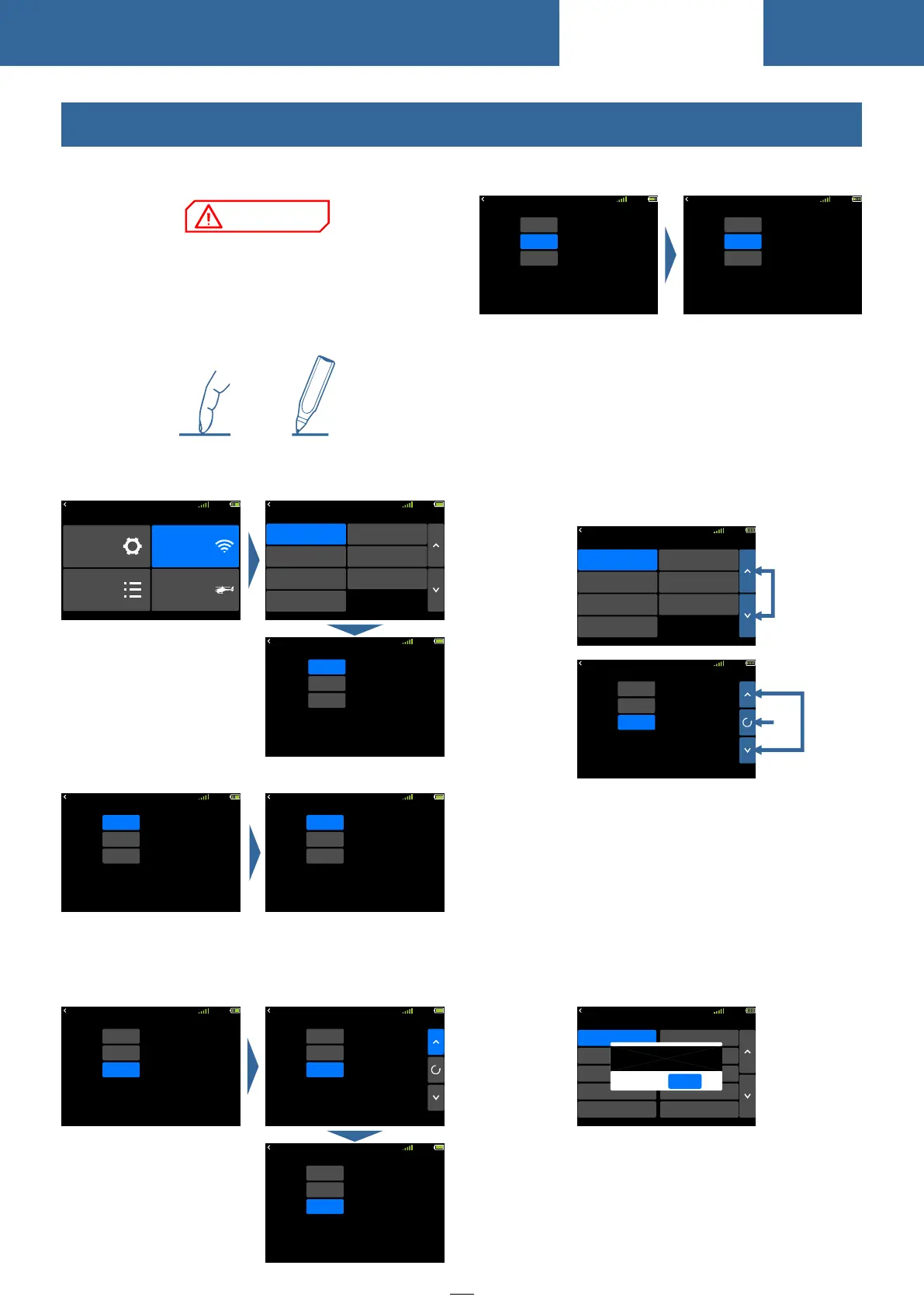
1 Page up and down key: Used for turning pages
and switching lists
2 Up and down key: Displays when entering into
value setting, used for editing parameters
3 Reset key: between UP/Down/+/- keys, used for
reset the default
Popup prompt: When the operation changes
important parameters, the selection box will pop up
for secondary confirmation. The default "No" is
selected.
Example: The interface model selecting operation
of(Model Selecting)!Click a model selecting, then
pops up a selecting box, and then click confirm key
means select "No".
模拟器
RX
NORM
混控
8.4V
00:12:02
ON
SA
Switch
Throttle Hold
Status
+10%
Pos
②③
①
模拟器
RX
NORM
混控
8.4V
Link
Range Check
Fail Safe
W.BUS Servo
PPM/W.BUS
Telemetry
Linkage Setting
Servo Frequency
00:12:02
RX
NORM
8.4V
Model 12
Model 13
Model 14
Model 15
Model 11
Model 17
Model 18
Model 19
Model 20
Model 16
00:06:59
Sure?
NO
OK
Model Select
ET10 uses 3.5 inches resistance touch screen,
which makes ET10 operation more flexible and
efficient.
Touch the touch screen softly with the stylus pen
or your fingertips. Plastic film is attached to the
touch screen. Please be careful so that you don't
scratch the touch screen with anything hard such as
a metal object. Don't push the touch screen with
excessive force or drop anything on the panel.
Operate Demonstration
Menu Operation: Click enter into the relative
interface
Status Switch: Click into switch status
Parameters Setting:
1 Data setting: Click and pop up the upper right
setup key, click again the key to return the set calue .
2 Switch, function type setting: Click to switch.
RX
NORM
8.4V
00:12:02
ON
SA
Switch
Throttle Hold
Status
0%
Pos
RX
NORM
8.4V
INH
SA
Switch
Throttle Hold
Status
0%
Pos
00:06:59
RX
NORM
8.4V
Link
INH
ModeA
Telemetry
Mode
Link
Start
00:06:59
RX
NORM
8.4V
00:06:59
Link
Range Check
Fail Safe
W.BUS Servo
PPM/W.BUS
Telemetry
Linkage Setting
Servo Frequency
RX
NORM
8.4V
Menu
Linkage Setting
General Menu Model Menu
System Setting
00:06:59
Touch Screen Operation
NORM
00:12:02
ON
SA
Switch
Throttle Hold
Status
0%
Pos
NORM
00:12:02
ON
SB
Switch
Throttle Hold
Status
0%
Pos
RX
NORM
8.4V
00:12:02
ON
SA
Switch
Throttle Hold
Status
0%
Pos
RX
NORM
8.4V
00:12:02
ON
SA
Switch
Throttle Hold
Status
+10%
Pos
RX
NORM
8.4V
00:12:02
ON
SA
Switch
Throttle Hold
Status
+12%
Pos
Basic Operation



 To Next Page