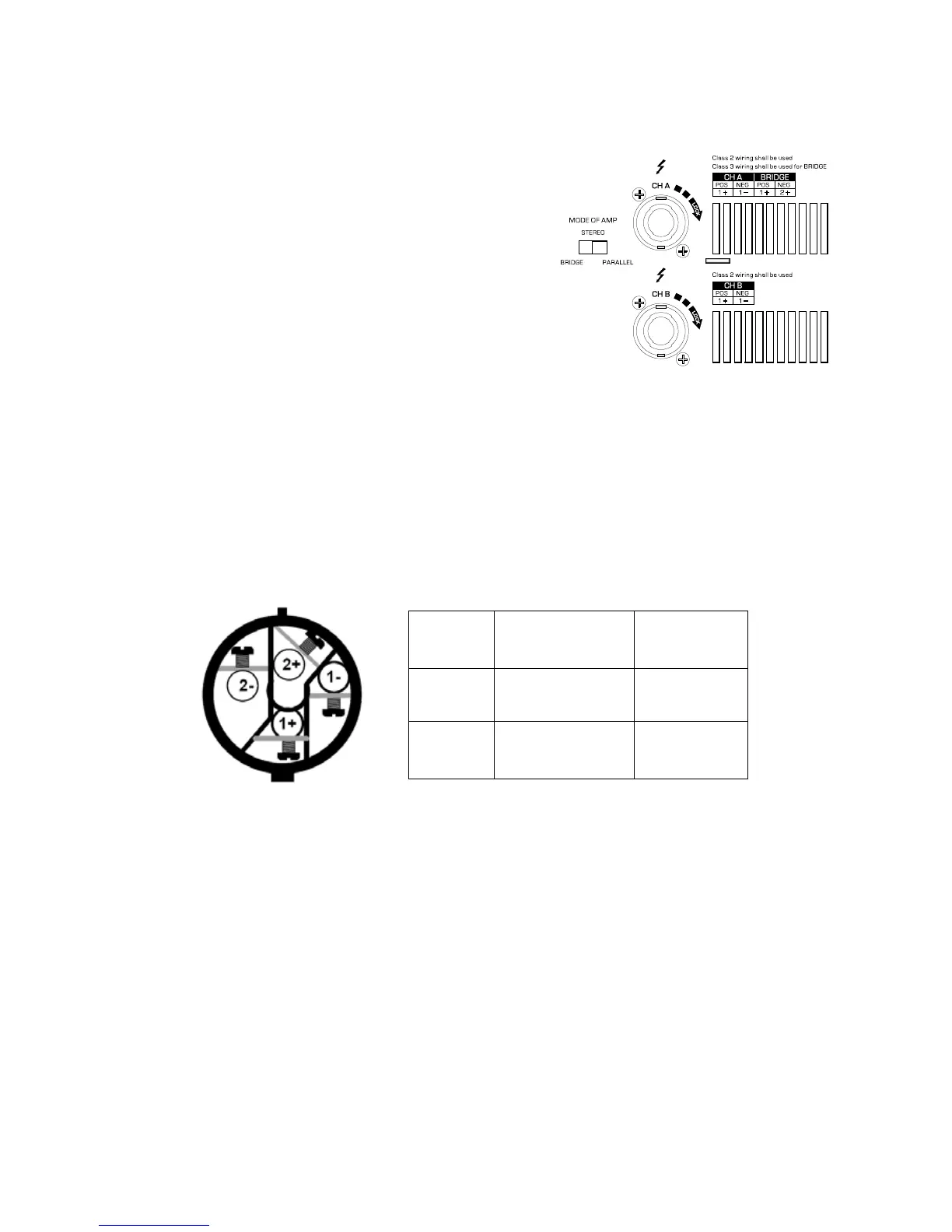
There are 3 different operating modes switchable for the MP series ampliers.
PARALLEL (right) mode- This setting connects both inputs together.
One signal feeds both channels. Each channel's Gain control and
loudspeaker connection remain independent.
STEREO (middle) mode- Each channel remains independent. The
amplier may be used for two different signals.
BRIDGE (left) mode- This setting combines both channels into a
single channel with twice the output power. Use only the rst channel's
input and Gain control. Set the second channel's Gain control at
maximum. The load must be rated for the higher output power.
OPERATING MODE SWITCHES
The MP Series employ Speakon output connectors. Ensure that only heavy gauge two conductor speaker cables with
professionally wired Speakon connectors are used for connection from amplier to loudspeaker.
STEREO and PARALLEL Mode- Connect each loudspeaker to its own channel of the amplier, as shown on the right
side of the Speakon. The Mode switches must be set for Stereo or Parallel Mode.
BRIDGE Mode- Bridge Mode congures the channel pair to drive a single audio circuit. The Mode switches must be set
for Bridge Mode. Connect the load as shown on the right side of CH A’s Speakon.
OUTPUT WIRING
WARNING: Do not use less than 4 ohm load in Bridge Mode!
WARNING: Note polarity of connection for Bridge Mode.
OUTPUT WIRING WARNING: CLASS 2 WIRING SHALL BE USED. FOR BRIDGE MODE, CLASS 3 WIRING SHALL
BE USED.
OUTPUT SAFETY WARNING! Make all connections with amplier turned off. Risk of hazardous energy!
STEREO/
PARALLEL
BRIDGE
CH A
1
+=Positive
1-=Negative
1+=Positive
2+=Negative
CH B
1
+=Positive
1-=Negative
No use


 To Next Page