3-6
REMOVING THE MECHANICAL HUMIDISTAT,
LIGHT, AND POWER SUPPLY CORD
Electrical Shock Hazard
Disconnect power before servicing.
Replace all parts and panels before
operating.
Failure to do so can result in death or
electrical shock.
1. Unplug dehumidifier or disconnect power.
2. Remove the cabinet from the dehumidi-
fier (see page 3-2 for the procedure).
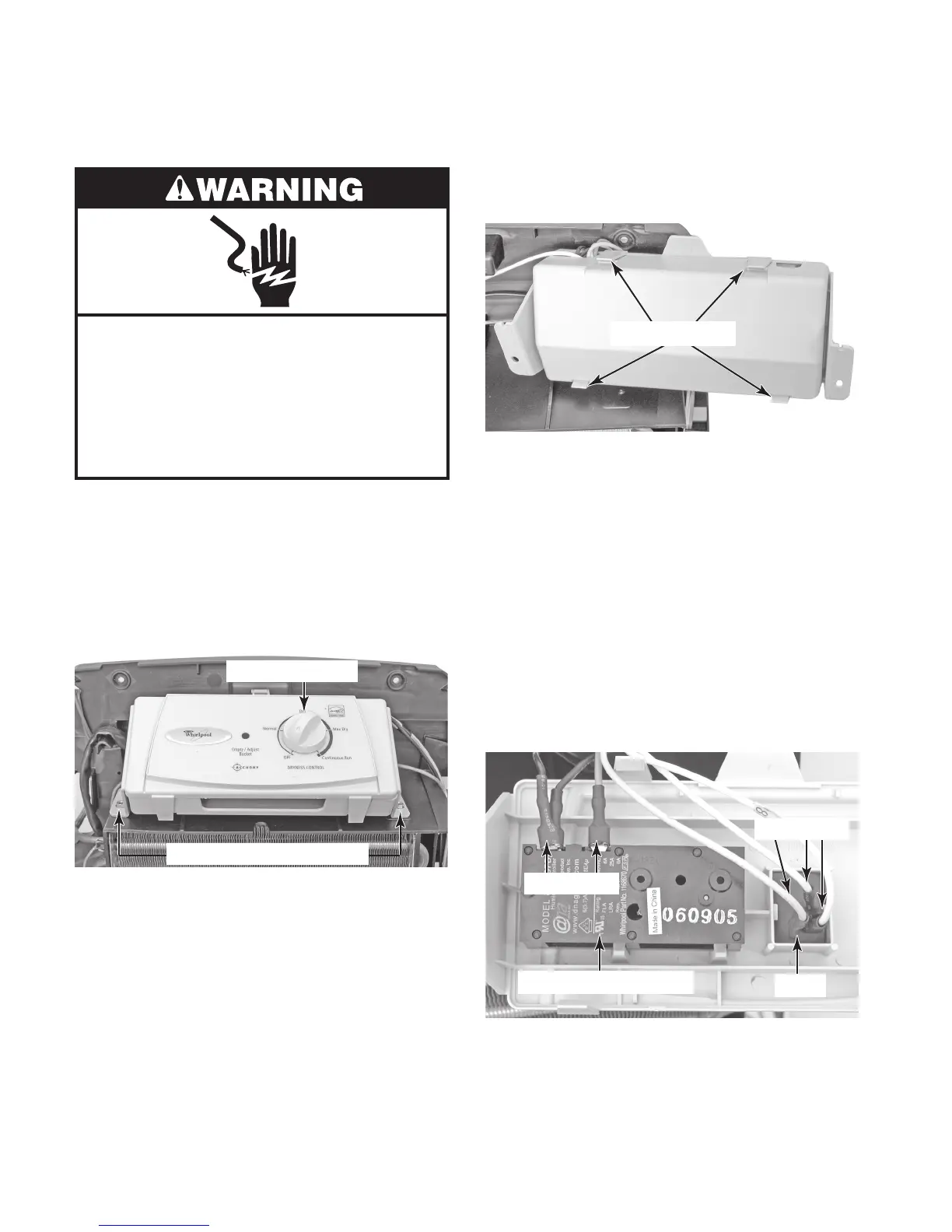
3. Pull the knob off the humidistat shaft.
4. Remove the two hex-head screws from
the control.
5. Unsnap the four top cover tabs from the
mechanical control and remove the cover.
Mechanical Control Screws
Humidistat Knob
Top Cover Tabs
6. To remove the mechanical humidistat:
a) Disconnect the brown wire and the
connector with the two black wires
from the mechanical humidistat termi
-
nals.
b) Unclip the humidistat from the cover
and remove it.
7. To remove the light:
a) Disconnect the yellow and two white
wires from the light terminals.
b) Unclip the light from the cover and re
-
move it.
Mechanical Humidistat
Light
2 BK BN
YL 2 WH




 To Next Page