8
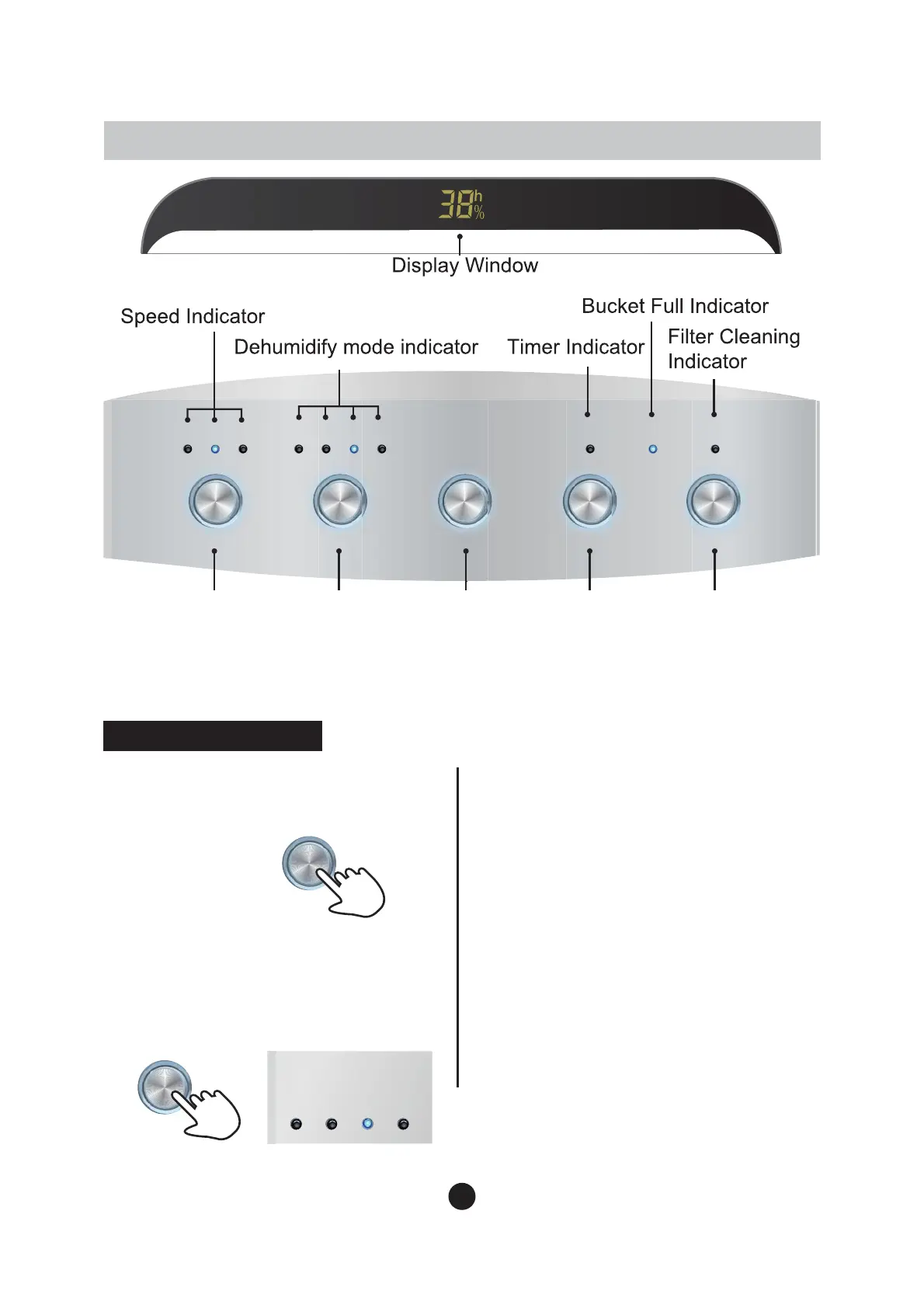
DISPLAY PANEL
1. ON/OFF:
After connected to power
VXSSO\SUHVV212))EXWWRQWRWXUQon
the machine.
$XWR0RGH:KHQWKHDXWRLQGLFDWRU
OLJKWHGXSWKHPDFKLQHRSHUDWHVat
Auto mode. The machine will
2. MRGH 6election:
3UHVV02'(
button to select the operating mode
±
$XWR&RQWLQXRXV4XLHWDQG
Dry mode.
&RQWLQXRXV0RGH:KHQWKH
FRQWLQXRXVLQGLFDWRUOLJKWHGXSWKH
machine operates at Continuous
mode.
This is suitable
for the place
where is super dry.
Function Description
Fan
Timer ON/OFF Water Full Fillter CleanHigh Med Low $XWR Cont Quiet Dry
Mode Humidity Timer ON/OFF
$XWR
)DQ6HWWLQJ
0RGH
6HOHFWLRQ
6HW
+XPLGLW\
7LPHU6HWWLQJ 3RZHU&RQWURO
maintain
ranging from 40-60%.




 To Next Page