37
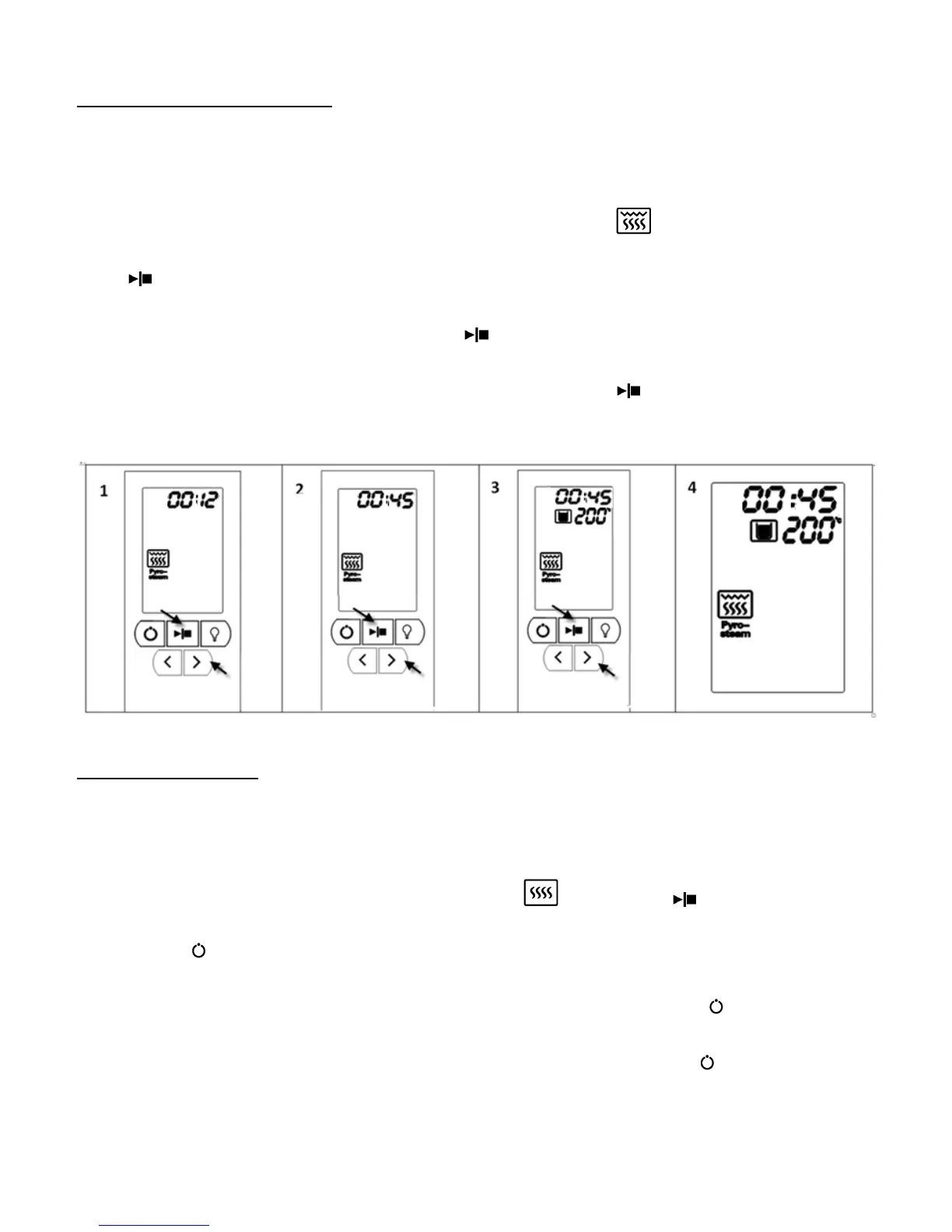
Setting of convection + steam mode
Example: 45 minutes of steaming at 200°C.
Steps:
1. In standby mode, press the 【>】button to the convection + steam icon“ ”, which will flash. Press the
【 】button to confirm.
2. Press the【>】button to reflect 00:45. Press the【 】button to confirm.
3. Press the【>】button to reflect cooking temperature 200°C. Press the【 】button to confirm.
4. The convection + steam mode is set successfully.
Setting of preset function
Example: Time is 13:30 now. Need to preset 40 minutes of steaming at 100°C. Target to finish at 15:10.
Steps:
1. In standby mode, press the 【>】button to the steam icon“ ”. Press the【 】button to confirm.
2. Press the 【 】button once.
3. Set the current time. The hour digits flash, press the【>】button to 13:00. Press the【 】button to confirm.
Hour is set. Then, the minute digits flash, press the【>】button to 13:30. Press the【 】button to confirm.
Minutes is set


 To Next Page