Using the Automatic MEALTIMER” Clock
The automatic MEALTIMER’ Clock is designed to turn the oven on and off at times
you set, even when you are not around.
Automatic baking is ideal for foods which do not require a preheated oven such
as meats and casseroles.
Do not use the automatic cycle for cakes, cookies,
efc...undercooking will result.
To star-l and stop baking automatically:
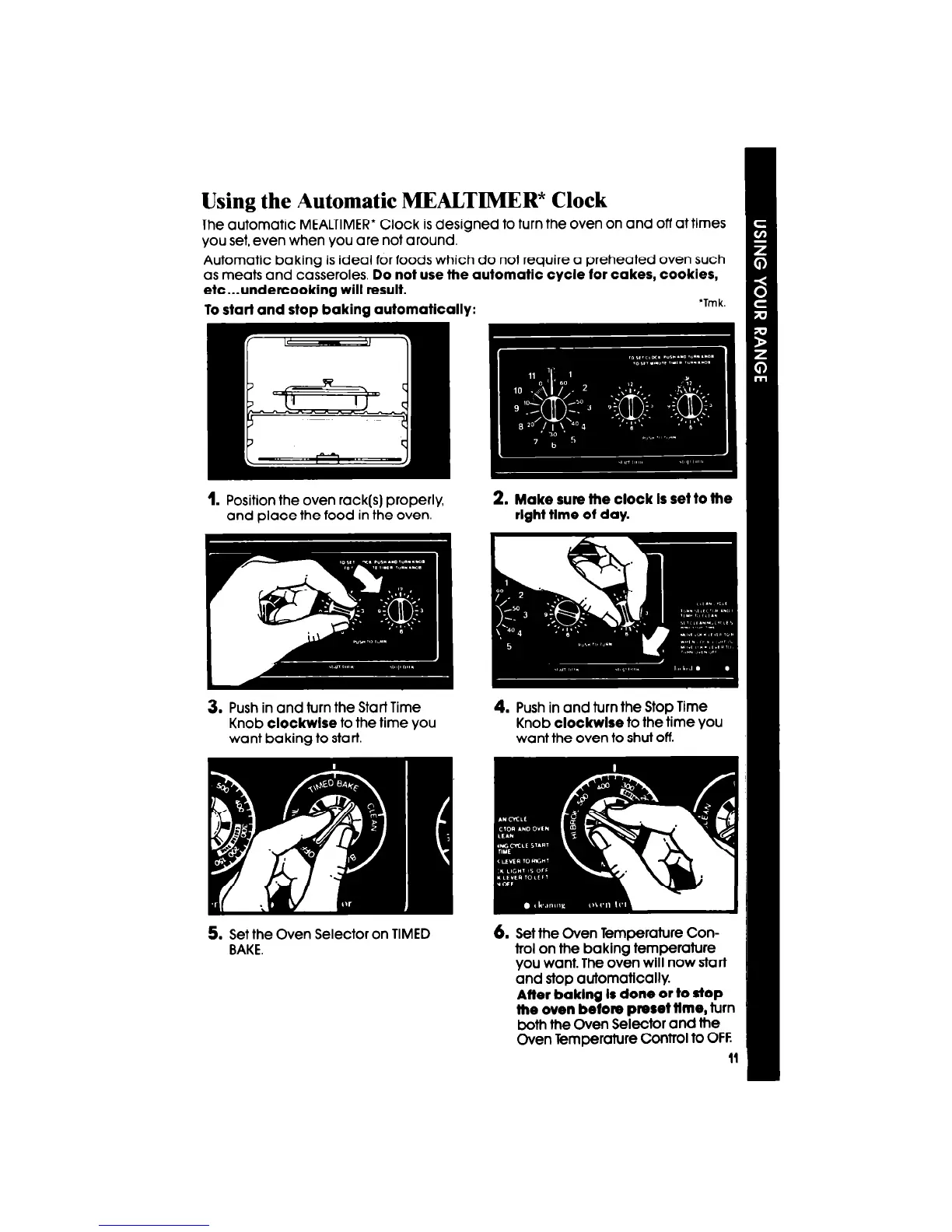
1. Position the oven rack(s) properly,
and place the food in the oven.
2. Make sure fhe clock Is set to the
rlghf flme of day.
3. Push in and turn the Start Time
Knob
clockwlse
to the time you
want baking to start.
5. Set the Oven Selector on TIMED
BAKE.
4. Push in and turn the Stop Time
Knob
clockwlse
to the time you
want the oven to shut off.
6. Set the Oven Temperature Con-
trol on the baking temperature
you want. The oven will now start
and stop automatically.
Affer baklng Is done or to SfOP
the oven before preset ffme,
turn
both the Oven Selector and the
Oven Temperature Control to OFF
11



 To Next Page