- 8 -
User Interface
64 127
5
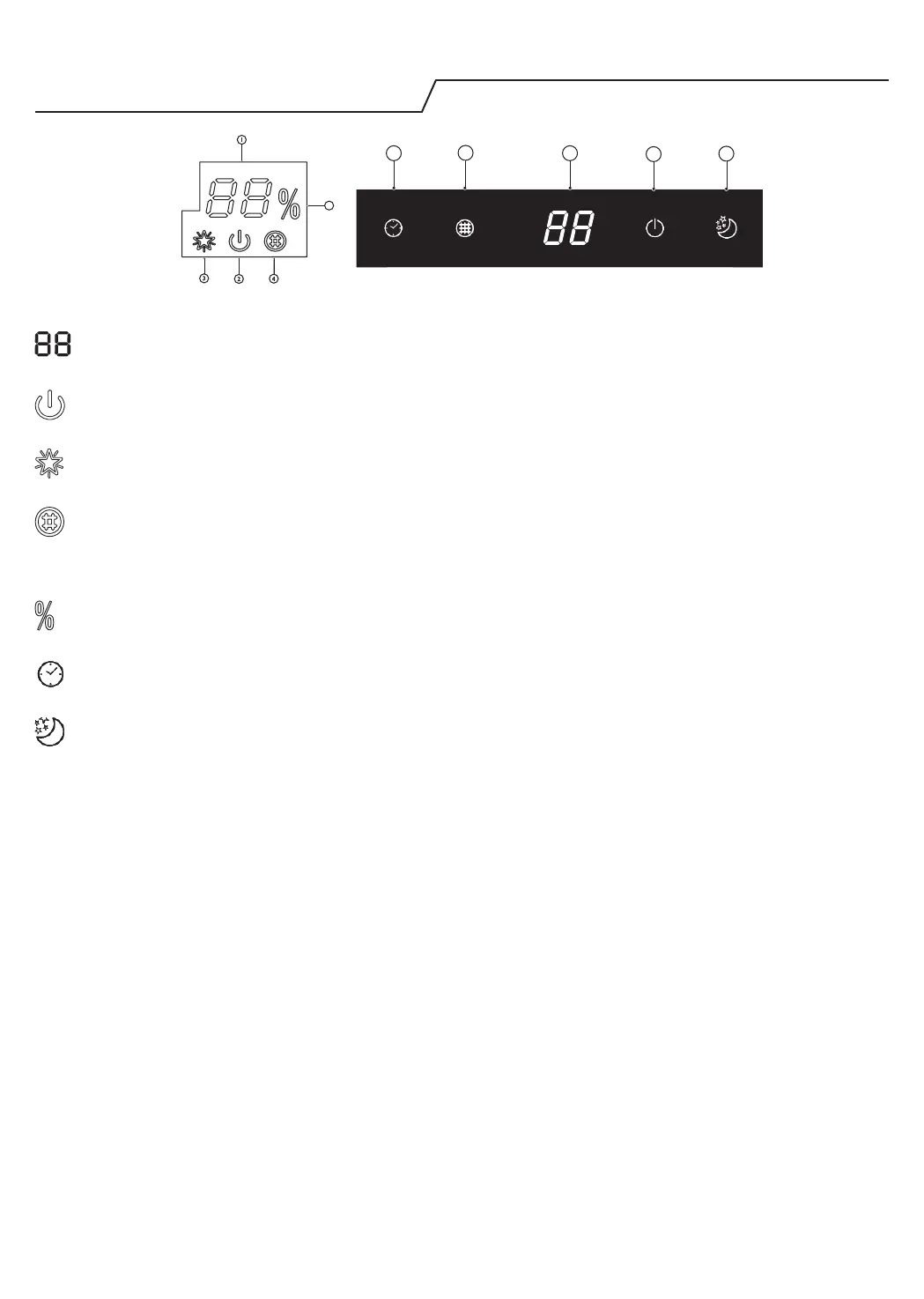
Temperature indicator (1)
Displays set temperature.
It shows “FC” as a reminder to clean the lter.
Running indicator (2)
It lights up during operation.
It ashes during outside unit defrosting.
6
th
Sence indicator (3)
It lights up when 6
th
sense is on.
It goes o when 6
th
sense ends.
Filter monitor indicator (4)
It ashes when the lter needs to be cleaned.
Filter monitor indicator ashes after 720 hours of usage as reminder to clean the lter.
After lter cleaning, press the lter reset button located on the indoor unit behind the front panel in order to
interrupt the ashing of the lter monitor indicator.
Humidity indicator (5)
It lights up when showing the humility level.
It goes o when showing the temperature.
Timer indicator (6)
It lights up during the set time.
It goes o when timer operation ends.
Sleep indicator (7)
It lights up once sleep mode is set, “Running” indicator will ash for 10 times then the whole display will light
o.
For air conditioners without Wi-Fi control, we recommend the Wpro SmartClim: a smart device to control via Wi-Fi
the main settings of your appliance from your smartphone.
This accessory is not included inside the product packaging. Please contact our After-Sales Service for more details
and purchase.




 To Next Page