PAGE 2
FOR SERVICE TECHNICIAN’S USE ONLY
DO NOT REMOVE OR DESTROY
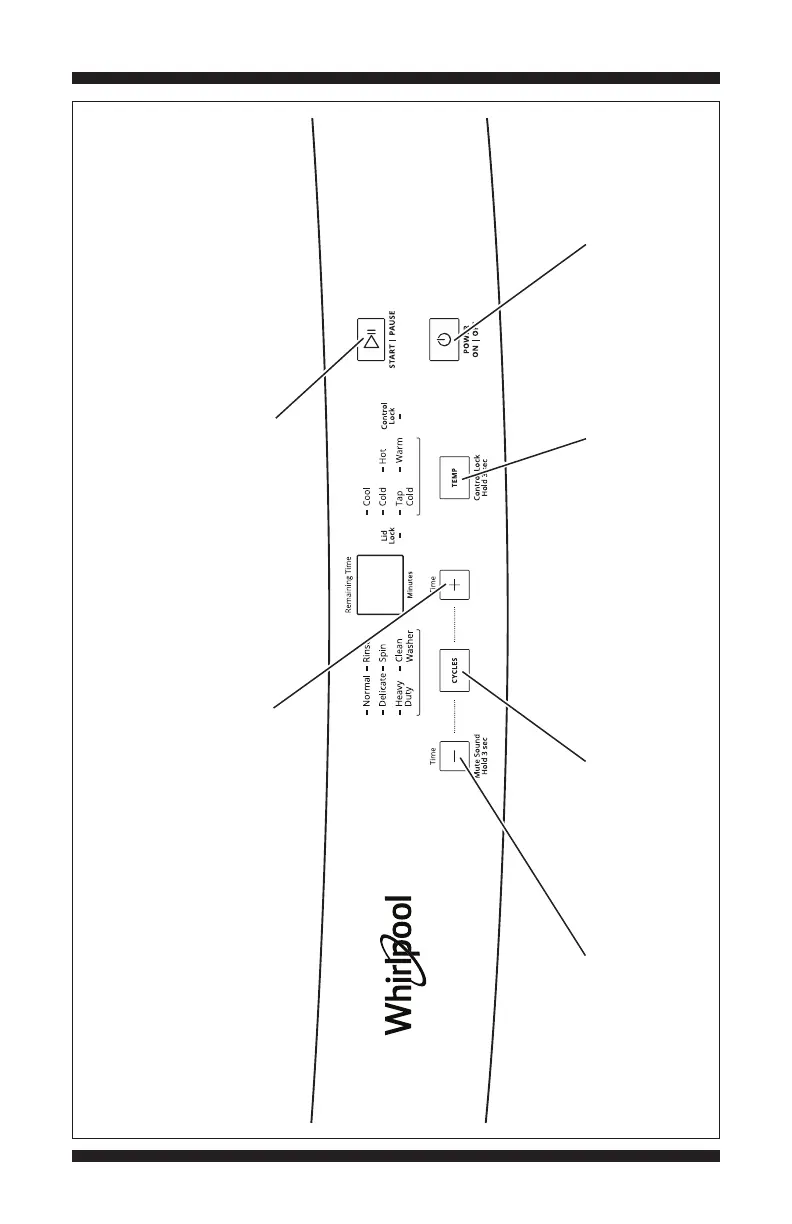
WHIRLPOOL WASHER CONTROL PANEL
Figure 1a - User Interface Test, Whirlpool Washer
Pressing the
Cycles button
turns on/off each
corresponding
cycle indicator.
Pressing the Power
button exits the
UI/LED Test Mode.
Pressing the Start/Pause
button begins or continues the
test. Press once to turn off
the indicator.
Pressing the
Temp button
turns on/off each
corresponding
temperature
indicator.
Pressing the “+” button
turns on/off the 7-segment display.
Pressing the “–” button
turns on/off the control lock
and lid lock indicators.



 To Next Page