Using Your Washer
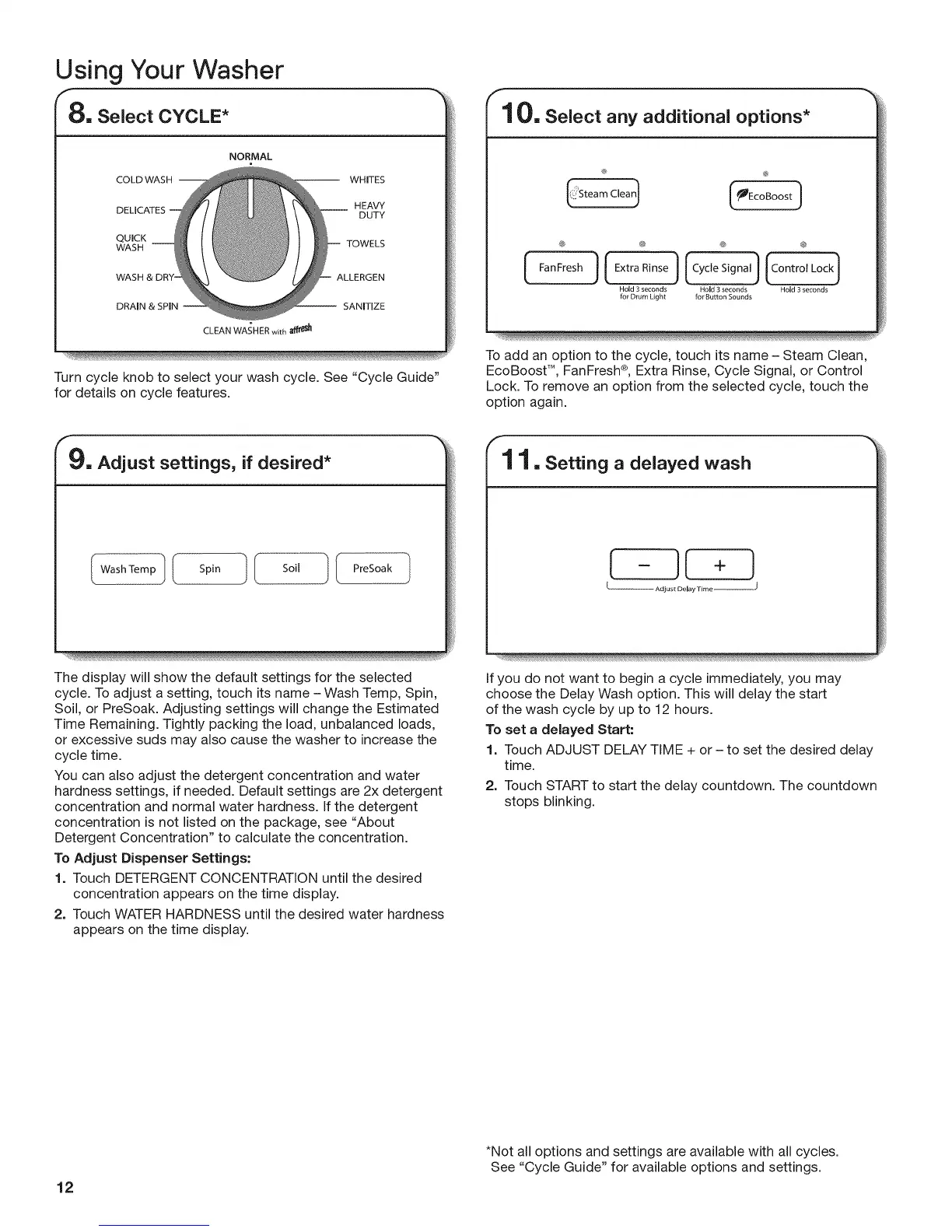
8. Select CYCLE*
NORMAL
COLD WASH -- WHITES
HEAVY
DUTY
QUICK
WASH TOWELS
WASH ALLERGEN
DRAIN & SPIN -- SANITIZE
CLEAN WASHER with _1
Turn cycle knob to select your wash cycle. See "Cycle Guide"
for details on cycle features.
9. Adjust settings, if desired*
(WashTempl ( Spin I (i Soil I I PreSoak ]
The display will show the default settings for the selected
cycle. To adjust a setting, touch its name - Wash Temp, Spin,
Soil, or PreSoak. Adjusting settings will change the Estimated
Time Remaining. Tightly packing the load, unbalanced loads,
or excessive suds may also cause the washer to increase the
cycle time.
You can also adjust the detergent concentration and water
hardness settings, if needed. Default settings are 2x detergent
concentration and normal water hardness. If the detergent
concentration is not listed on the package, see "About
Detergent Concentration" to calculate the concentration.
To Adjust Dispenser Settings:
1. Touch DETERGENT CONCENTRATION until the desired
concentration appears on the time display.
2. Touch WATER HARDNESS until the desired water hardness
appears on the time display.
f
10. Select any additional options*
® @
(,ilSteomC'ea
[
@ @ @ @
FanFresh ] (ExtraRinse) _ _
Hold3 seconds Hold3seconds Hold3 seconds
for DrumLight for ButtonSounds
To add an option to the cycle, touch its name - Steam Clean,
EcoBoost TM, FanFresh ®, Extra Rinse, Cycle Signal, or Control
Lock. To remove an option from the selected cycle, touch the
option again.
1 1. Setting a delayed wash
-JI +
Adjust Delay Time
)
If you do not want to begin a cycle immediately, you may
choose the Delay Wash option. This will delay the start
of the wash cycle by up to 12 hours.
To set a delayed Start:
1. Touch ADJUST DELAY TIME + or - to set the desired delay
time.
2. Touch START to start the delay countdown. The countdown
stops blinking.
12
*Not all options and settings are available with all cycles.
See "Cycle Guide" for available options and settings.





 To Next Page