19
Using the Priority Channel
The priority feature sets the scanner to check one
channel every two seconds while scanning. You can
program one frequency into the priority channel.
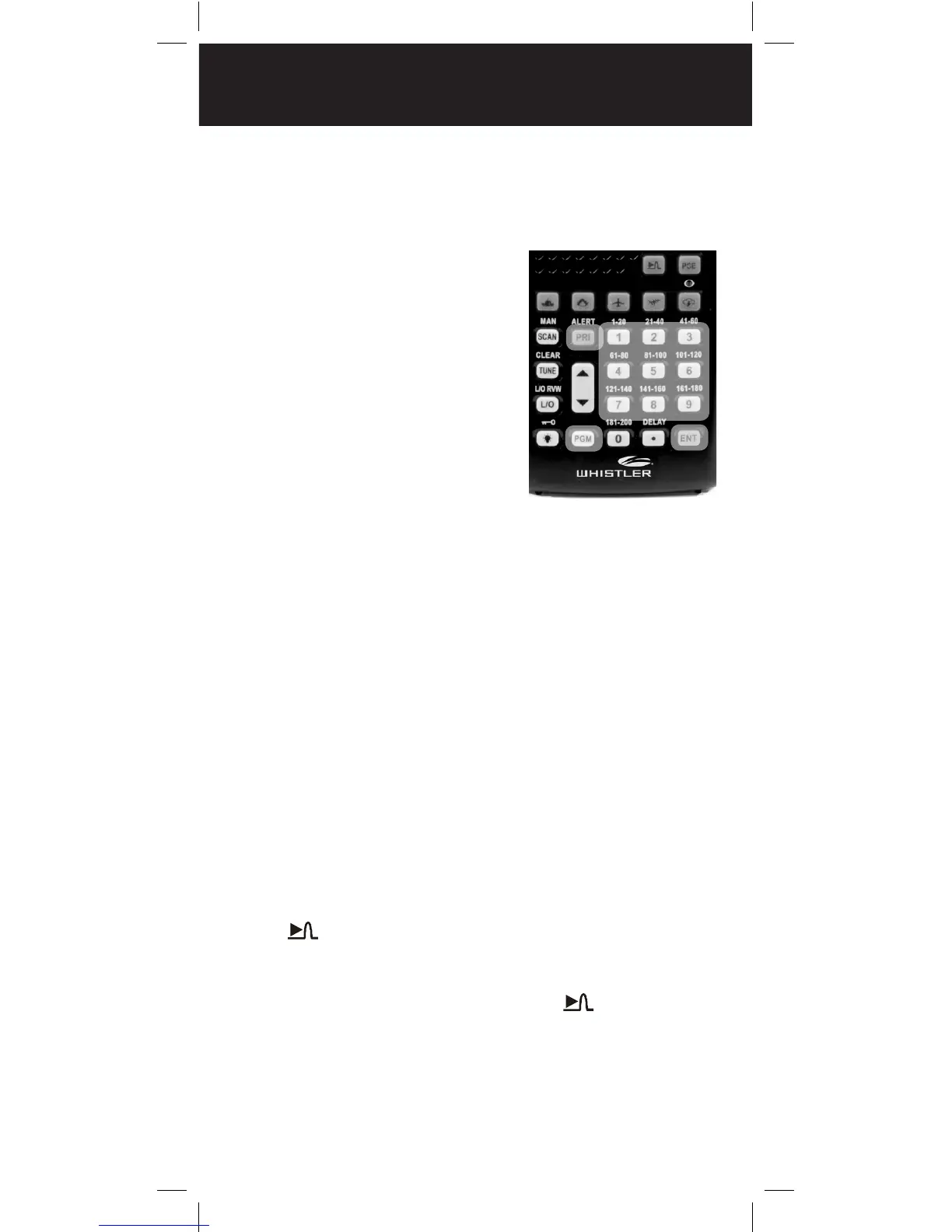
1. Press PGM.
2. Press PRI/ALERT. PCH and
000.0000 (or the previously
stored frequency) appear.
3. Enter the frequency you
want stored in the priority
channel, then press ENT.
4. To turn on the priority
feature, press
PRI/ALERT during scanning
or searching. PRI appears.
The scanner checks the
priority channel every two seconds and stays on
the channel if there is activity.
To turn off the priority feature, press PRI/ALERT.
PRI disappears.
Spectrum Sweeper
Spectrum Sweeper allows you to sweep a range of
frequencies to detect, monitor and store frequencies
for nearby radio transmissions.
The Spectrum Sweeper feature is more sensitive
than portable frequency counters and detects
transmissions at greater distances.
The Spectrum Sweeper can be set to watch for
activity on all bands, or on Police/Fire, Aircraft, or
Ham frequencies exclusively.
When the scanner is in manual, scan or tune mode,
press to watch for activity on all bands.
To watch for activity on Police/Fire, Aircraft, or Ham
frequencies exclusively, press the button for the
desired service bank and then press .
NOTE: Priority mode is not available while using the
Spectrum Sweeper.
1
4
3
2
SPECTRUM SWEEPER


 To Next Page
 Loading...