Compass quick guide
Page 3
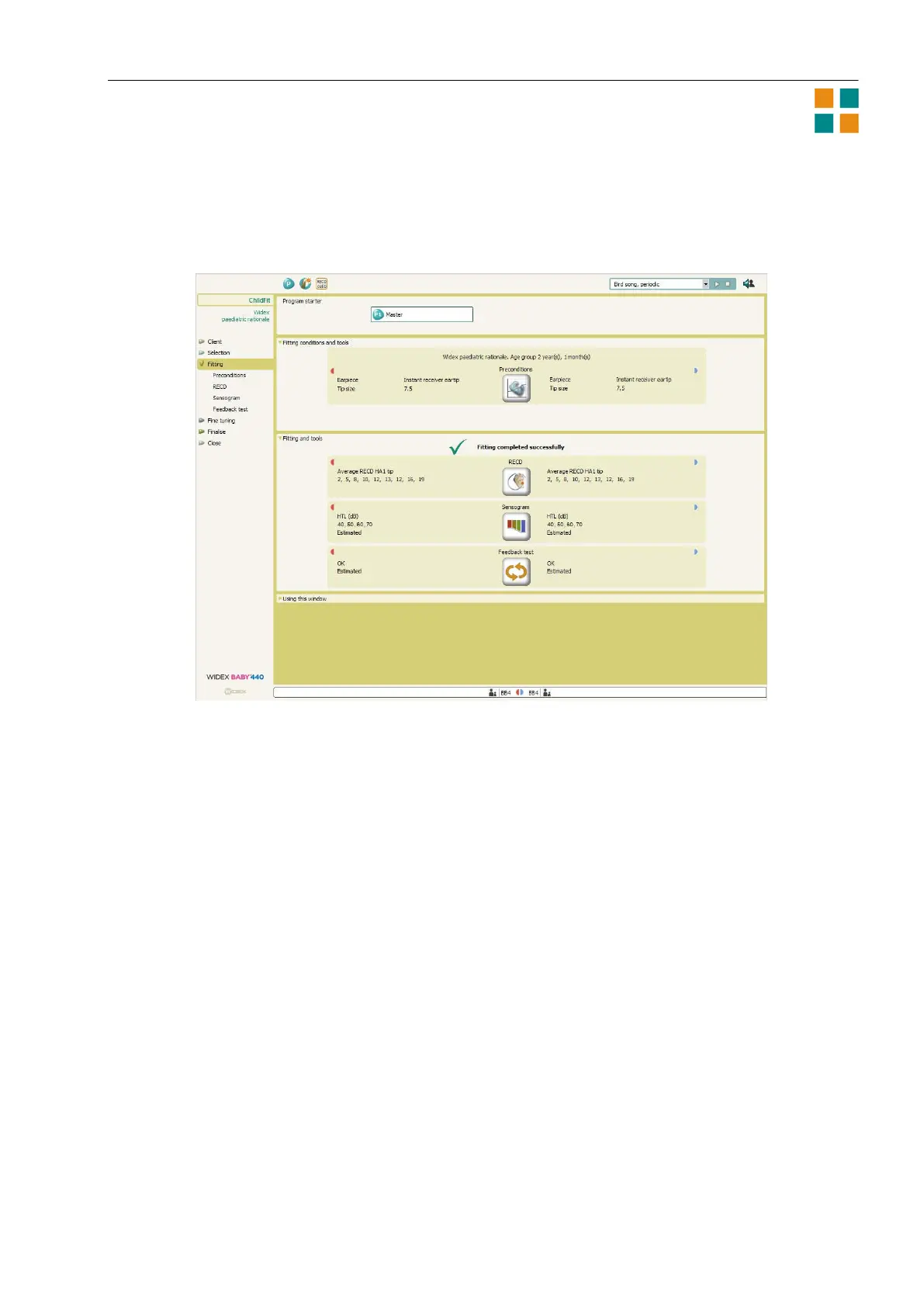
5. When you have finished defining the preconditions, select OK. Compass uses the age,
audiometric, and precondition information to estimate the fitting data and display it in the Fitting
window. The sound is turned on in the hearing aids at this point.
6. If you wish to obtain an in-situ RECD measurement, select the RECD button to open the RECD
wizard. Then select Widex in-situ RECD to continue. When you have connected the hearing aid
parts and positioned the RECD probe, you are ready to calibrate and obtain the RECD
measurement. The calibration may be performed as part of the hearing aid pre-fitting. From the
Fitting window, you can also open the Sensogram window or the Feedback test window, so that
you can obtain this information.
The ChildFit procedure
When your client arrives for the fitting session, do the following:
1. Explain the hearing aid fitting procedure to the parent (or older child).
2. Make sure that Compass is open, and that the hearing aids are connected. If you wish to mute
the hearing aids, you can do this by means of the mute icons in the toolbar.
3. Place the hearing aids on the child’s ears, and make sure that the correct size of eartip or mold is
used.
4. If it is possible, you should perform an in-situ RECD measurement and a feedback test.
Depending on the child’s age, it may also be possible to obtain a Sensogram.












 To Next Page